

The Boot Manager (BOOTMGR) is the bootloader of the Windows 7, Windows Vista, and Windows Server 2008 operating systems (OS). The computer's BIOS loads the program upon startup and will start the bootloader for the OS and other required programs. The NTLDR preceded it on older versions of the Windows OS.
What Problems Can Occur with BOOTMGR?
Unfortunately, the BOOTMGR may display a number of errors due to varying circumstances. Some of the common BOOTMGR errors are a result of operating system upgrade errors, corrupt hard drive sectors, a damaged IDE cable, and an outdated BIOS. Another common cause of BOOTMGR errors is a computer trying to startup from a flash/disk drive that is not configured to be a boot disk.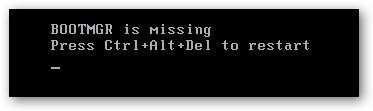
How to Fix BOOTMGR Errors
Step 1 – Check the CD/DVD drive for a disk, as it could be triggering the error when the computer starts up. If a disk is found, remove it.
Step 2 – If there was no disk in the drive, insert the Windows repair CD/DVD into the computer's disk drive and click “Next” on the subsequent menu prompt.
Step 3 – Select “Repair your computer” on the subsequent window, then click “Next.”
Step 4 – Click “Startup Repair” to initiate the systen's installation repair process and restart the computer when prompted. If the System Repair application is opened from the MS DOS prompt, then the command for running the repair application is “bootrec /fixboot.”
Step 5 – If the computer still has the BOOTMGR error after repairing and restarting, check if there are any damaged IDE cables. If so, replace them.
Step 6 – If none of these steps fix the error, get a professional to examine the hard drive to see whether a hard drive replacement is needed in order to solve the BOOTMGR error.
Follow Us!