

GIMP is the GNU Image Manipulation Program. GIMP is a free and open source program for tasks such as photo retouching, image composition, and image authoring.
It has many capabilities. It can be used as a simple paint program, an expert quality photo retouching program, an online batch processing system, a mass production image renderer, an image format converter, etc.
GIMP is expandable and extensible. It is designed to be augmented with plug-ins and extensions to do just about anything. The advanced scripting interface allows everything from the simplest task to the most complex image manipulation procedures to be easily scripted.
GIMP is written and developed under X11 on Unix platforms. However, basically the same code runs on MS Windows and Mac OS X.
Photoscape is the fun and easy photo editing software that enables users to fix and enhance photos.
Photoscape Features:
- Viewer: View folders’ photos, slideshow
- Editor: resizing, brightness and color adjustment, white balance, backlight correction, frames, balloons, mosaic mode, adding text, drawing pictures, cropping, filters, red eye removal, blooming
- Batch editor: Batch editing multiple photos
- Page: Make one photo by merging multiple photos at the page frame
- Combine: Make one photo by attaching multiple photos vertically or horizontally
- Animated GIF: Make one animation photo with multiple photos
- Print: Print portrait shot, carte de visite, passport photo
- Screen Capture: Capture a screenshot and save it
- Color Picker: Zoom in screen on images and search and pick the color
- Rename: Change photo file names in batch mode
- Raw Converter: Convert RAW to JPG
PhotoPlus is a photo editing software that enables users to fix and enhance digital photos, create stunning bitmap graphics and even web animations.
With PhotoPlus, users can easily adjust brightness and contrast, color balance, remove red-eye, and make numerous other image editing adjustments and enhancements, achieving fantastic results time after time.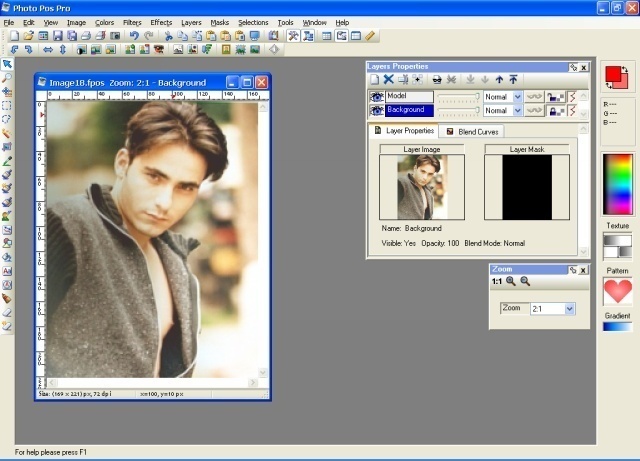
Paint.NET is free image and photo editing software for computers that run Windows. Paint.NET features an intuitive and innovative user interface with support for layers, unlimited undo, special effects, and a wide variety of useful and powerful tools. An active and growing online community provides friendly help, tutorials, and plugins.
VCW VicMan’s Photo Editor is a versatile image editor with an intuitive interface and a wide variety of features. This powerful application is user friendly, offering simple image editing, high productivity, and easy customization.
Now users do not have to fork out hundreds of dollars for a quality image editor. This award winning application is freely downloadable and comes with a wide range of essential features for both novice users and professional designers. With VCW VicMan’s Photo Editor, users can refine digital photos and draw artwork naturally and effortlessly, producing superb graphics for the web.
Pixia is a free painting tool made exclusively for full color graphics.
Pixia runs under Windows Me, Windows 2000, Windows XP, and Windows Vista.
PhotoFiltre is a complete image retouching program. PhotoFitre allows users to do simple or advanced adjustments to an image and apply a vast range of filters to it. It is simple to use and has an easy learning curve. The toolbar, which gives access to the standard filters with just a few clicks, gives
PhotoFiltre a robust look.
PhotoFiltre’s wide range of filters allows novice users to familiarize themselves with the world of graphics. Users can find the standard adjustment functions (Brightness, contrast, dyed, saturation, gamma correction) and
also artistic filters (watercolor, pastels, Indian ink, pointillism, puzzle effect).
Rendera is a free graphics program suitable for artistic painting, photo-retouching, colorizing, and seamless tile design. It emulates common art tools and features an easy-to-learn, labeled interface. The edge wrapping and interactive offset functions make it perfect for Web background tiles. Version 1.5 includes JPEG support, faster polygon rendering, and minor tweaks.
ch2os
Just wondering if anyone associated with the website actually reads/responds to these messages… ???
ch2os
PS: I really enjoy your site and find it very useful. Thanks for all your hard work!
ch2os
Using Windows XP, which free photo editing software is easiest, and most user friendly, for doing basic things like cropping?
Thanks for any help you can give me, or suggestions you may have!
HAPPY NEW YEAR!!! Ü
Rpgkeys
I most like Paint.NET is free image and photo editing software for computers that run Windows.Thanks for sharing with us………
Vicky
I’m looking for some good photo editing software for my dad’s birthday. He is starting to get in to photography and needs something with some tools to allow basic editing and skills such as removing power lines easily. I am prepared to pay up to about £80 but the only issue is that his computer is windows 2000 (and adamant he is not changing). Is there anything suitable out there? My first choice would be adobe elements but I do not think any of the later versions will work? Is that right? Any help would be very much appreciated as I need to sort this out this week.
Many thanks,
Vicky