How to Block Pop-ups in Firefox
Mozilla Firefox is a web browser that the Mozilla Foundation runs and NetScape owns. It provides users with add-ons and plug-ins that other web browsers do not, while allowing them to browse the Internet, search for and read email, and play online games. Mozilla Firefox also provides users with advanced options for controlling how webpages are displayed and recorded, as well as how they interact with computers. These advanced options are easy to access and do not require the user to have an advanced understanding of web options.
How to Block Pop-ups in Firefox
In order to block pop-ups in Firefox, do the following:
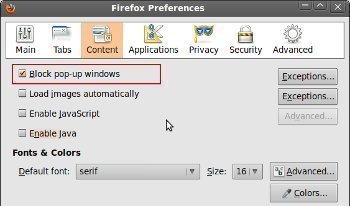
1) Click the Firefox button or Tools menu and select the Options button.
2) Select the Content panel and check the checkbox for “Block pop-up windows.”
3) Allow pop-ups from specific websites by clicking on the “Exceptions” button, entering a specific website’s URL, and clicking “Allow.”
Mozilla Firefox will now block all pop-ups except for those listed in Exceptions.
Firefox Pop-up Blocker Add-ons
In addition to Firefox’s built-in option for blocking pop-ups, users also have the ability to install Firefox add-ons that are capable of automatically blocking pop-ups and that allow the user to choose which pop-ups are allowed and which ones are blocked. For example, PopupMaster and AdBlock Plus can both be installed in the Firefox browser and provide setting options for allowing pop-ups on specific webpages.

- Firefox Toolbar
A Firefox Toolbar can be any toolbar within Mozilla Firefox, whether it is a default toolbar provided by Firefox or an add-on provided by third-party extensions. Firefox currently has five default toolbars that can be turned on and off at any time: the Menu Bar, the Tab Strip, the Navigation Toolbar, the Bookmarks Toolbar, and [...]...
- Firefox Plugins
Firefox Plugins are a type of Add-On in the popular web browser, Mozilla Firefox. Firefox Plugins allow users to add multimedia support and functions to Mozilla Firefox or a third-party extension. Firefox Plugins are available from a wide variety of sources and can manage multimedia support for Windows Media Player, YouTube, Acrobat Reader, Flash Player, [...]...
- Firefox Extensions
Firefox Extensions are programs in Firefox that allow users to edit the way Firefox works and add new functions to their browser. Firefox Extensions are most commonly used to add RSS readers and text editors to Firefox, but can be used for a wide variety of purposes. While “Firefox Extensions” can actually be used with [...]...
- Firefox Themes
A Firefox Theme is a type of Firefox Add-On that can be installed in order to change the appearance and/or functionality of Mozilla Firefox. Firefox Themes allow users to customize the “look and feel” of their web browser without removing any of the basic functions provided by Mozilla Firefox. Firefox Themes can be created by [...]...
- How to Block Websites
Most Internet users need to block websites at some point. Reasons for doing so include keeping known malicious or spam-ridden sites from being loaded onto the computer and preventing children from accessing adult or other content. Users may block a website via existing tools or browser options on the computer, third party applications, or browser [...]...