

Yahoo Mail is the web-based mail client provided by the popular search engine, Yahoo. Yahoo Mail organizes the email of all Yahoo users and guarantees that users have a way to receive notifications from Yahoo concerning their services and activities. Yahoo Mail is similar to Gmail and Windows Live Mail and is compatible with a number of websites and email clients, including Windows Outlook.
What Is Outlook
Windows Outlook is a desktop-based email client for Windows that is included in Windows Office and allows users to manage email accounts from a variety of different providers. Outlook is advantageous because it allows users to download messages from multiple email accounts into one inbox and respond to messages using the appropriate email address.
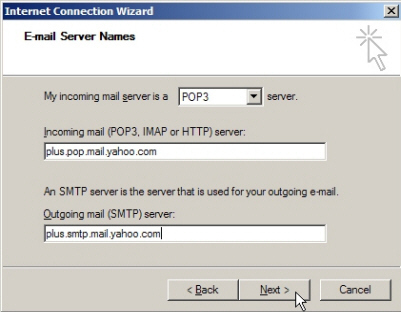
How To Download Yahoo Mail Into Outlook
Users can download Yahoo mail into Outlook by opening Outlook, selecting “Email Accounts” from the Tools menu, and selecting “Add New Email Account”. You can then select “POP3”, click Next, enter your email address, server information (pop.mail.yahoo.com for POP3 and smtp.mail.yahoo.com for SMTP), and all other user information.
You can then select the Advanced tab and change the POP3 number to “995” and the SMPTP number to “465”. You should then ensure that “Log-in Requires Authentication” is unchecked, click OK, and Finish. Outlook should then start downloading all messages from your Yahoo Mail account.
Note: A Yahoo Mail Plus account may be required.
Abdulla
Thank you for all this help,,, I have plus service from yahoo and created some customized folders which emails are farwarded to… my question is how can I download the folders with the emails in them.
Thanks again..
sahaia
Thanks VERY MUCH MiG !!!
After many years (ever since ypops stopped working) my outlook and yahoomail meet again !
How did you figure out these server and ports ?
panos
emails get deleted from my Yahoo account, after they are downloaded to Outlook.
can i restore them?
sahaia
it does not happen to me.
When I delete yahoo mail it does not get deleted or go to a deleted folder – There is no deleted folder created for yahoo emails. Instead the email is then displayed with a strike out font. and there is no way to get rid of it from outlook itself.
However, when I go to Yahoo account (login via browser) and delete all those email (they were not deleted from Yahoo when deleted from outlook) they go away from outlook as well. I think I can live with this.
panos
thanks δουλευει αψογα
Gail
Amazing!!! it was getting me so mad that they would ask me to pay to use another server! It works with Thunderbird also and its free!!!!
Roberto
Sorry Guys It didn’t worked!!
Log onto incoming mail server (POP3): The operation timed out waiting for a response from the receiving (POP) server. If you continue to receive this message, contact your server administrator or Internet service provider (ISP).
Send test e-mail message: The connection to the server was interrupted. If this problem continues, contact your server administrator or Internet service provider (ISP).
ANY CLUE!! Please I need it
sahaia
your problem is you are still using POP3 instead of IMAP protocol.
see my response to kristal above.
oprisan
no poido recibir coreo electronico
Gautam Shakya
thanks buddy.. it worked..
shk
I;m getting error
——-
There was a problem connecting to imap-ssl.mail.yahoo.com
Server returned error: “Missing +OK response upon connecting to the server: * OK [CAPABILITY IMAP4rev1 ID NAMESPACE X-ID-ACLID UIDPLUS LITERAL+ CHILDREN XAPPLEPUSHSERVICE XYMHIGHESTMODSEQ AUTH=PLAIN AUTH=LOGIN AUTH=XYMCOOKIE AUTH=XYMECOOKIE AUTH=XYMCOOKIEB64 AUTH=XYMPKI] IMAP4rev1 imapgate-0.7.68_8.314902 imap129.mail.ne1.yahoo.com”
——————————————————-
any one please help me….
Jane
this worked great….thank you …but I was wondering if I can also send mail from here.
thanks again
God Bless
russ
I am trying your setup using imap on 2003 but keeps coming up with imap logon username and password for the yahoo account, I am typing on the correct ones any idea?
Vikram
Awesome! Works very nicely using native features rather than having to use ypops or freepops.
Thanks
Pinto
been trying for too long now. And finally here’s the answer. Thank you, works like a charm
Bogs Pontillas
Thanks for the info. It was of great help for me.
Tao
I put this data in my account set up in Outlook Express. I did not try downloading emails from my yahoo account yet because I would like to set it up so that emails do not get automatically deleted from my Yahoo account when they are downloaded. I set it up that way with Webmail account I have.
When I go to mark that setting in Outlook for my Yahoo account, the option is not available. In Outlook Express I select the account and go to Properties/Advanced. For my Webmail account I find the options at bottom of window of “Leave a copy of messages on server” or “Remove from server in ___(#) day(s)”
For my Yahoo account that option is not there at all. Is there a way to have that option when you set it up the way you described?
Tao
This reply was supposed to be to MiG’s Aug. 10th suggestion, but I posted it in the wrong place and after posted a more updated one in the right place. Sorry for the confusion.
MiG
Actually, you don’t have to upgrade to a paid Yahoo account in order to use Outlook with Yahoo. You can just set up an IMAP connection to imap-ssl.mail.yahoo.com on port 993 (SSL) for incoming email, and a secure SMTP connection to smtp.mail.yahoo.com on port 465 (SSL). Works like a charm.
heya
Works perfect Ty!!
Kris
Works for me too. Win 7, Office 07.
Tao
This worked very well partly, so far. It automatically downloaded all my folders and the emails in them (except my Yahoo Inbox content), then it appears that all the emails that it downloaded in my Yahoo downloaded Sent folder & Draft folder in Outlook, just disappeared, so those 2 folders are empty. Luckily they (& all emails downloaded) are still in my Yahoo account.
How can I download the old emails that are in my Yahoo Inbox, Sent folder & Drafts folder? Should I move them to new folders in Yahoo and then somehow tell Outlook to download the new folders & their content? How would I get the new folders & their content to download to Outlook Express? It happened automatically when I started the account in Outlook, so I don’t know how to tell the system to download new folders.
I did get a new email in Outlook from my Yahoo Inbox. I hope that no emails get deleted from my Yahoo account, after they are downloaded to Outlook. I would like to manage deleting myself manually. I could not find the option to choose not to delete emails from server in this Outlook/Yahoo account set up. I do have that option, which I chose, in my Outlook/Webmail account set up.
Tao
I was able to get my messages from my Yahoo Inbox & Sent folder by trying the way I guessed, moving them to a new custom folder. I figured out how to get the new folders downloaded. And it appears that no messages are being deleted from my Yahoo account. Thank you very very much. It does work like a charm! Amazing!
David
Works great! I actually couldn’t get it to work with Outlook, but I just downloaded Thunderbird and it worked perfectly.
Tengiz
Thanks for the info. It was of great help for me. I was trying to do it very long time! Every folders is copyed and also everything on Yahoo server are on their place.
Now I have backup copy of my mails on my PC!!!
Thank you MiG!
Hamada
Many Many Thanks.
Kristal
I can’t get mine to work when I set it up like that. I get this error message. Can anyone help?
The connection to the server has failed. Account: ‘Family’, Server: ‘imap-ssl.mail.yahoo.com’, Protocol: POP3, Port: 995, Secure(SSL): Yes, Socket Error: 10060, Error Number: 0x800CCC0E
Mzansi
Hi Guys, anyone respond to this, I am also getting this error.
sahaia
make sure you select/choose/use
email protocol IMAP … (do not use POP3)
incoming server as imap-ssl.mail.yahoo.com
outgoing server as smtp.mail.yahoo.com
encryption connection as SSL and port 993 (for incoming)
encryption connection as SSL and port 465 (for outgoing)
Leave rest everything at default and it should work (did for me).
If you need more detailed instructions as to where in outlook set these options (or what these means) then read some outlook help first or play around in outlook account settings.
jp
I still keep getting on sending the test email 530 authentication required. Can’t figure out problem, any suggestions?
ELR
Absolutely brilliant protocol…. saved me hours of coping over folder contents…priceless procedure… much better than other advise out there recommending copying each folder contents into the yahoo inbox and syncronising…it would have taken ages….
Ed
wpmann
If you want to try the Yahoo Mail Plus approach, you can get detailed instructions for Outlook 2003 and Outlook 2007 at:
http://www.living-with-outlook.com/yahoo-mail.html
and for Outlook 2010 at:
http://living-with-outlook-2010.com/emailaccounts/2010/06/the-yahoo-outlook-2010-connection/