

Even if you’ve only recently opened up a MySpace, there is a good chance that you are receiving emails and profile comments from your friends and others who you do not know. In order to access your MySpace inbox messages, follow these simple steps below.
First, log into your MySpace account with your email address and password, and press the login button. You will be taken to your main MySpace control center page, where you can edit your profile or your account information from the links near your selected picture. Ignore these links for now. Instead, scroll down the page (depending on the size of your browser window) until you come to a section on the left side of the page which says: “My Mail”.
Under the “My Mail” header, you will see two links which state that you have “New Friends Requests!” and “New Comments!” Ignore these links for now and click directly below them, where it says “Inbox.”
This is your mail center inbox where you can check all of the emails which others on MySpace have sent to your MySpace account. Much like your own regular email inbox, many of the messages that you receive will be spam of some sort.
In order to read an email from your MySpace inbox, you should click on the email’s subject on the right side of the page. You can read emails from anyone who has sent you a message, unless the subject states that “This Profile No Longer Exists.” Messages with this subject state that either the user or MySpace has deleted their profile, and all email that you have received from that user will be deleted.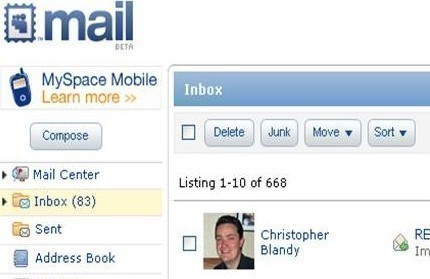
While reading a MySpace email, you can choose to reply, forward, save, or delete the message from the buttons directly below the email message just as you would with your usual email client. Further, if you feel that a message you have received is spam or is abusive in nature, you can flag it as such with the “Spam” and “Abuse” links directly above the message. Flagging a message as spam will assist MySpace in blocking and removing spammers from the system, and will result in you receiving less spam in the long run.
Dealing with MySpace Inbox Spam
Because many messages you receive in your MySpace inbox will be from spammers, you should follow a few simple rules which can help you sift through your messages more easily.
First, you should only open messages if you know the sender. Try to avoid people who you have never seen or heard of before; and do not open messages that look as though they are obviously from people who are attempting to spam you.
There are several types of MySpace messages that you should be on the lookout for, as they are most often spam. The first type includes the image of a sexy guy or girl. Even though there are lots of perfectly legitimate sexy guys and girls on MySpace, many of the messages you will receive that contain sexy pictures will have some kind of pornographic spam attached to them.
The next type of spam includes promotional emails for bands and rappers. There are countless bands and rappers on MySpace who are trying to get their names out there and gain popularity.
Finally, there are the people who either have no profile picture or a deleted profile account. Deleted profile accounts are always spammers, so just delete their messages immediately. A person without a profile picture is either a spammer or a brand new member. In most cases, profiles without pictures are going to be spammers.
lindagina
everytime I want to open an email i get the following error message:
Oops! Something went wrong…
Sorry but something may have gone wrong with our system or the page you have requested is currently not available. If you have mistyped the address then please try again. Otherwise go explore everything else we’ve got — music, movies, games, celebrities, and more.
HELP
Abdulqader Kapadia
Can you upload the error’s screenshot here? It may help us understand your problem better.
Aida
I forgot my Myspace email and password
Donna
How COME MY FRIENDS CANT SEAN ME MESSAGES i need help to see why.