

IPv6 stands for Internet Protocol version 6. IPv6 is the latest version of the network-layer protocol for packet-switched networks. The version that is generally used is IPv4. One of the reasons for the upgrade to IPv6 is that it allows greater space and flexibility in assigning IP addresses.
For instance, IPv4 is based on a 32-bit address system that limits the number of possible unique addresses to 4,294,967,296. In a few years, the number of available unique addresses will decrease. IPv6 solves this problem by making the number of possible unique addresses practically infinite. It is said that IPv6 offers every star in the known universe 252 unique addresses! Since the Windows Vista version, IPv6 protocol is enabled by default. If you are not using it, you can freely disable it without consequences to your system or Internet performance.
Disabling IPv6 in Windows Vista and Windows 7
Process of disabling the IPv6 is same in Windows Vista and Windows 7. You can easily disable it by unchecking IPv6 option in Local Area Network Properties, but after you restart your computer, it will be checked again. In order to disable this protocol permanently we need to work with registry editor.
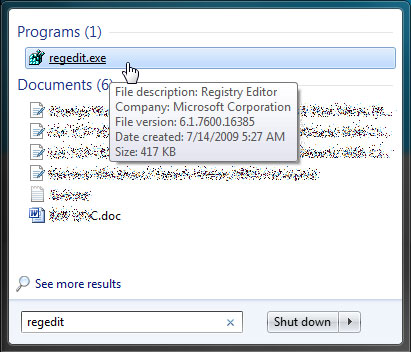
1. Open registry editor by clicking the Start button, and then “Run”. Then type the “regedit” without quotes and press “enter” on you keyboard.
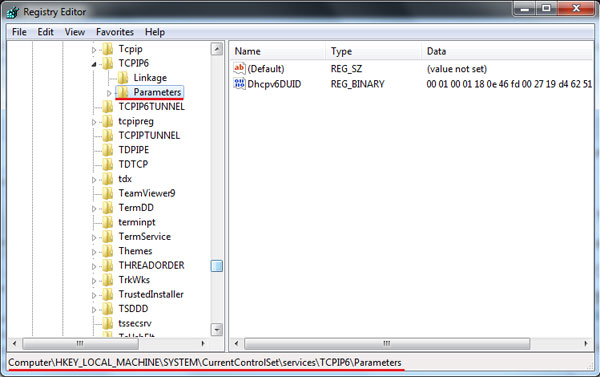
2. Navigate to the HKEY_LOCAL_MACHINE -> SYSTEM -> CurrentControlSet -> services -> TCPIP6 -> Parameters.
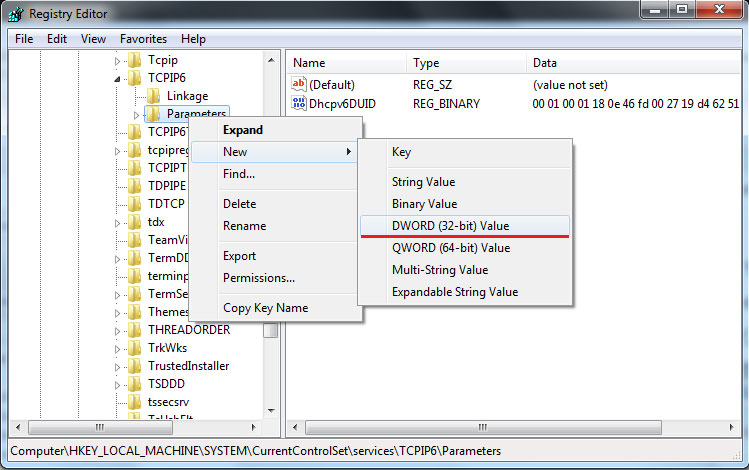
3. Right click on the Parameters section in left pane and go to New -> DWORD (32-bit) Value
4. Under Value name write: DisabledComponents. Then double click on the Disabled Components you created and enter FFFFFFFF.

5. Click OK, close everything and restart your computer.
This method will disable IPv6 from your LAN interfaces, connections, and tunnel interfaces, but will not disable it from the IPv6 loopback interface.
It should also be noted that once you disable IPv6, you will not be able to use specific applications such as Windows Meeting Space or any application that requires the Windows peer-to-peer networking platform.

adam
i have had trouble with local only for about four months now… i have not been able to connect to the internet at all, i have read about a hundred posts on the issue, none helped me.. trust me when i say ive tried everything ive read… my computer almost ended up in the middle of thhe road numerous times… okay, the hkey….interfaces stuff, when i go there the only thing after interfaces is numbers.. no guid thing, no delete thing.. just numbers.. ive looked in all them files and find nothing to do with disabling anything… is there a way to get rid of the ipv6 through another way.. i did the check mark thing and it ALWAYS comes back… took the computer to a computer guy, he said nothing is wrong with it, i get home and same thing, local only… im ready to shoot this thing… thank you