

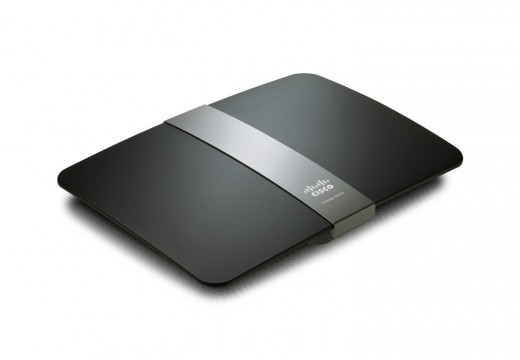
The Linksys network router is one of the most popular home and office networking pieces of equipment sold by Cisco. The company has produced Linksys routers supporting the latest version of the 802.11 standard for more than a decade with the most current models capability of supporting the 802.11N standard supporting extremely high throughput for data (approaching 270 Mbit/second) when used with compatible network devices. No matter what the model or age of the router; however, a common dilemma that arises for the end-user is determining what the Linksys default password is for a given device when having to update network settings, encryption type, or passcode to access the network.
What are the Default Linksys Logins and Passwords?
Before getting into the various functions that can be accomplished on one’s network after logging into the Linksys configuration panel, the following is a listing of the known default Linksys passwords at the time of this writing. The content will be updated to reflect any new passwords that we learn about or that reader(s) leave in the comments section of the article (after validation). All login names and passwords are case sensitive.
Default Linksys Router Login Names
Linksys Comcast Network Routers: Comcast
Linksys Router Models WRT54G and BEFW11S4: admin
*Note: Depending on the firmware version of the WRT54G router that is loaded on the device, the default login may be {none} vice “admin.” We recommend using “admin” first and revert to no entry if this is not successful for your router.
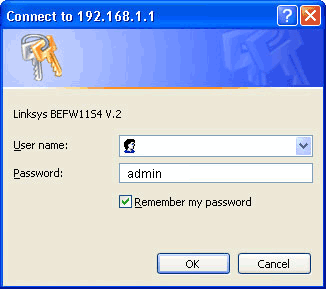
Linksys DSL Ethernet / EtherFast Cable Network Routers: Administrator
Linksys EtherFast Cable/DSL Ethernet routers: Administrator
Linksys / Cisco RTP300 (2 phone ports): user
Linksys ADSLME3: root
Any remaining Linksys Router: {none}
*Note: Please do not type “None” into the login field, simply leave it blank!
Default Linksys Router Passwords
Linksys Router Model BEFW11S4: {none}
*Note: Similar to the modern default login name, this model of Linksys router’s password is blank.
Linksys Comcast Network Router: 1234
Linksys / Cisco RTP300 (2 phone ports): tivonpw
Linksys ADSLME3: orion99
Any remaining Linksys Router: admin
How Do You Change the Linksys Router’s Password via the Web Browser?
The Linksys router’s configuration panel is accessed via web page accessed by connecting a laptop to the router via USB or Ethernet cable. This page can be used to customize the network’s settings, security, or to change or reset the router’s password. Prior to attempting to access the configuration page, ensure the network router is turned on and functioning properly.
Step 1 – Connect a laptop to the router via one of the Ethernet ports located on the rear or side of the router. The computer should already be turned on prior to making the connection.
Step 2 – Make sure that the light corresponding to the Ethernet port that you have connected the laptop to the router on is illuminated.
Step 3 – Launch the laptop’s Internet browser. The Linksys configuration page is compatible with all major web browsers in production at the time of this writing.
Step 4 – Enter the default Linksys router setup IP address into the web address text field in the Web Browser: 192.168.1.1. Alternatively, the URL: http://myrouter.local can be used on newer Linksys network router models.
Step 5 – If there is a default router login/user name for the model of router you are changing the password on, enter it in the user name field. If there is not a login name for the model, then leave this field blank unless you have changed the login name for the router since installation.
Step 6 – Enter the default Linksys router password for the model you are configuring if you did not previously changed the password. If you have changed the password, enter the current one for the router and then click the “OK” menu button.
Step 7 – Choose or click the “Administration” menu label or tab located on the next screen displayed in your web browser.
Step 8 – Click the “Management” menu label and located the “Password” text field. Then, input the old password for the router.
Step 9 – Enter the new password in this field and re-enter the same password in the confirmation block on the screen. Newer Linksys network routers support longer passwords than older models produced by Cisco.
Step 10 – Pick the “Save Settings” menu option and disconnect from the network router with the laptop. The default Linksys router password will now be set to the new password when the network administrator or other authorized users on the network need to access the router’s control panel.
What if You Have Problems Resetting a Linksys Router Password on a Mac?
Depending on the age of the Mac and build of the Safari web browser installed on the computer, an end user can encounter the “Safari Can’t Connect to the Server” error message while attempting to login or access the Linksys router configuration panel. If you encounter this error, the following steps can be taken to help resolve the issue.
Step 1 – Download and install the Mozilla Firefox web browser on the Mac computer that you are going to use for resetting the Linksys router password.
Step 2 – Connect the computer to the Linksys router using one of the Ethernet ports located on the rear or side of the device.
Step 3 – Open the Mozilla Firefox browser and enter the configuration panel URL in the web address tool bar: 192.168.1.1. Then, press the computer’s “return” key.
Step 4 – Input the Linksys router’s user name and password on the router’s login screen. Use the Linksys default username and password if you have not previously changed these settings. End-users that experience issues using the Safari web browser will normally see the error thrown on this or the previous step.
Step 5 – Click the “Administration” menu item located on the router’s setup menu.
Step 6 – Click the “Factory Defaults” menu choice followed by choosing the “Restore Factory Defaults” menu option.
Step 7 – Wait for the router to reboot. Then, proceed to login to the router’s configuration panel using the default Linksys password and login for the device.
Step 8 – Click the “Administration” menu label.
Step 9 – Enter the new Linksys router password in the appropriate text field and confirm the entry in the subsequent field.
Step 10 – Choose the “Save Settings” menu option to complete changing the Linksys password with your Mac OS X computer.
How Do You Verify Linksys Router Settings?
Many times, home or small business network owners / administrators will encounter an issue with a local network using a Linksys router and believe that the router’s password needs to be reset in error. In many cases, if a simple reboot of the router is not sufficient to solve the connectivity issue, there may be an issue with one of the following settings on the router: 1 – Security Key, 2 – Network Name (SSID), or 3 – The Wireless Security Mode. Prior to taking the time to either reset the Linksys router’s password, or the entire network’s settings, it can save time and frustration on the part of the end-user to login and verify these settings.
Step 1 – Turn on the Linksys network router if it is not already in operation.
Step 2 – Login to a laptop and connect to the network router via one of the available Ethernet ports on the rear or side of the device.
Step 3 – Open an Internet browser on the laptop.
Step 4 – Enter the default configuration address in the browser’s address bar: 192.168.1.1 and press the “Enter” key on the computer.
Step 5 – Enter the default Linksys login and password for the router model that you own followed by pressing the “OK” menu button. If you have changed the default login settings on the router since installation, then enter these settings instead.
Step 6 – Choose the “Wireless” menu option located on the primary configuration panel of the Linksys router.
Step 7 – Toggle the “Configuration View” menu option so that it reads “Manual” on the screen.
Step 8 – Write down the “Network Name” or the “SSID” that is being used for the local network. If you have the router set to not “Broadcast” the name, a common mistake by users of wireless networks is to attempt to connect to the wrong network.
Step 9 – Choose the “Wireless Security” menu option on the Linksys router’s configuration panel.
Step 10 – Write down the “Passphrase” and the “Security Mode” that is being used on the router.
Step 11 – On legacy versions of the Linksys router, the password or passphrase can be displayed as either a WPA Shared or Pre-Shared Key. On newer Linksys routers, the “TX Key” label will mark which of the four possible keys is being used for the wireless network. Passwords can be case sensitive which can also be another possible cause for network users to fail to properly access the network.
Step 12 – Ensure the verified Linksys router settings are being used on the network device(s) that are having issues accessing the wireless network being driven by the router.
What are the Most Common Models of Linksys Routers in Use?
There are more than 30 different models of Linksys network routers that can be found on the market on any given day. Although the Linksys WRT54G saw widespread use several years ago, it is quickly being replaced by the higher capacity 802.11N compatible models produced by Cisco to include the Linksys e2500, E1200, and the E900. From the legacy router models through the latest offerings made by Cisco, the user interface of the router configuration panel has remained mostly consistent over the years. There are some small differences in the default Linksys password and / or login used to gain access to the configuration panel as well as the odd menu button label or location change; however, the network setup “Wizards” have become easier for end-users to use for initial router setup. Another small difference between models is the length of time that it takes to manually reset the router (from 10 seconds on newer models to more than 30 on older ones). Other popular Linksys router models include the WRT54G, e2000 (802.11N compatible), e1000 (Single band, 802.11N), WRt54gl (802.11G), e4200 (Supports dual band 802.11N networks), and the Linksys WRT610N (Supports dual band 802.11N and real-time HD content streaming).
How Do You Reset the Linksys Router to Factory Settings?
If you are unable to login to a Linksys network router using the default user name and password and do not recall what you changed the password to, it may be necessary to use the factory reset button to revert the router’s settings to the factory defaults. On the newer models of router produced by Linksys, the button will have to be held for 10 seconds; however, on older routers, the button will have to be held for a total of 30 seconds to conclude the factory reset action.
Step 1 – Ensure the Linksys router is turned on.
Step 2 – Remove all network and other computer connections from the router while ensuring the power remains on to the device.
Step 3 – Move the Linksys router so that you can easily access the back of the component.
Step 4 – Locate the small pinhole button or regular button that is labeled “reset.”
Step 5 – Press and hold the button for a range of 10 to 30 seconds depending on the age of the router. If you are unsure on where your model of router falls with regards to the different length of time to hold the button, then press and hold for a total of 30 seconds.
Step 6 – Once the router starts to reboot, ensure you have released the reset button and wait for the rebooting process to finish.
Step 7 – Turn off the router and then turn it back on to ensure it has been fully reset
Step 8 – After the router reboots, you will need to login to the device to setup the wireless network.
Step 9 – Connect a laptop to the Linksys router using an Ethernet cable and launch the computer’s web browser.
Step 10 – Enter “192.168.1.1” in the browser’s address tool bar and press the “Enter” button on the computer.
Step 11 – Login to the router’s configuration screen using the default Linksys username and password.
Step 12 – Proceed to configure the wireless network’s SSID (network name), encryption standard to use on the network, and passphrase required for network connection. If the router is not located in a secure location, you may also want to consider changing the default login and password required to access the network router.
Step 13 – Save all settings before exiting from the router’s configuration panel. Once complete, disconnect the laptop from the router and start using the wireless network.
How Do You Reset a Linksys Router using the Web Configuration Panel
Sometimes, end-users will have the need to reset a Linksys router to the factory defaults in order to setup a home or small business network from scratch. This need can occur from a variety of reasons to include: implementing a different encryption standard for the network, to change the SSID, or to modify other network settings. In this case, the factory reset can be initiated from the Linksys web configuration panel instead of using the factory reset button.
Step 1 – Ensure the Linksys network router is turned on, and connect a laptop to the device via one of the Ethernet cable ports on the router.
Step 2 – Launch or open the laptop’s Internet browser and load the Linksys configuration panel’s IP address in the web address text field: 192.168.1.1 followed by pressing the “Enter” key on your computer.
Step 3 – Login to the router’s configuration panel with the user name and password created on original configuration of the device or by using the default Linksys router login and password for the respective model.
Step 4 – Click the “Administration” menu label and then choose the “Factory Defaults” menu choice.
Step 5 – Select the “Restore Factory Defaults” menu item that is located beneath the “Factory Defaults” menu label.
Step 6 – Wait for the router to restart (this can take up to several minutes based on the model of router). Then, login to the device and configure the wireless network based on your desired security and connection configuration needs.
Julien
http://www.stumbleupon.com/su/1jNOSF/www.cirt.net/passwords%253Fcriteria%253Dlinksys
easier
JackJ
I have Linksys WRT120N VI.0.04 wireless built into my Acer Desktop AX3910
Trying to setup to connect to DVD/Netflix wifi
I have the following
Security Type WPA2
Encrp AES
Security Key ????????? Where do I find this code?
On the DVD setup,it asks for PASSWORD. I never gave the wireless a password. Do I enter admin?
Any help…………please
Daniel Memenode
Originally posted by JoAnn: “After my computer was hit with power surges three quick times in a row, my Linksys did not work. After resetting, etc. it works, but it is no longer secure. I connected with Linksys, and they would not tell me how to get security back because I was one day over support. They wanted $35.00 to get it back. It is working, but I want it secure. Some people say it doesn’t matter, others say it does. Any way I can make it secure again? It is WRT 54G2V1. Thanks. 2u3hu”
You can change its password to a more secure one and enable WPA2 encryption for your wireless connection, which is better than WEP. You should be able to set that up on the Wireless Security page of your router’s interface. This video might help.
After you change to WPA2 you’ll have to configure your wireless connection on your computer and other devices to authenticate via WPA2 and enter the generated key from your passphrase.
JoAnn
After my computer was hit with power surges three quick times in a row, my Linksys did not work. After resetting, etc. it works, but it is no longer secure. I connected with Linksys, and they would not tell me how to get security back because I was one day over support. They wanted $35.00 to get it back. It is working, but I want it secure. Some people say it doesn’t matter, others say it does. Any way I can make it secure again? It is WRT 54G2V1. Thanks. 2u3hu