RSS Feed

Microsoft Windows Server

Understanding Server Roles

Understanding Server Roles

A network or network infrastructure is the grouping of hardware devices and software components needed to connect devices within an organization and to connect the organization to other organizations and the Internet.

Using the Terminal Services Manager Tool

Using the Terminal Services Manager Tool

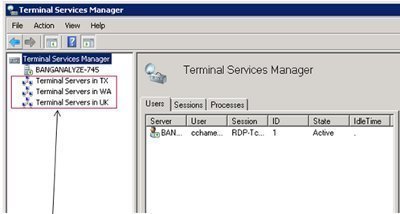
The Terminal Services Manager tool (Tsadmin.exe) is the main administration tool used to manage existing Terminal Services sessions, users, and processes that are connected to or running on the Terminal Services server. The Terminal Services Manager tool can manage one or more Terminal Services servers.

Using the Terminal Services Configuration Tool

Using the Terminal Services Configuration Tool

In order for clients to establish Terminal Services sessions on a server, listener connections have to be configured on the particular server. A listener connection can be configured for only RDP (Remote Data Protocol) over TCP/IP. One listener connection can be configured for a network interface card (NIC) in the Terminal Services computer.

Understanding Fault Tolerance

Understanding Fault Tolerance

An Introduction to Fault Tolerance
The following issues initiate downtime:
Hardware Failures: Hardware failures can be described as failures that occur in mechanisms like disks or storage media. Hardware failures tend to offset other failures.

Understanding ASR

Understanding ASR

Automated System Recovery (ASR) Overview
Previously, in the Windows NT and Microsoft Windows 2000 operating systems, the emergency repair disk (ERD) feature
was used to recover the system when disasters occurred.

Understanding and Managing NNTP Virtual Servers

Understanding and Managing NNTP Virtual Servers

An Overview on the Network News Transfer Protocol (NNTP) Service
The NNTP service is a component of IIS that supports client/server and server/server elements of NNTP.

UNIX and Windows Server

UNIX and Windows Server

Interoperating with UNIX
The Unix operating system was developed in 1969, and was the initial operating system written in the C programming language. Unix enabled multiple users to access the system and run programs at the same time, and share resources and files. To date, Unix is regarded as being a robust, stable operating system.

Server Clustering Technologies and Concepts

Server Clustering Technologies and Concepts

Microsoft Cluster Service Overview
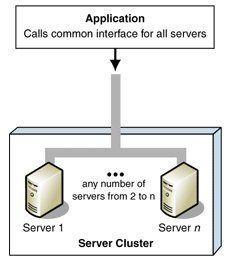
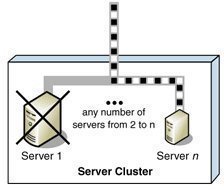
A cluster is the grouping of two or multiple physical servers that are perceived to the network as one network server.

Optimizing Servers for Application Performance

Optimizing Servers for Application Performance

Monitoring Server Performance and Activity
One of the basic steps to optimizing server performance is to monitor server performance. To optimize server performance, you can perform a number of tasks, such as:

Reducing the load of network traffic on the particular server by implementing load balancing strategies.

Novell Netware and Windows Server

Novell Netware and Windows Server

Interoperating with Novell NetWare
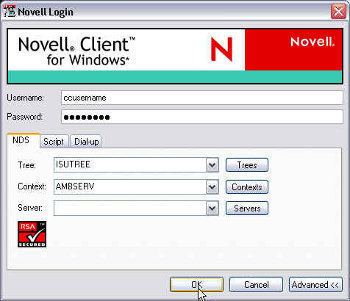
Windows Server 2003 includes a few specific services that enable Novell NetWare servers and clients, and Windows computer to interoperate:

NWLink IPX/SPX/NetBIOS Compatible Transport Protocol (NWLink): NWLink IPX/SPX is the Microsoft implementation of Novell's NetWare Internetwork Packet Exchange/Sequenced