

Windows users may encounter the following when trying to start the HP Solution Center: “The installation package for solution center cannot be found. Try the installation again by using a valid SolutionCenter.msi.” This error commonly occurs when the solution center software was installed from a downloaded file and is then unavailable to reinstall the HP Solution Center if required. It can also be triggered through Windows Operating System (OS) updates that are no longer fully compatible with the version of the HP software on the computer. At minimum, users may become frustrated with the error as it may prevent them from conducting necessary tasks on their computer.
How Do You Fix the SolutionCenter.msi Error?
There are two ways to fix the SolutionCenter.msi: 1) reinstalling from the HP install CD or 2) downloading the latest patch from the HP website. The patch from the HP website is designed to fix the following two issues: 1) The HP Solution Center asks the user for the installation disk when the computer is restarted or launched and 2) Eliminates an error with the hpqgpc01.exe executable file when the computer is shut down. Although not advertised to do so, the patch has also been found to correct the “No HP Devices Detected” error that can also be associated with the SolutionCenter.msi error.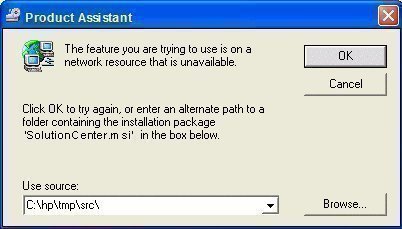
How to Update the HP Solution Center Automatically
Another way to fix the SolutionCenter.msi error is to use the HP update application to directly download the patch for subsequent update.
Step 1– Start the computer normally.
Step 2 – Select “Start” and “All Programs.”
Step 3– Click “HP” then “HP Update.”
The program then automatically updates the HP Solution Center, HP Update application, and the HP Guided Solution program files. The most recent reason for HP Solution Center problems is Windows users’ upgrading their operating system from Windows XP/Vista to Windows 7. Some new computers that have Windows 7 installed may also require this update out of the box depending on when the Operating System and supporting programs were loaded onto the machine. After completing the update, the user may also be prompted to restart the computer before the updated HP applications become active. Whether the user is prompted depends on what preferences and OS are installed.

Bill Pomeroy
Using Windows 10. This did not get rid of the error message
Monika
Same problem here. My sofware is apparently up to date.
I noticed that I have this issue since I updated flash player. Any suggestions are very welcome. Thank you.
BERGER
None of the proposed solutions got read of the plage “solutions center.msi”.
Show me another way, please.