

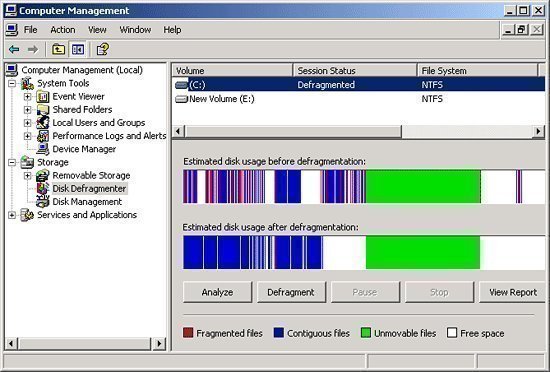
File and disk fragmentation usually causes problems in large networked companies where many people simultaneously save, retrieve and delete their work on a company’s servers.
In an ideal scenario, people will be ‘lining up’ to use the company’s servers, allowing data management (especially storage and retrieval) to proceed in an orderly, logical, and sequential manner. In reality, people are working simultaneously. This results in pieces of data being stored on servers in a seemingly random manner, ending up in data fragmentation.
The scale of fragmentation is such that even small companies with less than twenty people will have servers dealing with literally thousands of data fragments spread all over the server’s data storage system – pushing servers to the wall as they try to cope with constant demands for various files which the server has to locate, retrieve and consolidate in a matter of seconds (which is what most people have come to expect from their computers).
Heavily fragmented servers are the cause behind perceived system slowdowns or system ‘hangs.’ No matter the speed with which modern processing systems operate, it still takes time – as said – to locate, retrieve and consolidate data pieces spread out over terabyte-sized systems; more so if a server has to process hundreds of such requests every minute. It is also the cause behind file or program corruption – the introduction of a large file into a heavily fragmented server can cause major file corruption or even a complete system crash.
In addition, heavily fragmented files are an indirect cause of hard disk failure – the process of locating, retrieving and consolidating thousands of data bits spread out over a huge area may cause wear and tear on the mechanical components of the hard disk.
Server Crashes, Hangs and Other Problems
Among the problems that disk fragmentation can cause are server crashes or ‘hangs,’ usually indicated by people complaining that their systems are ‘slowing down’. Retrieving a file takes anywhere from 45 seconds to several minutes rather than near-instantaneously and printing out files on shared printers takes longer than normal.
File corruption is also an increasing concern for many companies working with a shared network resource or server. This happens when essential data or files as well as essential applications become scrambled or cannot be found.
The worst problem for many companies and IT professionals are hard disk failures, especially on their company servers. Hard disk failures are far more difficult to deal with – especially as these often happen with little or no warning, and can catch companies completely unaware. However, it may not be a major problem if the company has been religious in backing up vital company information.
Follow Us!