

The Xbox 360 is a popular game console produced by the Microsoft Corporation. It is the successor to the original Xbox console first released in late November, 2001. Unfortunately, many Xbox 360 users end up having to troubleshoot its power supply when the indicator light turns red. Before paying to repair it, try troubleshooting the Xbox 360 Power Supply.
What Causes the Xbox 360 Power Supply Indicator Light to Illuminate?
The Xbox 360 power supply indicator light will turn red when the unit diagnostic detects a problem. There are several built-in safeguards to help prevent catastrophic damage to the console. For example, if one or more of these occur, the light will illuminate: 1) Too much current, 2) Too much voltage, or 3) The temperature of the power supply is too high.
How to Troubleshoot the Xbox 360 Power Supply
The following are common causes and recommended troubleshooting steps for Xbox 360 power supply issues.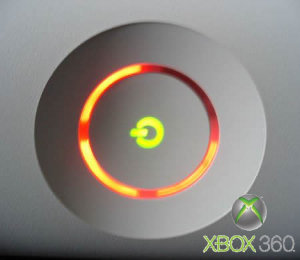
If the Xbox 360 Power Supply Has Over-heated
Step 1 – Turn the Xbox 360 off.
Step 2 – Disconnect the power supply from the main console and the wall socket or power strip.
Step 3 – Vacuum (do not blow air into) all openings on the side of the unit in case they are obstructed by dust or debris.
Step 4 – Set the power supply in a well-ventilated space and allow it to cool for at least two hours.
Step 5– Reconnect the Xbox power supply console and plug it into the power source.
Ensure the Xbox 360 is Plugged into a Working Outlet
Step 1 – If the Xbox 360 is usually plugged into an extension cord, plug it directly into a functioning wall outlet.
Step 2 – Ensure the power supply is connected to the Xbox 360 console securely.
Step 3 – Take the Xbox 360 to a different room and plug it into a different wall outlet to see if there is an issue with the primary wall outlet.
Reset the Xbox 360
Step 1 – Remove all game or DVD discs from the Xbox 360 and turn off the console.
Step 2 – Turn the console back on, and press and hold the “Y” button while pulling the “Trigger” at the same time.
Step 3 – The console reset eliminates the power supply error in about 30% of all cases.
Verify the Hard Disk Drive and Memory Unit Integrity
Step 1 – Turn off the Xbox 360 console.
Step 2 – Remove the Hard Disk Drive and Memory Unit (if installed).
Step 3 – Examine the drive connectors and ensure that they are intact and unobstructed.
Step 4 – Reinstall the Hard Disk Drive and Memory Unit and turn the console back on.
If none of these steps help you fix the power supply issue with your Xbox 360, you will need to consider ordering a new power supply or taking the unit in to a repair shop for additional troubleshooting.


shay
my outlet blew out and my xbox 360 was still hooked up now it wont turn on what do i do