ATA (AT Attachment)

ATA (AT Attachment) is the primary standard for connecting storage to PC’s.

ATA replaced earlier technologies such as MFM, RLL, and ESDI. ATA is currently SCSI‘s major competitor.

ATA is a specification for attaching hard drives to the AT bus. The AT specification has been extended to include other storage, such as CD/DVD drives, tape drives, and Zip drives with the Advanced Technology Attachment Packet Interface (ATAPI) additions to the specification. It is also known as IDE (Integrated Drive Electronics).

Parallel ATA Cables

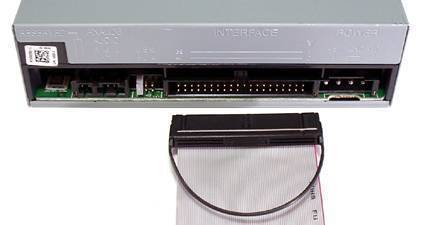
Parallel ATA cables originally had 40 wires. With the introduction of ATA-5, parallel ATA cables with 80 wires became standard. Only 40 wires are used to carry signals. The additional 40 wires exist to provide a ground wire for each signal wire.

These grounding wires enable the ATA subsystem to operate at higher speeds with greater reliability.

parallel ata ATA (AT Attachment)

ATA Masters and Slaves

Each ATA bus supports two storage devices. The first storage device is called “Master” and the second storage device is called “Slave”.

There are two methods for configuring which device is the master and which is the slave: drive jumpers and cable select.

Drive Jumpers

The original method for configuring Master and Slave relation on ATA drives was to place or remove jumpers on each storage device.

The jumper definitions differ among drive manufacturers and models. The jumper setting are often printed on the drive. If not, read the drive manual or visit the drive manufacturers web page.

In a single drive configuration, some drives should be set to “Single Drive”, while other drives should be set to “Master”.

In a dual drive configuration, one drive should be set to Master and the other drive should be set to Slave.

Cable Select

A newer standard for configuring the Master/Slave relation on ATA drives is to allow the position of the drives on the drive cable to determine the ordering.

For Cable Select to work, both of the drives and the ATA cable must support cable select.

To use Cable Select, the jumpers on both drives should be set to Cable Select.

Parallel ATA vs. Serial ATA

All versions of ATA up until ATA-7 in 2004 utilized parallel transfer of data from the motherboard to the drive controller built onto the disk.

The ATA-7 specification introduced Serial ATA.

The most obvious change with Serial ATA is the difference in drive cables. Other differences include:

  • Higher throughput
  • Revised power connector
  • Longer data cables
  • Support for external drives (eSata)

serial ata ATA (AT Attachment)

VN:F [1.9.17_1161]
Rating: 0.0/10 (0 votes cast)
Follow Daniel Memetic on

Leave a Reply

Related Posts

  • PATA (Parallel ATA)

    PATA is an abbreviation for Parallel Advanced Technology Attachment. It is a regular interface that is used within PCs to connect all kinds of storage devices like hard disks, CD or DVD drives and solid state disks to the motherboard. The PATA interface connector is made up of thirty four pins and is connected to [...]...


  • Maxtor Jumper Settings

    An Integrated Drive Electronics (IDE) drive is a device that meets the Parallel AT Attachment, ATA or AT Attachment Packet Interface, and ATAPI standards. IDE drives include hard drives, floppy drives, and CD/DVD players. IDE drives have a specific type of cable that allows multiple streams of data to be shared between the device and [...]...


  • eSATA (External Serial Advanced Technology Attachment)

    eSATA stands for External Serial Advanced Technology Attachment. It is meant to be an external interface for SATA technologies. SATA or Serial ATA (Advanced Technology Attachment) is the next generation of drive interfaces, its predecessor being the Parallel ATA (PATA). PATA Anyone who has opened up their computer must have noticed the flat, 40-wire parallel [...]...


  • How to Install a Hard Drive

    If you would like to replace your old hard drive with an upgraded drive, this is a simple process that can be done at home. Most new hard drives will come with installation instructions to make the task easier for you. Steps To install A Hard Drive Shut down the computer, and unplug all accessories [...]...


  • Disk to Disk Backup

    Disk to disk backup is the modern method of backing up your computer or server's data to an another drive. This can be quite helpful to any individual or business who uses a computer to organize their information because many times, months or even years worth of information is stored on one hard drive. Backing [...]...