

The longer a computer is used, the more cluttered the registry can become because most applications these days do not remove all traces of themselves when deleted. This can slow Windows’ performance. So it is essential to know how to clean the Windows registry to speed up the PC’s performance. Cleaning it up effectively is not easy, though. The steps for doing so are outlined below.
The Windows registry is the Windows component that has all the information about the computer and the software installed on the computer. The Windows registry’s main purpose is to store the configuration of the different software programs installed on the computer, the hardware installed or attached to the computer, and any other special settings the user has implemented. A computer’s registry is an efficient way of monitoring the different software and hardware components. For example, all the software programs are organized based on user profiles. It is also a delicate place to fiddle around without proper knowledge. One needs to be well equipped with registry handling information in order to configure/modify the computer’s registry.
Spyware and viruses can corrupt the computer registry. In addition, not all programs will remove themselves cleanly and completely from the registry when deleted.
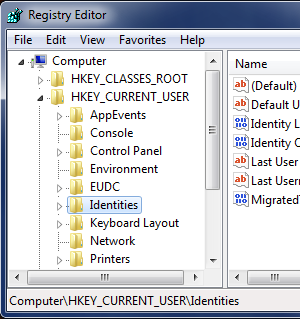
There are two main ways to clean up a computer’s registry – cleaning manually using the Windows Registry Editor or using registry cleaning software. Only someone who understands what the registry entries mean should manually clean it. Software programs can cease to function correctly if essential registry entries are removed.
The Windows Registry Editor
To manually clean the registry with the Windows Registry Editor, create a registry backup then remove unnecessary files:
- On the desktop, click the Start button on the left bottom corner of the taskbar
- Click Run
- Type regedit in the new Run window and Click OK
- At the top of the window, click File on the menu toolbar
- Scroll down and select Export
- Type a name for the backup file and click Save
After creating a registry backup, go to the left side of the registry editor window and view how the computer is configured.
Click the plus sign to expand a section of the registry editor. A “well used” area for anyone manually deleting registry files is “HKEY_LOCAL_MACHINE.” This area is used to make registry changes to hardware and software.
Registry Cleaning Software
Registry cleaning software is suited for anyone who is unsure about making manual changes to their registry. There are numerous registry cleaning programs available to remove unwanted entries from the registry. Examples of registry cleaning software include TweakNow Regcleaner, Registry Mechanic, and Registry Healer. Our Free Registry Cleaners page is a good source for free options.
These programs all basically function in the same way – they scan the registry and remove errors such as missing references to files. It is important to discover what registry cleaning software works best for particular needs. All registry cleaners give a list of entries that are safe or not safe to delete. Some of them, such as Registry Mechanic, allow the user to create a backup using their program. The backup can be easily restored if the system becomes unstable.
Joshua83
Has anyone tried korjam cleaner for clearing junk from their PC? A lot of people are recommending me.
Barbara E. Gearhart
I have a malware attack on my email at yahoo.com.My yahoo email sends spam mail.Thus far,i have found the name on the email answer and sent and deleted it.However , it still sends spam email in my other emails.How do i eliminate the malware?How do i clean the registry? I found old registry entries and i delete software conflicts when i can.What can i do? The computer rating is low and because i had an extreeme amount of emails(144000) i have eliminated over 44000 emails.I also have a short hard drive error 0146.
Techno9
I think that it is better to have the registry cleaned by an automated software that has been proven safe and easy to use. I have been using WinCleaner OneClick for years and it works. I will stick with it. http://www.wincleaner.com
lyn
nice info it helps a lot… thanks….
Marysia
I am infected with Jave Update virus, Security Center Virus, Windows Vista SecurityCenter Virus.. I am not sure if these are all related or if they are virus/malware/spyware/etc? I just know they are a pain!
I have run (with no success): Spybot, Malwarebytes, Microsoft Security Center and AVG anti-virus.
I have searched my Registry and have located at least one of the files, but it will not let me delete it.
HELP!!
memenode
Try starting regedit as administrator (search for regedit and then right click and choose “Run as Administrator”. It might let you edit it then.
You should probably update your anti-virus program and database, boot in safe mode (repeatedly pressing F8 when booting), delete all temporary files (with disk cleanup), and then scan it.