

A key concept in data storage is that it is linear, logical, and systematic in nature. When someone ‘saves’ data to the hard disk, the disk will follow a logical system.
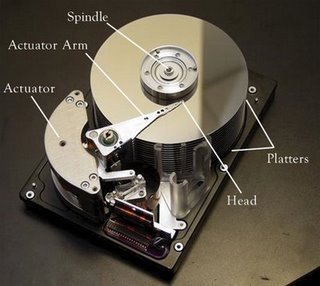
A hard disk can be compared to a large, square piece of graphing paper composed of squares, a thousand long and a thousand wide. Each square can accommodate one kilobyte of data and thus a ‘strip’ having a thousand squares can store one megabyte of data. In such a case, the disk head will ‘fill’ in the upper leftmost square first then continue down the line – one square at a time until all the appropriate squares are filled.
A second key concept to remember is that data storage follows a simple rule – data is stored (or ‘written’) on the first available space, wherever this may be.
Data Storage Example
Imagine that someone is saving a 1-Mb Word document on the hard disk. Saving a 1 MB file means the disk will systematically ‘fill in’ a thousand squares.
After saving the Word document, assume that a 3 MB photo is saved to a hard disk. Following the key data storage concepts, the disk writer head will go through the disk and look for the first available space, which, in this example, happens to be the square following the Word document’s last kilobyte. Thus, the 3 MB photo will be saved in the space next to the Word document.
Afterward, go back to the Word document and trim it down, ending up with a file 700 KB in size, which is then saved to the hard disk. Given the smaller file size, the 1 MB space requirement was reduced to 700 KB, leaving 300 KB free or (using the analogy above) 300 blank squares immediately after the Word document. There is now available space between the Word Document and the 3 MB photo.
When yet another file is saved, say a 2 MB Excel file, the hard disk will follow its rule of saving data on the first available space. Thus, the Excel file will be split into two portions: 300 KB will be written on the 300 KB free space and the rest will be placed in the next available space, after the image file.
The Problem
Data storage, while designed to be logical and systematic, leads to file fragmentation. Imagine adding, deleting, and editing files for days, weeks, and months. After a few months, the hard disk will become so fragmented that the disk will take quite a bit of time to find a single file’s fragments.
It is easy to see from this that data retrieval would be easy if the file components were in a single, contiguous location on the hard disk. De-fragmentation is the process in which the different file fragments in a data storage system are located, ‘gathered,’ and consolidated into specific areas of the storage device, thus making it easier to retrieve data. This allows speedier processing as well as reduced wear and tear on data retrieval mechanisms.


Satish tigerreddy
Such a Best Explanation…
deepak
where is th e data stored after format???
rohini
hw cn i save data in local dics pls help
Kiran.R.S
thanx for the best wau oy explanation 🙂 perfect 🙂
dhanu
well explained with example, thank you for u r answers
Satish Medos
Was very lucid explanation!! Thanks for that 🙂
Lillah
hi, i am trying to delete programs,and i need to get to my hard disk.can anyone tell me how to get there?? thanks!