

Creating your own MySpace layout requires the use of coding in CSS and HTML. Prior knowledge of these technologies is not absolutely necessary, but will make your life easier.
There are two types of MySpace layouts. One involves customizing your default profile and another requires creating what is called a div layout. The latter is suitable for the more advanced user and prior knowledge of HTML and CSS is recommended, but it is possible to create some amazing layouts this way.
Customizing Your Default Profile
To customize a MySpace profile you need to insert HTML and CSS codes into one of the sections on the “edit profile” screen. These codes can be created yourself if you know both languages. They can be easily found on one of the many MySpace resource websites out there.
On the default profile a number of parts can be customized. For example the contact table and extended network banner can be replaced with images of your own choice, code can be added to create a background image and change the font type and size. You can also hide sections of your profile such as comments and/or friends.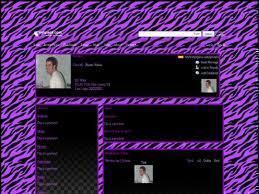
One of the most important aspects of your profile will be the content. You need to know your audience and create the content around that. For example if people you do not know very well will be viewing your profile, then you will not want to reveal any personal information such as a phone number or email address.
Creating a Div Layout
A div layout gives you full control of what you want your layout to look like. Your default profile is hidden and you get to replace it with your own layout. Your own layout can be something made in a graphics program such as Photoshop, or any preferred arrangement of divs (boxes which hold data). This allows you to make much more creative layouts, the downside being that they are harder to code than the customization option.
MySpace Resource Sites
Many web sites have free layouts for you to use in creating your own MySpace layout. These sites are known as “MySpace Resource Sites.” You simply need to click on the one you choose, and there should be instructions on how to enter the given code into your MySpace page.

Follow Us!