

An iPad is a tablet PC that Apple produced. It allows users to browse the web, check their email, and run applications while traveling or away from a charger. An iPad is similar to a laptop, but is smaller, does not fold, and has touch screen capabilities. iPads range in price, but feature support for Bluetooth, WiFi, and 3G. Although the original iPad does not include any built-in cameras, the iPad 2 has a built-in camera on both the front and back, while both versions include motion detection capabilities and automatic screen brightness adjustment. While the iPad does not feature a USB port, it is able to connect to various devices such as printers and scanners through several wireless methods.
WiFi
The primary way to print materials via an iPad is its built-in WiFi adapter. The iPad is a wireless device. Therefore, the iPad can transmit and receive WiFi signals whenever it is near a wireless network. In order to use WiFi to print materials from an iPad, the user must purchase a wireless printer or enable WiFi on a regular printer by installing a wireless adapter on the printer itself. Doing so allows the user to wirelessly print materials from an iPad from anywhere within the same wireless network, which may be broadcasted throughout a residence, business, or school.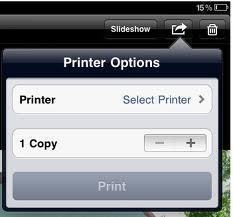
Bluetooth
iPad users can also print materials via Bluetooth if their printer is Bluetooth enabled. While Bluetooth may be slower than WiFi and is limited in its range, it is still a viable option for those who do not have a wireless network available.
Though Bluetooth is run through the iPad’s built-in Bluetooth adapter, a number of products can control the iPad’s WiFi capabilities in order to process printing jobs. One of the most popular wireless printing programs available for the iPad is AirPrint, the iPad’s default printing software. Though the user must purchase an AirPrint compatible printer from the Apple Store, he/she will be able to wirelessly print materials without setting up anything.
MIke
How can you print to a bluetooth printer from an Ipad without a network (WiFi). If you can answer this you would be a hero. Everyone wants to print from their HP office jet 100 portable printer using bluetooth and their Ipad. I tried the HP 1200 adapter but could type faster than the printer would print from an ipad.
Thanks
Mike
Rebecca
Can you plug into a printer with the USB and print?
MIke
Rebecca, Any luck with a bluetooth ipad print solution?
Lena
Ed – from personal experience, i have not been able to connect my ipad via bluetooth, not even to my mac
i have been told that bluetooth is not possible on the ipad, but i could be wrong
if you want to print and don’t have an airprint enabled printer, your best bet is to get an app like print n share for the ipad, this is what i use
Ed Harrison
you stated that an ipad2 can print via bluetooth. Apple website sells the HP100 mobile printer and state that the Iphone can print to the printer vai bluetooth. however the Aplle store tech support said that it was a mistake and that the Iphone and Ipad can not print via bluetooth.
who is mistaken? Do you know how to make an ipad print bluetooth?