

The motherboard is the most essential component in a personal computer. It is the piece of hardware that contains the computer’s micro-processing chip and everything attached to it is vital to making the computer run. The term “mainboard” is also sometimes used to refer to the motherboard .
Motherboard Components
The motherboard is the flat, rectangular piece of circuit board inside the computer’s case to which everything seems to connect to for one reason or another. It contains the following key components:
- A microprocessor “socket” that defines what kind of central processing unit the motherboard uses
- A chipset that forms the computer’s logic system. It is usually composed of two parts called bridges (a “north” bridge and its opposite, “south” bridge), which connect the CPU to the rest of the system
- A Basic Input/Output System (BIOS) chip that controls the most basic computer function and how to repair it
- A real-time clock that is a battery operated chip that maintains the system’s time and other basic functions.
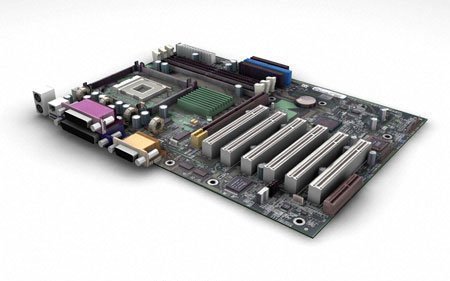
The motherboard also has slots or ports for the attachment of various peripherals or support system/hardware. There is an Accelerated Graphics Port that is used exclusively for video cards, an Integrated Drive Electronics that provides the interfaces for the hard disk drives, Memory or RAM cards, a Peripheral Component Interconnect (PCI), which provides electronic connections for video capture cards and network cards, among others.
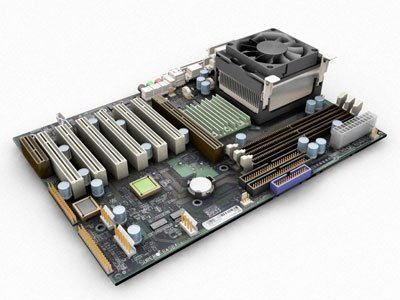
How a Motherboard Works
The most important thing to remember about the motherboard is that it is a printed circuit board that provides all the connections, pathways, and “lines” connecting the computer’s different components to each other, specifically, the Central Processing Unit (CPU), which is where (as its name implies) all the “processing” is goes on.
The CPU or “chip” (the most popular of which is Intel’s Pentium series) is an assembly of transistors and other devices (Pentium IV has over 4 million transistors) that performs or processes myriad programmed tasks.
The CPU rests in a “socket” on the motherboard that is connected to the other components through the board’s printed circuits. The most important connections are to the chipsets, especially the northbridge chipset that is connected to the main computer memory (hard disk and RAM). The southbridge set is connected to the peripherals – video and audio cards, IDE controllers, etc.
Aside from these, the most important element of the motherboard is the BIOS chip, which performs key functions like checking power supply, the hard disk drive, operating system, etc. before the computer actually starts “booting up.” Turning on the computer automatically starts the BIOS chip up to perform its diagnostic functions, after which it powers up the CPU which, in turn, starts powering up the other peripherals (hard disk, operating system, video and audio, etc.).
This is why the motherboard is the computer’s key component. It is, in effect, the CPU’s “housing.” That is, the place where the latter resides and from which commands, instructions, and power course through before being sent out to other components.
susan.thomas32
=====
Guest
|
trini
asus P4R8L MANUAL….CAN SOMEBODY INFORM ME???
janine
it was really helpful info thx a million