

PXE Boot (Pre-eXecution Environment) is a protocol that boots computers without using a hard drive or an operating system. It is often used in industrial computers that do not require a graphical user interface, but require other applications to be run. PXE Boot is run over a network of computers and may or may not include Internet access. It is almost exclusively used in systems that are connected to a central server and uses subsequent computers to run virtual operating systems or DOS-like APIs.
How PXE Boot Works
PXE Boot requires that the computer it is installed on to boot from a network before any other operating systems or hard drives. If a local hard drive is connected to the computer, PXE Boot will be able to access it, but will also run if the hard drive is corrupted or nonexistent. PXE Boot receives all of its commands directly from the network server that it is connected to, with the network server handling all storage and user accessibility. The network server sends the name of the application that PXE Boot should run on the client computer so that PXE Boot can download the program from the server and execute it.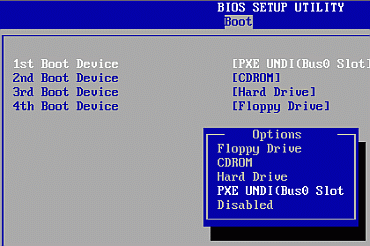
Applications
PXE Boot is often used in industrial and commercial computer systems that involve the use of a central server and client computers that connect to it in order to carry out commands over a network. This allows system resources to be widely distributed as not everything is run on one system. It also allows many different users to use a specific program on separate terminals without having access to administrative tools.
Advantages
PXE Boot can be run over a network and does not require local hard drives or an operating system. However, if a hard drive is attached to the client computer, PXE Boot will have access to it as long as the computer boots from the network first. Likewise, an operating system may be accessed through PXE Boot if the operating system exists on the client computer and the server commands PXE Boot to do so. PXE Boot can be deployed without Internet access if the client computer is connected to a central server through a LAN (Local Area Network).
shivendra vyas
I have read above the information about the PXE.boot. i have clearly understood.