

Warning: Unless deliberately changed, the keychain password is bound to the original administrator password. This originally provided single sign-on capabilities. Using the following method to reset one’s administrator password will require additional steps to also reset the keychain password. Please be advised that this may mean deleting any keychain protected with one’s original administrator password. For more information on resetting a keychain password, please refer to the FAQ entitled How do I reset a Mac OS X Keychain Password?
Warning: Utilizing this method to reset one’s password could potentially disable one’s automatic login capability. Please review the FAQ entitled How do I re-enable Mac OS X Automatic Login Following a Password Reset? for information on how to re-enable automatic login.
Required: Mac OS X Install Disk 1 (A reset CD/Boot Disk may also be used). It is important to use an install CD with a version that matches or is very close to the current OS revision.
- If enabled, please disable firmware password protection. This is disabled by default. For instructions on how to disable firmware password protection, please refer to the FAQ entitled How do I disable Mac OS X Firmware Password Protection?
- Turn on the Mac.
- Load the Mac OS X Install Disk 1 into the CD/DVD drive.
- Restart the Mac. When the startup bell (or custom sound) chimes, hold down the “C” key. The “C” key will prompt the Mac to boot from the CD/DVD. Please be patient as it may take the machine a bit longer to boot.
- Step 2 will load the Macintosh OS X install process. The following step depends on the Mac OS X version utilized.
- For Mac OS X Pre-10.4, please navigate to the Installer menu and select the Reset Password option.
- For Mac OS X 10.4 (Tiger) or higher, please navigate to the Utilities menu and select the Reset Password option.
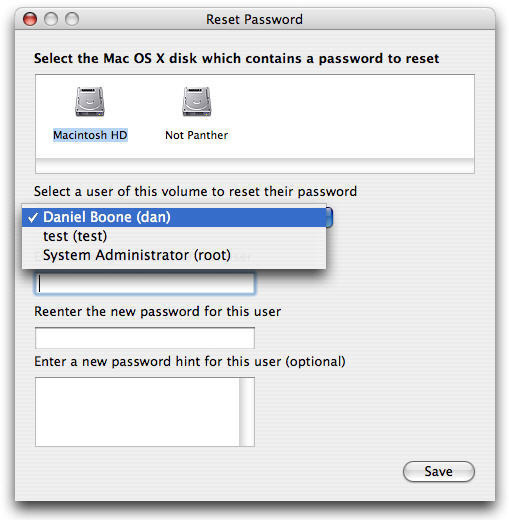
- This will launch a Reset Password window. This utility will prompt the user to select disk/volume and user. Please answer the requests as follows:
- Select the Macintosh OS X disk that contains a password to reset. Click to highlight the icon entitled Macintosh HD.
- Select a user of this volume to reset their password. From the pull down menu, please select System Administrator (root).
- Enter the new password for this user. Please enter a new password.
- Reenter the new password for this user. Please reenter the password entered in the previous step.
- Enter a new password hint for this user (optional). If desired, please enter a password hint that only the user can decipher. Do not enter a password here.
- Click Save. This will commit the changes and close the Reset Password window.
- Restart the machine and eject the Mac OS X Install Disk.

steve
the longest i have seen it take to successfully load up to the install disk on 10.5 or 10.6 is 7 minutes on the clock at the apple and spinning gear..
Pete
how long does it take for the system to boot from disc after u hold the c key? mine has been ‘loading’ for an hour is this normal?
memenode
That doesn’t seem right to me. It must’ve gotten stuck for some reason. I’d try it again.