

As the price of blank, burnable, DVDs has dropped over the past decade, the demand to learn how to burn a DVD has increased amongst computer users. Single-sided, single layered DVDs can now store 4.7 gigabytes (GB) of data, music, movies, or combination of the media types. If using a double sided, or dual layered disc, the capacity increases to 9.4 GB, and if using a dual layered, double sided disk it is 18.8 GB. As a result of the increased capacity, consumers can now store entire music libraries, multiple movies, or entire photo libraries on a single DVD.
What Are the Types of DVDs?
Unfortunately, the types of blank DVD can be confusing at first glance on what the specific capabilities and limitations of each variant are. Some of the better known types of DVD media in use today are: DVD+R, DVD+R DL, DVD-R, DVD+RW, DVD-RW, and DVD-RAM. Before purchasing a specific DVD type, end-users should confirm what type(s) of disk are supported by their computer’s DVD burner to avoid wasting money or trips to the electronics store.
DVD-R:
DVD-R disks are a write-once format with a total capacity of up to 4.7GB. They are compatible with the majority of DVD-R burners and are typically cheaper than a DVD-RW disk. The primary drawback of the DVD-R format is that consumers can waste a significant amount of storage space on the disk if they do not have several gigabytes of data to write to disk at once.
DVD-RW:
The DVD-RW is a rewritable DVD format. The disk does not support random access as well as the DVD+RW, but does have an overall capacity of 4.7GB.
DVD+R:
DVD+R was the first blank DVD format to use both sides of the DVD. Performs the same function as the DVD-R and on supporting drives is able to contain 9.4 GB of usable space.
DVD+RW:
DVD+RW is similar to the DVD-RW format with a greater storage capacity (9.4 GB). The format is supported by the DVD Plus RW Alliance which includes Phillips and Sony.
DVD+R Dual Layer / Double Layer:
A double layer DVD+R disk has a total capacity of 8.4GB and is compatible with the majority of DVD players. Dual layers DVD+R disks also provide 8.4GB of storage.
DVD-RAM:
The DVD-RAM (Random Access Memory) format is another read/write DVD format supported by Hitachi, Toshiba, and Panasonic. DVD-RAM discs do not guarantee data integrity and have storage capacities than range from 2.6GB to 9.4GB depending on if the disc is single or double sided, and single or double layered. The discs cannot typically be read on legacy DVD-ROM or DVD-Video drives.
What DVD Media Does Your Computer Support?
The primary formats used by consumers today include the DVD-R/RW or DVD+R/RW family of formats. Both families of formats support recording and playback of both data, video, and other multimedia files. Both formats are compatible with the majority of DVD combo drives sold today. Older drives; however, will only write to their specific format. For example, if you have a DVD+RW drive on an older computer in your home; you will have to buy a DVD+RW disk to burn. Same goes for legacy DVD-RW drives. Some disc players will support reading “unfinalized” DVD-/+R discs; however, they will not normally be formatted to support playback on DVD players until placed in a “finalized” condition.
How to Burn a DVD in Windows
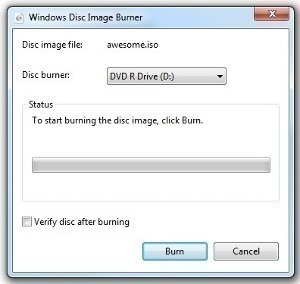
Starting with Windows Vista and continued in Windows 7, Microsoft has included the ability to burn a Data DVD in the Operating System code. In order to burn a data disk:
Step 1 – Insert a blank DVD into the DVD drive (ensure your drive is labeled DVD+/-R, DVD+/-RW or else you will not be able to create or burn a DVD).
Step 2 – Select the “Start” menu followed by choosing the “Computer” menu option.
Step 3 – Double click the “DVD” and then choose the “With a CD/DVD Player” menu option.
Step 4 – Select the “Next” menu button. Then, drag and drop the files that you desire to burn to the data DVD onto the window.
Step 5 – Alternatively, you can choose any file or files in a folder on the computer and select the “Burn” menu button located on the toolbar to burn these selected files.
Step 6 – Click the “Burn” or equivalent menu option to commence burning the data DVD.
Shareware/Freeware DVD Burning Applications for Windows
If your computer has an older build or version of the Windows operating system (OS) that does not support DVD writing natively, a popular alternative amongst consumers is to use free or shareware to create DVDs. These applications are also used by Windows Vista and 7 users who desire additional options or a more comprehensive application than is supported by the OS.
– CDBurnerXP (free)
– BurnaAware Free (free)
– Nero Burning ROM (free trial)
– Super DVD Creator (free trial)
How to Burn a DVD in Windows Using Freeware/Shareware
The majority of the free or shareware DVD burning applications follow a similar pattern when creating or burning a DVD.
Step 1 – Download and install the third party DVD burning application onto your computer.
Step 2 – Insert a blank DVD into the DVD burner.
Step 3 – Ignore any default Windows menu prompts that are displayed (or exit from the dialog box that is displayed).
Step 4 – Launch the third party application by double-clicking the program icon located on your computer’s desktop.
Step 5 – Select the menu option to burn a “Data DVD.”
Step 6 – Add the desired folders or files to that you would like to burn. The application should display how much available space you have to work with to ensure you do not exceed the total free capacity of the DVD.
Step 7 – Choose any desired advanced options for burning the disc such as the burning speed or rate. If you are not a power user, the default menu options will suffice.
Step 8 – Select the “Burn” or equivalent menu option to create the DVD. Most third party applications will eject the DVD player disc tray when complete with the burning process.
How to Burn a DVD in Windows Video
Burning a Multimedia DVD in Windows
Many times, burning a data DVD will suffice to support playing back music, viewing photos, or movies on a recently purchased DVD player or computer. The player will need to support DivX, JPEG, MP3, and similar file formats. In order to burn a video or multimedia DVD that supports a tradition DVD menu, you will need to select the “Video DVD” format in one of the share or freeware applications listed under the DVD data format instructions. To build a more professional looking DVD, the following authoring tools can be used:
– DVD Styler (free)
– DVD Flick (free)
– Roxio VideoLab (free trial)
– Nero Vision Xtra (free trial)
– DVD Lab (free trial)
– Womble EasyDVD (free trial)
How to Burn a Multimedia DVD Using Windows Media Player
A common application on the Windows OS to burn multimedia DVDs is the Windows Media Player. The player includes the burning or copying capability into the application making the process simplified as compared to the steps required for created a data DVD.
Step 1 – Launch the Windows Media Player application by double clicking the program icon on your computer’s desktop or by selecting from the “Programs” sub-menu of the “Start” menu. If the program is not installed on your computer, you can download and install it for free by visiting the Microsoft website.
Step 2 – Select the “arrow” button located directly beneath the “Burn” menu tab on the program. In the subsequently displayed drop-down menu select the “DVD” menu option.
Step 3 – Choose the “More Options” menu choice located in the “Burn” drop down box. This will let you configure and format the disc for the proper formatting to support movie and/or audio format.
Step 4 – Select the “Devices” menu tab located at the top of the “More Options” dialog box. Then, select the “Advanced” menu option.
Step 5 – Select the check box that states, “De-interface video files when converting.”
Step 6 – Insert a blank DVD into the disc drive on your computer. Close the “AutoPlay” wizard if it launches after inserting the disc.
Step 7 – Find the movie or multimedia file that you want to burn in the Windows Media Player library. If not located in the library, import the file by selecting the “File” and “Add to Library” menu options. Select the movie or video by using the application’s file chooser and clicking the “ok” or “Add” menu button.
Step 8 – Drag the video file to the right panel of the application that is titled “Burn.”
Step 9 – Select the “Start Burn” menu button once you have the file(s) to burn to DVD loaded.
Step 10 – View the time indicator on the screen. This will give you a rough idea of how long the DVD will take to create. After the file(s) have been burned to disc, it will automatically eject from your computer.
How to Burn a DVD in Mac OS X
Mac OS X ships with the capability to burn data DVDs. To burn a disc using the built-in functionality of the OS:
Step 1 – Insert a blank DVD into the DVD player on the computer.
Step 2 – Double click the disc icon that is subsequently displayed on the computer’s desktop.
Step 3 – Drag and drop the files and/or folders to burn onto the disc. Alternatively, you can right click any folder and select the “Burn Folder to Disc” menu option.
Step 4 – Select the “Burn Disc” menu option to burn the selected files to the blank DVD.
How to Burn a DVD in Mac OS X Video
Mac OS X Third Party DVD Applications
Similar to the Windows OS, Mac OS X supports third party software applications that are capable of burning a DVD. Some of the popular options for creating data discs are:
– Burn (free)
– Disco (free)
– Roxio Toast (buy)
If you want to create a professional looking DVD that has a DVD menu and title, there are more advanced DVD authoring applications available for use on Mac OS X. These include:
– iDVD (part of iLife, bundled with Macs)
– SmallDVD (free)
– Roxio Toast (buy)
How to Burn a DVD in Linux
K3b is one option for Linux users that require a full-featured media burning application for the Linux OS. The program is designed to run in the KDE desktop but can also be used in Gnome. In order to use the application your computer will need to be using KDE 3.2 or newer, QT 3.2 or newer, dvd+rw-tools, and cdrecord/mkisofs.
Step 1 – Download and install the latest build of K3b. If using the command line to install, the command on the Ubuntu build of Linux is:
Sudo apt –get install k3b.
Step 2 – Launch the K3b program. The default location for the application is under the “Start” and “Multimedia” menu options.
Step 3 – Select the type of project to create. To burn a new data DVD, select the “New Data DVD Project” menu option. For a video, select the “Further Actions” and “New Video DVD Project” menu options.
Step 4 – Drag and drop the desired files onto the project window. The application will display how much space on the DVD will be taken up by the selected files as they are added.
Step 5 – Choose the “Burn” menu option to start creating the DVD.
Step 6 – Eject the DVD when the application indicates that the burn is complete.
How to Burn a DVD in Linux Video
Linux Third Party DVD Burning Applications
Similar to Mac OS X and the Windows OS, there are a number of third party applications available as freeware or shareware that support burning DVDs. For creating data DVDs, the following programs are available to try:
– GnomeBaker (free)
– K3B (free)
– Brasero (free)
– SimpleBurn (free)
If you need to make a professionally appearing DVD that includes menus and titles, the following tools support more advanced authoring options:
– Bombono (free)
– Q-DVD Author (free)
– DeVeDe (free)
How to Burn Commercial DVDs
A common task that arises for consumers that are avid movie watchers is copying a DVD. If the disc is protected with Digital Rights Management (DRM); however, it may require decoding prior to the copy task being carried out. Some of the applications referenced earlier in the article may be able to do the work; however, if you do not have any success the following DVD rippers and decrypters may have a better success rate on the Windows OS:
– DVD Shrink which can also be used to shrink double layer DVDs (7 to 8.4GB) to fit a single DVD
– Magic DVD Ripper
DVD43 can also be used to run in the background on the computer. The application automatically decrypts DVDs as they are loaded into the system to allow them to be copied. Once a DVD is ripped it can then be burned onto a blank DVD. In many countries, bypassing the copy protection on a DVD is illegal, while in others it is only legal to make backup copies for personal use
Mac OS X
Some of the popular DVD ripping software applications for the Mac OS X OS include:
– MacTheRipper (free)
– Handbrake (need to install VLC for the codecs too) (free)
– RipIt (buy)
– DVDRemaster (buy)
– Mac DVDRipper Pro (free trial)
Linux
Popular DVD rippers for Linux:
- AcidRip (free)
- Handbrake (might need to install VLC for the codecs too) (free)
- DVD::Rip (free)
- Thoggen (free)
- K9Copy (free)
As with Windows and Mac, once you rip a DVD you can burn it to create a copy.
Common Problems with Burning DVDs
One of the most common problems encountered by consumers attempting to burn a DVD is getting the, “There is not enough space available for the recording process” error. This error indicates that the computer’s hard drive does not have enough room for the temporary files created during the DVD burning process. The error does not mean that the DVD does not have enough blank space to save the desired files. The solutions to fix this error are:
Solution 1 – Located the folder that is reported as being too full and delete unnecessary files from the folder. For many home computer users, this will mean you need to save some videos and/or images to a portable or network drive (or delete those you do not intend to view or use anymore).
Solution 2 – Choose a different folder for the temporary files. If there is another hard disk partition available with more free space, reconfigure the burning software to use that disk.
may mayoya
1`1
romario millington
this site really help me to burn a dvd thanks a lot
LM
THANK YOU – I just used this to burn some pics to DVD after trying to do it for ages 🙂
Wafa
I burned some movies to a DVD ,it works good in the computer.when I tried to watch it on Tv it doesn’t work.It says Unknown DVD.What can I do?
Pete Tinsley
The how-to section seams to be missing from this how-to guide, just tells you what DVD burning is, not how to go about it.
Jigz
Good Day Sir! Got problem to record mwv file to dvd and play it to dvd player. I tried but when i play it to dvd player …only title of file is being displayed to the player. God Bless!
cynthia
download Video Monkey and you can change all different files to mp4
kro
hi,
i have a movie of 140 min and 2.8 gb, but a dvd+r(4.7 gb/120 min)
my question: is it posibble to burn that movie on this dvd?
LORRAINE
i would like to copy a dvd not sure what to do
please go step by step for me as i hope to try this
and not too computer savy
BrianReyn
hey i jus bought a new external dvd burner for my acer windows vista laptop and am trying to watch movies i have on my computer on my dvd player or xbox, but when i cope the files to the dvd it doesnt detect on either of my systems… maybe its the dvds im using which are dvd-r or maybe the format of the file but have dvd flicks to convert so idk… plz sumone help as soon as possible
memenode
Which file formats are the movies in?
As for DVDs, DVD-R should be fine.
Jayanta Kumar Mitra
CD/DVD Drive is not responding to watch photographs or burning Moser Baer DVD/Sony DVD.Please advise a remedy.
memenode
Could be a bad or dirty DVD. You could try wiping it with soft cloth and see if it helps.
mark darcy
hey guys, i want to copy a commercial dvd on to my laptop??just so i have the option to watch at a later date, i want to put it in with the windows media center, but i dont have a clue how to achieve this?//thank you ppl.
memenode
Read How to rip a DVD and How to Convert DVD to AVI.
bisquitetr
I am trying to find a dvd program that will allow me to watch my movie on a dvd player. Which one should I try?
memenode
Try these. A good popular movie player which supports playing DVDs as well is VLC.
help
how do i burn a dvd that can be played on a dvd player?
i’m using a mac and i’ve got .wmv files to burn as well as a .ppt file.
Thanks!!!
Marko
Hey guys, I wanted to write How to Burn a DVD because it took me a long while and four attempts but ive got it now lol just wanted to share!
1) Download DVD Flick. Its simply the best I think. Basically, in order for you to burn a DVD you need to get all your .avi and other files into a specific file, which DVD Flick does for you. Its free and very very easy to use.
2) Once youve downloaded DVD Flick, get to know the program. Check out the settings and make sure under “Burn” you do check the box labeled “Burn to Disc” , very simple.
3) Okay so open your folder with the movie you want to burn and click and drag it into the DVD Flick, it will load and then appear as your “project”, again check the project settings to make sure they are right- make sure you SAVE the project to a file on your computer (in order to burn successfully DVD Flick will put the entire file again on your computer in this folder, after the burn you will delete it to save space- which you will need ) 🙂
4) Everything’s pretty much done here. Burning a DVD takes TIME, a lot of it actually. Mine takes 2 hours, but I have a shitty connection lol So your gonna want to let it do its thing, but you can always surf the web too. So put your blank DVD+R in, and let it burn from DVD Flick, it will automatically encode any file you have to the correct file needed for a DVD.
5) Hope it works out well, if not- message me on the board 🙂 Thanks!
anees
sir i have a q?i hve to copy multi media on to the dvd,the abve mentioned steps for dvd to burn will be usefull for me are not?and what would u like to suggest?regards
Lou
I tried burning my DVD movie with flick and it didnt work…it doesnt like the files
Ko than Aung
Excuse me, please help me.
I was copy from document to dvd but it doesn’t work when I play by dvd player. Why doesn’t it? I would like to know about that.
memenode
What kind of a document was it? A DVD player (assuming it’s the one you connect to TV) only supports some types of documents. If it is a video not all video formats are supported.
SmoothLake
8) 8) will download it for a try..
As
Originally posted by Anonymous: “There isn’t that many games to play on the Mac so the PC wins there, and you can use a PC to jailbreak a iPod/iPhone :P”
You can use a Mac to jb iOS!!! It has always been available. 😮
Anonymous
There isn’t that many games to play on the Mac so the PC wins there, and you can use a PC to jailbreak a iPod/iPhone 😛