Home     Blog

How to Reset a BIOS Password


On Windows computers, the BIOS (Basic Input/Output System) is updatable computer firmware designed to initialize the computer during start prior to handing control to the operating system. Due to the sensitive nature of the system settings controlled by the BIOS, a password can be set by either the computer manufacturer or the end-user. Some of the most common BIOS producers include AMI, AWARD, IBM, and Phoenix with many manufacturers making their own changes to the firmware prior to selling a computer on the open market. The common methods to reset BIOS password include: Generating a BIOS password using a hash code, entering a backdoor BIOS password, reset the BIOS password using software, reset the BIOS password using hardware, and resetting the BIOS password with vendor specific solutions.

How Does the BIOS Work?

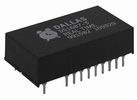
The computer BIOS is the first programming code executed by a Windows computer when the machine is rebooted or turned on. The computer firmware conducts a power-on self-test of the system which is responsible for identifying system hardware and initializing components such as the CPU, hard drive(s), RAM, video card, mouse, and keyboard. Once the initialization task is Dallas Semiconductor DS1687-3 Real Time Clock. This IC stores BIOS setup information, including the BIOS password.complete, the BIOS checks the boot devices in order of configured preference (traditional default setting is the computer’s hard drive). The boot loader software is executed by the BIOS once located, and control of the computer is then passed to the operating system. Functionality that can be changed by the end-user through the BIOS user interface (UI) include setting the system clock, enabling or disabling system hardware, configuring hardware, enabling or setting passwords, and choosing the order of boot devices.
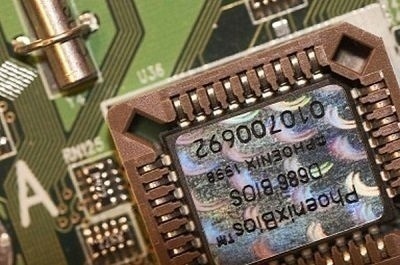
Although the BIOS was originally stored on a ROM (read only memory) chip on the computer’s motherboard, today’s computers will store the firmware in flash memory or EEPROM chips that can be updated after the computer has been sold. Once Intel started producing chips for use on non-Windows OS’s such as Mac OS X and Linux, a successor to the legacy BIOS system was required and is called the Extensible Firmware Interface (EFI). Although EFI provides a number of improvements over the traditional BIOS, it has not yet gained market dominance on computers running the Windows operating system.

Is There a BIOS on Mac OS X?

Prior to the production of Mac computers using x86 or Intel chips during the later portion of the 2000’s and their use of EFI, OpenFirmware was the BIOS equivalent on all Macintosh computers. OpenFirmware provides similar functionality on a Mac as the BIOS and EFI do on other computing systems. It conducts tasks such as locating attached or installed hardware and uses environment variables to direct the boot process for the Mac. To access the interface for OpenFirm, press the power button on the mac for about 10 seconds. While pressing the power button, simultaneously depress the “CMD,” “OPT,” “O,” and “F” keys once you hear an audible “chime.” Once you are done with the required modifications in OpenFirmware, exit the interface by typing “bye”, “boot”, or “mac-boot” (depends on the version of Mac computer you are using) followed by pressing the “return” key.

How to Rest a BIOS Password By Using a Hash Code

A lot of the major computer manufacturers use a master password generated from a hash code to reset the master BIOS password. This hash code is normally calculated from a unique equipment identifier such as the Serial Number, Service Tag, System ID, or Express Service Code. On many brands of computer, the identifying code will be displayed after the BIOS password has been entered incorrectly three times in a row. On other brands, it may be printed on the computer. On some HP models of computer, the hash code will only display if the “F2” or “F12” keyboard function key is press prior to entering the incorrect password a third time.
A free service provided by Tech FAQ (other websites will charge you) is our BIOS password generation tool. The tool is designed to make a BIOS password that will work on many computer brands to include: Compaq, Dell, Fujitsu-Siemens, HP, Samsung, and Sony models. The tool has also worked for many white-label PC’s running Phoenix or Insyde BIOS. Tech-FAQ.com recommends end users that desire to reset the BIOS password for their respective computer try the hashcode generator before paying another company money to conduct the same task. Many times, third party companies will simply charge individuals upwards of $40 USD to obtain the same information provided for free here:

BIOS Password Generator Tool

Enter the checksum/hash (without any braces) you see on the screen or printed on your PC into the textbox below and click Generate.


Finding the Backdoor BIOS Password

In addition to creating a BIOS password from a hash code, a number of BIOS manufacturers also implement an explicit backdoor password. This password will work regardless of the presence of a manually set BIOS password. The primary purpose of a manufacturer’s backdoor BIOS password is for maintenance and testing evolutions. These passwords are changed periodically by the respective company and success will vary across brand and age of computer.
The reported BIOS backdoor passwords to date include:

Manufacturer BIOS Password
AMI A.M.I., AAAMMMIII, AMI?SW , AMI_SW, BIOS, CONDO, HEWITT RAND, LKWPETER, MI, Odor, and PASSWORD.
Award BIOS ,01322222, 589589, 589721, 595595, 598598 , ALFAROME, ALLY, ALLy, aLLY, aLLy, aPAf, award, AWARD PW, AWARD SW, AWARD?SW, AWARD_PW, AWARD_SW, AWKWARD, awkward, BIOSTAR, CONCAT, CONDO, Condo, condo, d8on, djonet, HLT, J256, J262, j262, j322, j332, J64, KDD, LKWPETER, Lkwpeter, PINT, pint, SER, SKY_FOX, SYXZ, syxz, TTPTHA, ZAAAADA, ZAAADA, ZBAAACA, and ZJAAADC.
Russian Award BIOS %øåñòü ïpîáåëîâ%, %äåâÿòü ïpîáåëîâ
Phoenix BIOS BIOS, CMOS, phoenix, and PHOENIX.
VOBIS & IBM merlin
Dell Dell
Biostar Biostar
Compaq Compaq
Enox xo11nE
Epox central
Freetech Posterie
IWill iwill
Jetway spooml
Packard Bell bell9
QDI QDI
Siemens SKY_FOX
SOYO SY_MB
TMC BIGO
Toshiba Toshiba

How to Reset the BIOS Password Using Software

A popular option for end users to reset the BIOS/CMOS password is to use third party software. The BIOS/CMOS Password recovery Tool is a low-cost application that can be used to remove or reset the BIOS password on Windows computers. Once the software is purchased, you boot the computer using the Boot CD provided by the company and it will recover the BIOS password on the computer. The application advertises success with the following BIOS versions:
ACER/IBM BIOS
AMI BIOS
AMI WinBIOS 2.5
Award 4.5x/4.6x/6.0
Compaq (1992, New version)
IBM (PS/2, Activa, Thinkpad)
Phoenix 1.00.09.AC0 (1994), a486 1.03, 1.04, 1.10 A03, 4.05 rev 1.02.943, 4.06 rev 1.13.1107
Phoenix 4 release 6 (User)
Packard Bell
Gateway Solo – Phoenix 4.0 release 6
Toshiba
Zenith AMI
CmosPWD is a free application that can be used to retrieve and decrypt the BIOS password. It also provides backup, restoral, and erasing capabilities. The program is proven to work with the following BIOS types:
ACER/IBM BIOS
AMI BIOS
AMI WinBIOS 2.5
Award 4.5x/4.6x/6.0
Compaq (1992)
Compaq (New version)
IBM (PS/2, Activa, Thinkpad)
Packard Bell
Phoenix 1.00.09.AC0 (1994), a486 1.03, 1.04, 1.10 A03, 4.05 rev 1.02.943, 4.06 rev 1.13.1107
Phoenix 4 release 6 (User)
Gateway Solo – Phoenix 4.0 release 6
Toshiba
Zenith AMI

How to Reset the BIOS Password By Removing the CMOS Battery

One of the most common methods to reset the BIOS password is to remove or discharge the battery on the computer’s motherboard. If the power to the battery is lost or drained, the BIOS configuration will be reset to the factory state with no password. System settings made to the BIOS will also be lost.
Step 1 – Turn off the computer and ensure it has no external power (ie unplug the power cable. If it has a battery, remove it).
Step 2 – Open the computer’s case or box.
Step 3 – Locate the computer’s motherboard and look for the white silver button battery on the motherboard.
Step 4 – If the battery is not soldered to the motherboard, remove it carefully and wait for approximately 30 seconds.
Step 5 – Put the computer case back together and boot the computer.
Step 6 – If the “CMOS Checksum Error-Defaults Loaded” error message is displayed, the BIOS password has been reset.
In the event the CMOS battery is soldered to the computer’s motherboard, you will want to seek a different method to reset the BIOS password on the computer.

Steps to Reset the BIOS Password Using Hardware

If the CMOS battery is soldered to the computer’s motherboard, some brands will have a jumper located on the board that can be used to reset or clear the BIOS password. The location of the jumper on the motherboard will be contained in the motherboard documentation. If you can not find documentation on which jumper will reset the BIOS password, some users will guestimate on which jumper is the appropriate by choosing the one closest to the battery for reset. Another option is to short the points of the battery connection pins to the motherboard (when there is no power being applied to the computer).

Steps to Reset the BIOS Password Using the Real Time Clock

If attempts at resetting the CMOS battery through removal or by jumper fail, another method is to reset the Real Time Clock (RTC) Integrated Circuit (IC) on the computer’s motherboard. This method will work if the RTC requires an external battery. To reset, simply remove the RTC from the motherboard socket with no power available to the computer and reseat. The RTCs reported to require external batteries include:
Dallas Semiconductor DS12885S
TI benchmarq bq3258S
Motorola MC146818AP
Hitachi HD146818AP
Samsung KS82C6818A
If the RTC contains an integrated battery, it can typically be reset by shorting two of the pins for several seconds after power has been removed from the system.

How to Reset the BIOS Password Using Vendor Specific Solutions

Resetting a Dell BIOS Password
For information on how to recover a Dell BIOS password, please refer to How do I reset Dell BIOS password?
Resetting an IBM ThinkPad BIOS Password
For information on how to recover an IBM Thinkpad BIOS password, please refer to How do I reset an IBM ThinkPad BIOS password?
Resetting an IBM Aptiva BIOS Password
Some IBM Aptivas can bypass the startup BIOS password if both mouse buttons are pressed repeatedly while booting the system.
Resetting an Acer BIOS Password
For information on how to recover an Acer BIOS password, please refer to How do I reset an Acer BIOS password?

How to Turn Off the BIOS Password

Once end-users obtain the master BIOS password for the target computer, a common task to accomplish is making the computer stop asking for the password when restarted or rebooted.
Step 1 – Restart your computer.
Step 2 – Press the BIOS access key during computer restart (F2 on many models, Tech-FAQ listing of common BIOS access keys).
Step 3 – Use the keyboard arrow keys to locate the security tab in the BIOS setup.
Step 4 – Locate the submenu that lists menu items similar to:
Supervisor password is: set
User password is: set
Step 5 – Use the keyboard arrow key to navigate to the available options and press the first password setting.
Step 6 – Enter the current BIOS password in the subsequently displayed menu prompt. Some BIOS types will ask for the password to be entered twice.
Step 7 – Change the password setting to blank, not set, etc.
Step 8 – Repeat steps 5-7 for the subsequent password options that indicate they are “set.”
Step 9 – Navigate to the BIOS “exit” menu option and choose the “save changes” menu option.
Step 10 – Continue to exit from the BIOS setup and restart your computer for the changes to take effect.
Please use the password generator tool above before asking for password in the comments.
VN:F [1.9.22_1171]
Rating: 9.4/10 (34 votes cast)
How to Reset a BIOS Password, 9.4 out of 10 based on 34 ratings
Follow Will.Spencer on
  • greenzone_560

     
    Hey, idk about your toshiba laptop, but i have a Toshiba Satellite a665 s6070 i7 core…
     
    anyhow, i forgot my pssword too…i looked around the intenet and couldnt find anything, prolly due to it being new.
     
    so the way i reset it is:
     
    1.take out the laptop battery
     
    2. unscrew the lid off the prossesors thing…
     
    3. take out both of the proccessors(or however many you have)
     
    4. there will be a sticker under it, peel it off.
     
    5. on the left hand side there should be two open connections, and by them it should say cmos
     
    6.just take a small wire or a clip or something and connect them.
     
    7.viola! youre done…put everything back together and youre done.
     
    8.just start up the computer and press F2 and there is no pssword :)
     
    -hope this helps at least someone, reply if helped
     

    VA:F [1.9.22_1171]
    Rating: 0.0/5 (0 votes cast)
  • Insyde Man

    Have no Fear!
    No more opening the Case or Laptop !!!
    If you start your PC or Laptop and you are faced with the dreaded “Password” dialog after you pressed the F2 button.

    The Acer company or any other PC company is in the Business of making money.But they know how to fix the Bios Password Issue too.
    And I will show you how it is done.
    The Acer Boys use a DOS Software called “Bios Password Cleaner”
    It’s on a bootdisk that also has a HDD Lockout Password Generator on it.
    all you need to remove the Password is the Software.
    The name is “clnpwd.exe”
    How do you get it you ask?

    Here is what you do,and it’s so easy!

    I encourage you to do this:
    1. Google it
    2. look for a file called “clnpwd.zip”
    3.If you can’t find it here is the link: hxxp://www.mediafire.com/?6g4v2q2yvo173q9
    4. download it and unzip the file.
    5. You find more Dos files in it that you can use if you want to make a Floppy Boot disk,
    but most PC’s don’t have a Floppy Drive anymore ,so you will need a Dos 7.1 Bootdisk.
    It is a MS-DOS 7.10 LiveCD / BootCD for BIOS Flashing
    Here is a link to the Dos 7.1 Bootdisk iso file: hxxp://depositfiles.com/files/5000144
    Download the Password protected file and extract it with Password “123″

    1. Use an ISO image editor to open the ISO file (I use UltraISO).
    2. Place all your DOS File “clnpwd.exe into the FLASH folder. You may want to delete the folder’s contents first.
    3. Burn ISO image to disc.
    4. Boot directly to disc.
    5. Select option 1 to launch MS-DOS.
    6. When “A:\>” appears, type “C:”.
    7. When “C:\>” appears, type “cd FLASH\”
    8. When “C:\FLASH\>” appears, type:”clnpwd.exe”
    9. Follow the on screen instructions to delete the Supervisor and or User Password by pressing 1 or 2.
    Now reboot your PC and when you press F2 the Password dialog will not appear.

    “A message given in Fear holds little Truth.”
    “A message given in Love leads you to the Answer.”

    VA:F [1.9.22_1171]
    Rating: 3.7/5 (3 votes cast)
  • Dogbert

    Laptops are little bit more tricky: in most cases, there isn’t a reset jumper or a working default password. Still, most vendors have implemented bypass mechanisms which I reverse-engineered: http://dogber1.blogspot.com/2009/05/table-of-reverse-engineered-bios.html

    VA:F [1.9.22_1171]
    Rating: 3.0/5 (2 votes cast)
  • Ron

    so Toshiba posts on their web site that commonly the computer will not start due to a password reset issue on the cmos. They state they will no longer repair this under warranty and charge 170.00 for the cmos reset password. Something is wrong with this. Nobody informed us of this issue before we spent our money even though they knew of it.  We appreciate all you have done to help us but short of some Toshiba tech recognizing that the company is acting in poor confidence therefor volunteering the password under the table, I think we have a new target for the kids to shoot at.
    I will never again support Toshiba.
    yours in disgust
    Ron

    VA:F [1.9.22_1171]
    Rating: 0.0/5 (0 votes cast)
    • Adam

      Hi Ron,

      I’m a broke college student experiencing the same difficulties with toshiba. My laptop is a huge part of my life since so much of our class work needs to be done through the Internet. If you could please help me that would be amazing! My e-mail address is Adam.condon@wallawalla.edu. I attend Walla Walla University in Washington state

      Thank you for your consideration,
      Adam Condon

      VA:F [1.9.22_1171]
      Rating: 0.0/5 (0 votes cast)
  • Patrick Peacock

    This worked for me. http://www.youtube.com/watch?v=eCPdsF0HjkY. Laptop was pre loaded with Vista  and bios was password protected. I followed directions on my link and it worked like a charm. Then once booted up nothing but a black screen with a blinking cursor at top left. I then tried to use recovery cd’s to restore but would quit responding on disc one. I then used XP Pro to wipe drive and loaded new partition with XP Pro. My next step then was to use the Vista recovery cd’s again and this time it.   worked. I’m thinking made some registry problems and wiping then putting XP pro fixed and allowed for a clean recovery from cd. Hope this may help someone :)    BTW my laptop was not same model as his in video but was lucky enough to have same setup from which i believe would be the case with most models.

    VA:F [1.9.22_1171]
    Rating: 5.0/5 (1 vote cast)
  • jessey cerrillo

    I have a toshiba satellite A305 and I ‘ve seen that many people have the same problem that I have….bios password activated by error, I send it to repair to the geek squad guys…”they should be called the reapers squad guys….they are charging me 335,73….hehhehe what a joke they are… ” to remove it , or better say erase it…anyways that things its that they said that they need to change the mother board……hehehhehe . those guys are a joke….I rather put the lop top in the garbage…..bye toshiba ….you just loose another customer…..toshiba lop tops are good but you ….toshiba tech guys and Geek squad are a joke……shame on you…

    VA:F [1.9.22_1171]
    Rating: 0.0/5 (0 votes cast)
  • adam richardson

    hi i have managed to sort the problem today, i did get an error code just saying system disabled.
    for future reference if anyone else has the same problem all i had to do is reset the cmos battery by placing a screwdriver tip over the two conacts labelled rct rest by the memory module and hey presto..
    thanks for your help as i only managed it by reading a few pointers on here

    VA:F [1.9.22_1171]
    Rating: 0.0/5 (0 votes cast)
  • Demetrius

    I don’t know if this will help anyone, but I had to reimage my Gateway M- Seris laptop. It now has a BIOS password. Tried all the forum backdoor passwords to no avail. Finally, I just started entering random default passwords. It has a PhoenixBios.
    1234 worked for me. Hope it can help someone else.

    VA:F [1.9.22_1171]
    Rating: 0.0/5 (0 votes cast)
  • George

    BIOS/RTC. If you have a non-resettable RTC try putting the IC (NOT THE WHOLE PC!) in the freezer for 12hrs. This works with Texas Instruments RTCs but shoul;d work with any with an internal battery. The cold causes the battery to supply insufficient current to maintain the settings. Allow the IC to warm up naturally before re-installing

    VA:F [1.9.22_1171]
    Rating: 0.0/5 (0 votes cast)
  • Patrick Lin

    I need master BIOS password for MSI-7350 P6N SLI PLatinum motherboard. need help!

    VA:F [1.9.22_1171]
    Rating: 0.0/5 (0 votes cast)
  • nicoletta

    hi, my laptop is
    hp probook 6560b
    4CZ1360VXS

    VA:F [1.9.22_1171]
    Rating: 5.0/5 (1 vote cast)
    • Will.Spencer

      Try ve03fg164n and ve03fg16rn.

      VN:F [1.9.22_1171]
      Rating: 0.0/5 (0 votes cast)
      • Mr Ed

        Hello Will,
        Could you please help me with a password for hp elitebook 8440p sn: CZC0416NJS pn: WJ681ET#ABU
        bios version: 68CCU Ver.F.0F

        Thanks in advance,

        VA:F [1.9.22_1171]
        Rating: 0.0/5 (0 votes cast)
  • hassani

    TOSHIBA SATELLITE A100-301 MODEL NO.PSAA(E-0PR043N5
    SERIAL NO.Z6123562Q

    Hello please respond to the request if it all started with

    VA:F [1.9.22_1171]
    Rating: 0.0/5 (0 votes cast)
  • JMJ

    I need a master password for a dell latitude d420 the numbers are 2q29y9d1-595b

    VA:F [1.9.22_1171]
    Rating: 0.0/5 (0 votes cast)
  • david

    please i need help i got 2 laptop from **** with bios password i cant loggin
    first – hp elitebook 8440p s/n: CZC0236KGY p/n: VQ669E#ABD tag : 3y/3y/0y
    second – hp elitebook 8440p s/n: CZC0242RKQ p/n: VQ669EA#ABD tag : 3y/3y/0y
    Tanks in advance

    VA:F [1.9.22_1171]
    Rating: 1.0/5 (1 vote cast)
    • Will.Spencer

      David:

      The first is e0e17fgshi and the second is e0e17v7bs5.

      VN:F [1.9.22_1171]
      Rating: 0.0/5 (0 votes cast)
  • Jason

    Hi my kid was messing around with my Sony Vaio PCG-71912L laptop and accidently put a bios password on it and he can’t remember what he used, if I try it 3 times I get a code like this K786-V3RT-97HJ-8TH3
    Can someone help me on this Thanks.

    VA:F [1.9.22_1171]
    Rating: 0.0/5 (0 votes cast)
    • Jason

      I just noticed I changed after I restarted now it says
      Key: 2rj6-d9h6-xvh3-v8xp I will leave it on until I hear form you. Thanks

      VA:F [1.9.22_1171]
      Rating: 5.0/5 (1 vote cast)
  • Wazzy Clef

    I’am in need of hardware instructions for clearing bios for Dell inspiron 1000 laptop with service Tag No:7TK0251.

    Thanks for your help.

    VA:F [1.9.22_1171]
    Rating: 3.0/5 (1 vote cast)
    • Will.Spencer

      Wazzy:

      Try these:

      gx1s31q1
      4xdsqmrj
      441DTLWwmfGi41N7

      VN:F [1.9.22_1171]
      Rating: 0.0/5 (0 votes cast)
      • Wazzy Clef

        Thanks a lot Will.

        VA:F [1.9.22_1171]
        Rating: 0.0/5 (0 votes cast)
  • Ese

    Hi,

    Please can i have the BIOS password for a EN TM87 Packard bell laptop, the SNID number is 03722479816
    and the serial no is lxbnl0200103736e1e1601.

    Thanks in advance

    VA:F [1.9.22_1171]
    Rating: 0.0/5 (0 votes cast)
  • ionut

    Can somene please help me. I have a elitebook 8440p i need the master password of bios. The serial number is:CZC1289KK2; and the Bios is:68CCu Ver F.12. Thank you very mutch

    VA:F [1.9.22_1171]
    Rating: 0.0/5 (0 votes cast)
  • Lotfi

    Hi ALL

    thank you for helpme to find the password for this machine
    HP 8440P
    serial: CZC0365Y85
    Product :W954AV

    THX in advance

    Lotfi

    VA:F [1.9.22_1171]
    Rating: 0.0/5 (0 votes cast)
    • Will.Spencer

      Lotfi:

      Try e0e1fgqiuq.

      VN:F [1.9.22_1171]
      Rating: 5.0/5 (1 vote cast)
  • facebook_jorge.leggis

    hola, mi laptop es
    HP Compaq nc6400
    s/n: CND7171GCD
    P/N: RX975EC#ABA

    VN:F [1.9.22_1171]
    Rating: 0.0/5 (0 votes cast)
    • Ajay Khule

      Hi,
      You can use “BIOS Password Generator Tool” present above in the article.

      VN:F [1.9.22_1171]
      Rating: 3.5/5 (2 votes cast)
  • http://www.facebook.com/nathan.oliver.79 nathanoliver

    Wow, thank you! Have a laptop that I am working on and someone locked down bios with password and disabled any other boot options. Seems any other method mentioned by Manufacturer didn’t want to work either as I believe the laptop has had a bad virus!. Acer Extensa 5620. Generator worked like a charm though!

    VN:F [1.9.22_1171]
    Rating: 0.0/5 (0 votes cast)
  • Allison

    Hi, I have a Toshiba Qosmio laptop and it’s always worked fine till recently, instead of starting up it goes straight to a screen that says ENTER PASSWORD: ______ … when pressing F2 during the initial startup it takes me to a similar page though it says “Phoenix SecureCore(tm) Startup Utility ENTER PASSWORD: _____ …” I’ve come to understand it’s asking of a BIOS password, but I have no way of disabling bios, and any password I’ve tried has failed me. Three failed attempts and the computer kicks me and shuts off. I’ve tried looking around the web for a few weeks now trying to figure it out, calling tech support etc and well nothing has worked. This is probably the most reliable page I’ve come too yet, but I’m still quite stuck. If there’s any way you can help please message me, I will be very grateful. — allisonbarbas@yahoo.com. Thanks!

    VA:F [1.9.22_1171]
    Rating: 0.0/5 (0 votes cast)
    • Daniel Memetic

      Have you tried the BIOS Password Generator Tool on the page below (box with a white background)? Instructions on how to use it are there too.

      VN:F [1.9.22_1171]
      Rating: 0.0/5 (0 votes cast)
  • robotnik

    I just tried the “loopback” thing on my old Toshiba Satellite laptop (whose BIOS password I have no clue about…). I was very septical at first but I gave it a try,…. It worked!

    VA:F [1.9.22_1171]
    Rating: 5.0/5 (1 vote cast)
  • ivanpedrero

    I just want to say a big “thank you very much!!!”
    The “BIOS Password Generator Tool” saved my life.
    It works perfectly in a packrd bell easy note NJ31!!!!
    Thanks Again.

    VN:F [1.9.22_1171]
    Rating: 5.0/5 (1 vote cast)
  • Tony Smyth

    I’m a little confused. Using the generator above with different codes supplied by my Samsung N150 it keeps coming back with what I believe the BIOS password to be but each time it fails. If the code appears to confirm the password is correct are there any other suggestions? Thank you. As yet I have unable to satisfactorily short the RTC pins

    VA:F [1.9.22_1171]
    Rating: 0.0/5 (0 votes cast)
    • Will.Spencer

      With the Samsung N150, you have have to remove the CMOS battery from the motherboard and wait for a few minutes before replacing it.

      VN:F [1.9.22_1171]
      Rating: 0.0/5 (0 votes cast)
  • Robert Davidson

    Well, I have a Toshiba Satellite L755D-S5204 with insyde h2 bios. When I turn on the computer I tried pressing F2 or F12 to get to bios or the boot manager and instead I’m presented with a black background and a blue box that says ‘Enter Password’

    After 3 attempts, it says ‘Verify error!! System is shutting down.’

    Then it turns off. No hash codes or any error messages.Would greatly appreciate if anyone has a clue on how to fix this or go about fixing this so I can use my laptop again. Thank you!

    VA:F [1.9.22_1171]
    Rating: 5.0/5 (1 vote cast)
  • mehul

    ples help me my compaq420 bios passawad unlock ples.., help me

    VA:F [1.9.22_1171]
    Rating: 0.0/5 (0 votes cast)
  • lancelight

    I used the password hash generator to reset the bios password on a gateway p 7805u fx. I entered the bios pw incorrectly 3 times in order to bring up the hash (for me it was a 5 digit number), entered it into the hash generator here and used the “Phoenix generic” pw that was generated on the next reboot. It worked awesome, thanx much :D

    VA:F [1.9.22_1171]
    Rating: 0.0/5 (0 votes cast)
  • sheikh aakib

    hii…
    my laptop acer aspire 3620 is bios paasword protected…..how to i remove bios password ….plzzz help me..
    thanks in advance

    VA:F [1.9.22_1171]
    Rating: 0.0/5 (0 votes cast)
  • tony

    i have the acer aspire 5920g need to get in to boot from dic but when i go to setup needs password 3 times comes up with 06895 can you halp

    VA:F [1.9.22_1171]
    Rating: 0.0/5 (0 votes cast)
  • Wazzy Clef

    How can I locate sony vaio VGN-NS230E laptop bios chip and how to disassemble the bios chip to remove bios boot password. Any advice will also help. Thanks for your help.

    VA:F [1.9.22_1171]
    Rating: 0.0/5 (0 votes cast)
  • Andrey

    Hi, i need a bios password for my HP EliteBook 2760p.

    Please Help

    VA:F [1.9.22_1171]
    Rating: 0.0/5 (0 votes cast)
  • Anon Ymous

    The hashcode generator worked PERFECT on the Samsung SF410

    Entered in wrong password 3 times

    It displayed the hashcode

    BIGGITY BAM!

    YOU GUYS ARE MY HEROES!

    VA:F [1.9.22_1171]
    Rating: 0.0/5 (0 votes cast)
  • Stian

    hello pls help me with my hp probook 4330s i need the bios passwor or admin?????? what to do. the rc battery is dificulty to get to

    VA:F [1.9.22_1171]
    Rating: 0.0/5 (0 votes cast)
  • George

    Hello, please help me with BIOS password to HP Elitebook 8440p serial: CZC1013SF8 product: VV954AV warranty: 3y/3y/0y

    VA:F [1.9.22_1171]
    Rating: 0.0/5 (0 votes cast)
    • Abdulqader Kapadia

      Try e0e313fn8u as the password for your HP.

      VA:F [1.9.22_1171]
      Rating: 0.0/5 (0 votes cast)
  • Alex

    Hi,
    Please can i have the BIOS password to HP Elitebook 8440p s/n:CND0240X6V, p/n: SJ780UC#ABA

    Thanks!

    VA:F [1.9.22_1171]
    Rating: 0.0/5 (0 votes cast)
    • Alex

      bios version: 68CCU Ver.F.0F

      VA:F [1.9.22_1171]
      Rating: 0.0/5 (0 votes cast)
  • Robert

    You guys are the greatest! Thanks so much for helping me get into my client’s Bios. now maybe i can fix this computer for her.. I hate to be the one telling that i cannot help and thanks to you guys i don’t have to.

    VA:F [1.9.22_1171]
    Rating: 0.0/5 (0 votes cast)
  • Robert

    Compaq mini q10. Worked like a champ now why doesn’t Bios see the hard drive???

    VA:F [1.9.22_1171]
    Rating: 0.0/5 (0 votes cast)
  • John

    Hi all! How to get the HASH code on HP ProBook 6560b? “F2″ “F12″ keys are not working

    VA:F [1.9.22_1171]
    Rating: 0.0/5 (0 votes cast)
  • Jules

    Hi,
    Please can you help with the BIOS password for HP Elitebook 8470p s/n:CZC2481XV8, p/n: B2F95EC#ABA

    Thanks!

    VA:F [1.9.22_1171]
    Rating: 0.0/5 (0 votes cast)
  • reymundharmony

    hi could anyone help me where i can locate the jumper on my toshiba satellite L640… ive been helpless for a couple of days…..thanx alot

    VA:F [1.9.22_1171]
    Rating: 0.0/5 (0 votes cast)
  • ahmed

    Please can you help with the BIOS password for HP Elitebook 8440p s/n:CZC044dnj0, p/n: wj681AW#ABF

    VA:F [1.9.22_1171]
    Rating: 0.0/5 (0 votes cast)
    • DanielMemetic

      Have you tried our password generator tool above? I entered in your s/n and it suggested this password: e0e1vvt9w1

      VA:F [1.9.22_1171]
      Rating: 0.0/5 (0 votes cast)
  • TINI

    HELP ME………. ACER ASPIRE 4730Z – RESET PASWRD BIOS

    VA:F [1.9.22_1171]
    Rating: 0.0/5 (0 votes cast)
    • DanielMemetic

      Check the article above. There’s a tool where you can enter your laptop’s Serial Number, Service Tag, System ID, or Express Service Code and get a password generated. The article tells you how to find these.

      VA:F [1.9.22_1171]
      Rating: 0.0/5 (0 votes cast)
  • Big Papa

    THE hashcode gen worked for my hp pavilion dv4000 it was the generic phenox that worked thanks guys :) )

    VA:F [1.9.22_1171]
    Rating: 0.0/5 (0 votes cast)
  • etienne

    what is the generate for Toshiba tecra s5 please help me

    VA:F [1.9.22_1171]
    Rating: 0.0/5 (0 votes cast)
  • Alfred Onaghise

    I have a samsung NP300V5A notebook and I’ve tried three different passwords without luck. At the third attempt, a message is displayed -”system is disabled”.
    Below this message the following code is displayed: 2789C0600380315CD2
    Please I’ll appreciate any help from you to enable me resolve this problem. Thanks

    VA:F [1.9.22_1171]
    Rating: 0.0/5 (0 votes cast)
    • DanielMemetic

      The generator in the article returns no result for that code. It needs a Serial Number, Service Tag, System ID, or Express Service Code.

      VA:F [1.9.22_1171]
      Rating: 0.0/5 (0 votes cast)
  • timosthenes

    Excellent work! I had never tried to fix someones box that had phoenix on it…usually I pop in hirens and im done…Thank you so much!

    VA:F [1.9.22_1171]
    Rating: 0.0/5 (0 votes cast)
  • tofclaire

    Hello,
    I’ve tried your password generator tool but the result not work..It’s for a dell m20 : the screen ask password for #DCXNL1J-595B
    Thanks a lot for your help

    VA:F [1.9.22_1171]
    Rating: 0.0/5 (0 votes cast)
    • senornlm

      try tuy8bfaf

      VA:F [1.9.22_1171]
      Rating: 0.0/5 (0 votes cast)
  • http://www.facebook.com/emily.dills Emily Dills

    Help. I have a toshiba a505-s6960 with sn 99122232q. I have the black screen with the blue box asking for current password. Toshiba wants to charge me 200.00 and I wont get it back for up to 10 days. Help….

    VA:F [1.9.22_1171]
    Rating: 0.0/5 (0 votes cast)
  • L. A. Cole

    I have an Acer Aspire 7741Z using a Phoenix SecureCore Setup Utility.

    I used your BIOS Password Generator Tool and it worked on the first attempt upon entering the checksum/hash number.

    Thank you.

    VA:F [1.9.22_1171]
    Rating: 0.0/5 (0 votes cast)
  • Tonic

    Hello, execuse my english,
    I need reset password to my HP Compaq nx9005
    s/n: C NF34423BZ
    p/n: DJ260A#AKB
    Service tag: Cnx9005UA180X430WC N25H

    Keys “F2″ “F12″ cannot display Hash Code
    I tried find jumper on mainboard to reset, I tried remove battery for 20days
    Can you help me?
    Thanks

    VA:F [1.9.22_1171]
    Rating: 0.0/5 (0 votes cast)
    • Tonic

      Another specification:

      Phoenix BIOS 4.0 Release 6.0
      HP Notebook PC BIOS Version KAM1.49
      BIOS version KT3R T3B71 T3A

      VA:F [1.9.22_1171]
      Rating: 0.0/5 (0 votes cast)
  • aahana

    well i hv samsung R439. i m unable to get setup utility password, aeter 3 attempts it shows “system disable”. what should i do? plz hlp me for using my laptop again as before. thak you!!

    VA:F [1.9.22_1171]
    Rating: 0.0/5 (0 votes cast)
  • HelpMEASAP

    I have a Toshiba Satellite L755-S5103 and the Bios randomly locked itself ( known Problem and according to Toshiba no password will unlock it) and I tried removing the cmos battery to no avail. I have seen other Toshiba Laptops that are different models where people were able to short out the “jumpers” usually just two small pieces of solder on the motherboard but I cant find any information for my specific model on where these are located or what they are labeled as??

    VA:F [1.9.22_1171]
    Rating: 0.0/5 (0 votes cast)
  • Rockstar

    Hi…MAN is my laptop driving me CRAZY !!! I’ve got a BIOS password I can’t break !! I’ve been scrolling, clicking and threading myself to a state of delirium!! Please help me..I have sought out such programs w/ no results..Here is my laptops info..

    Samsung NP-SF510-BA68-05408A
    Service Tag..( I think ) BA68-06297A 11
    S/N….CNBA5902849ABIH409C2419

    I don’t see anything else..Please see what you can do..234tgf@gmail.com

    VA:F [1.9.22_1171]
    Rating: 0.0/5 (0 votes cast)
  • Rockstar

    And BTW..I’ve tried EVERY hardware trick in the book !! It ALWAYS lives to taunt me another day !!

    VA:F [1.9.22_1171]
    Rating: 0.0/5 (0 votes cast)
  • Rockstar

    OMG !!! It worked !!! I didn’t see option to try it here earlier..just was grazing around not doin much…and there it was..so I typed in my info and…. FAG !!! My password was “FAG”
    Unfaggin believable !!! Thanx dude !!

    VA:F [1.9.22_1171]
    Rating: 0.0/5 (0 votes cast)
  • PoseydonIX

    Hello, please help me with BIOS password to HP Elitebook 8440p serial: CZC0407YTD product: WJ681AW#ACB

    VA:F [1.9.22_1171]
    Rating: 0.0/5 (0 votes cast)
    • DanielMemetic

      Based on the serial number you provided our tool above puts out: e0e1v1xiat Worth a try.

      Guys and gals, don’t forget to try the generator tool in the article!

      VA:F [1.9.22_1171]
      Rating: 0.0/5 (0 votes cast)
  • troubadour

    Hello, I have a clients’ Fujitsu Lifebook S761 (S/N DSCC0 34943). No success on unlocking Bios PW so far (it’s a 2012 make) comes up with 6×4 (!!) digits. Even when I leave the first set of always repeated “0222″ out, I cannot unlock with the (correct?) generated Fujitsu Password- I’m at my wits end with it (tried almost anything in the book). Any suggestions, they would be very much appreciated!?!

    VA:F [1.9.22_1171]
    Rating: 0.0/5 (0 votes cast)
    • troubadour

      @troubadour: To clerify here’s one example master hash code just entered,

      (0222)36946125413663520355
      resulting in: “Following generated passwords may help:

      Fujitsu-Siemens new8649778

      Fujitsu-Siemens oldf 5pntkxh
      Fujitsu-Siemens71542280=
      wrong Password!
      Any idea?!

      VA:F [1.9.22_1171]
      Rating: 0.0/5 (0 votes cast)
  • mantamech@Hotmail.com

    I got an Laptop HP Compaq NX9040 that keeps asking for bios password and sorry to tell the generator above doesn’t work for me. pls help me out with this. i opened the laptop but it doesn’t have cmos battery on it which made very frustrated. i won’t buy an HP laptop anymore.

    VA:F [1.9.22_1171]
    Rating: 0.0/5 (0 votes cast)
  • Donald Weston

    I have been MONTHS trying to remember (and try) what the pass was for the Phoenix BIOS on a Gateway MX6447. I have been frustrated to death. And I stumbled on your hashcode generator. Worked immediately. GFL!!! A thousand thanks, guys!! And I WAS almost prepared to pay $35 to some company on the net to do the same 10-second task for me. I REALLY appreciate your help.

    VA:F [1.9.22_1171]
    Rating: 0.0/5 (0 votes cast)
    • DanielMemetic

      Awesome! You’re welcome!

      VA:F [1.9.22_1171]
      Rating: 0.0/5 (0 votes cast)
  • Jadin

    Ok, so I own a Toshiba Satellite P305D – S8828 and this seems the most accurate and reliable page that I have come to regarding my problem (BIOS reset). I have tried the password generator with my serial number and it comes up as two different BIOS systems than I have. (I have a Phoenix) I tried pressing F2, but that brings me to a similar screen, still with a blue password box. I really need help.

    VA:F [1.9.22_1171]
    Rating: 0.0/5 (0 votes cast)
  • Jadin

    S/n: 78293728W
    I can’t seem to find anything else that you can enter.

    VA:F [1.9.22_1171]
    Rating: 0.0/5 (0 votes cast)
  • Ibrahim Younis

    plz a lost my bios password for Samsang 900X3C

    serial number is HWU591GCA00015B

    and the message is 1A0219AD21B99C6000

    i have tried the password generator tool but nothing happend

    VA:F [1.9.22_1171]
    Rating: 0.0/5 (0 votes cast)
  • http://www.facebook.com/per.person.5458 Per Person

    hello. can somebody please help me? been searching google for 4 days now….

    im about to give up:(

    i have
    a laptop. it is a hp probook 6360b, witch i can`t bootcd or usb from,
    and need a pw to get in bios to change boot settings. i have removed the
    small battery under the keyboard but still the same. after typing 3
    passwords i get an on screen keybord and have tried pressing f2 and f12,
    but no hash code or nothing. i have tried to change both hard drive and
    ram but no change. and so, please! please somebody help me!?

    Bigupp all the way from Norway!!! if someone can help me with this problem:)

    Here is all the information i can find on the system info:

    notebook model: hp probook 6360b

    product number: wy546av#abn

    serial number: 2ce12400j4

    universal unique identifier: 814e740bf594e011b40148c259000047

    asset tag: (blank)

    warranty start date: 00/00/0000

    system configuration id: A0001D02

    system board id: 1621

    system board CT: PCCJK1B2H0T24O

    bios revision: 68SCE Ver. F.03

    bios date: 04/27/2011

    keyboard controller revision: 97.40

    Processor type: intel(r) Core(tm) i3-2310m cpu

    MicroCode Revision: 14

    VA:F [1.9.22_1171]
    Rating: 0.0/5 (0 votes cast)
  • Barry

    i got mine sorted it rang RM, (RM CY27) Phoeonix 4.0 verson 6.0 bios
     
    they told me thier default bios password is rm or rmpc or rmplc
     
    it tried “rm” and got in straight away

    VA:F [1.9.22_1171]
    Rating: 0.0/5 (0 votes cast)
  • William Yount

    Hello,
    You seem like a smart man I was wondering after I install the reset password disk on my USB flash drive what do I do at BIOS I tried it but some Japanese or Russian code was popping up am I doing it right?

    VA:F [1.9.22_1171]
    Rating: 0.0/5 (0 votes cast)