The Shutdown Event Tracker

An Overview on Shutdown Events

Computer shutdowns can be sorted into either of the following categories:

To enable services, programs, and files to close correctly, you should only turn off the computer when the operating system informs you that it is OK to shut down the server. This is extremely important because it ensures that all configuration settings and other important information are saved and written to disk.

Since administrators need to monitor when and why servers are restarted, Windows Server 2003 includes the following tools to control shutdown events:
The Shutdown Event Tracker, a new Windows Server 2003 feature, is an uncomplicated GUI application that allows administrators to monitor shutdown events on the server. The tool is enabled on Windows Server 2003 by default. The Shutdown Event Tracker collects information on the reasons why the server was shut down, and then logs this information in Event Viewer. The command-line utility equivalent to the Shutdown Event Tracker is Shutdown.exe.
The Shutdown Event Tracker requires you to provide a reason whenever a server is shut down or restarted. When a server is expectedly shut down, a dialog box or page is displayed, requesting you to specify the reason for the server being shut down. When a server is unexpectedly shut down, the following user to log on to the server has to specify the reason for the server shutting down. Shutdown events can be viewed in Event Viewer, and can be useful when you need to improve uptime.

How to configure the Shutdown Event Tracker

  1. Click Start, Run, and then enter gpedit.msc. Click OK.
  2. The Group Policy Object Editor console opens.
  3. In the left pane, expand Computer Configuration, and then Administrative Templates.
  4. Click System
  5. In the right pane, find and double-click the Display Shutdown Event Tracker.
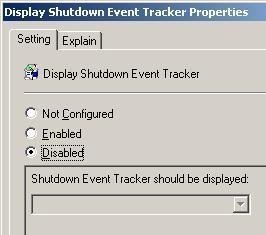
  6. When the Display Shutdown Event Tracker Properties dialog box opens, select one of the following options:
    • Not Configured
    • Enabled
    • Disabled
  7. If you select the Enabled option, you can choose between the following options to specify when the Shutdown Event Tracker should be displayed:
    • Always: This option is self explanatory.
    • Server Only: When selected, the Shutdown Event Tracker is displayed for only Windows Server 2003 servers.
    • Workstation Only: When selected, the Shutdown Event Tracker is displayed for only Windows XP Professional workstations.
  8. If you want to view help information on the Shutdown Event Tracker application, click the Explain tab.
  9. Click OK, and then close the Group Policy Object Editor console.

How the Shutdown Event Tracker works

  1. Enable the Display Shutdown Event Tracker policy so that the Shutdown Event Tracker is displayed.
  2. The Shut Down Windows dialog box is displayed when the server is shut down or restarted. The Shut Down Windows dialog box requires you to record information as to why the server was shut down.
  3. Using the options in the What do you want the computer to do drop-down list box, you can choose to perform the following tasks:
    • Restart
    • Shut down
    • Log off the current user
  4. Using the Options: drop-down list box, select the reason that best describes why the server was shut down or restarted.
  5. Next, either select or clear the Planned checkbox to indicate whether the shutdown was planned or unplanned.
  6. In the Comment box, enter any additional useful information.
  7. Click OK to close the Shut Down Windows dialog box

How to induce the Shutdown Event Tracker functionality on a remote computer

  1. To bring up the Remote Shutdown Dialog page on a remote computer, use the shutdown.exe command-line utility with /i.
  2. Select the appropriate option from the What do you want the computer to do drop-down list box.
  3. In the Shutdown Event Tracker group box, select an option which describes why the computer is being shut down, and click the Planned checkbox.
  4. Enter a comment in the Comment box.
  5. Click OK.

How to use the shutdown.exe command-line utility

The shutdown.exe command-line utility can be used to enter shutdown events using the command-line. The available options for the shutdown.exe command-line utility are listed below:

How to use the Registry to configure registry entries for the Shutdown Event Tracker

You can use the Registry Editor to configure the Shutdown Event Tracker. Through configuring registry settings, you can enable or disable the Shutdown Event Tracker.

To configure registry settings for the Shutdown Event Tracker,

  1. Click Start, Run, enter regedit, and click OK.
  2. The Registry Editor console opens.
  3. Navigate to HKEY_LOCAL_MACHINE, Software, Microsoft, Windows, CurrentVersion, and then Reliability.
  4. Select ShutdownReasonUI. If ShutdownReasonUI does not exist, create a DWORD value, and then name it ShutdownReasonUI.
  5. Enter a data value of 1 in the Value data box to enable the Shutdown Event Tracker, or enter a data value of 0 in the Value data to disable the Shutdown Event Tracker.
  6. Click OK.
  7. Close the Registry Editor console.
  8. Restart the computer.

How to add custom reasons for the Shutdown Event Tracker

  1. Click Start, Run, regedit enter, and click OK.
  2. The Registry Editor console opens.
  3. Navigate to HKEY_LOCAL_MACHINE, Software, Microsoft, Windows, CurrentVersion, Reliability, and then UserDefined.
  4. Create a new string value using the available flags:
    • P, indicates a planned shutdown.
    • C, a comment is required.
    • B, a ID is required.
    • S, the expected shutdown event dialog box is displayed
    • D, the unexpected shutdown event dialog box is displayed
  5. You can add additional comments using the string registry value. The format for comments is:
    • /n/r<Description of the comment>.</li> </ul> <li>Click OK and then close the Registry Editor console.</li> <li>Restart the computer.</li> </ol> <h2>How to view shutdown events</h2> <p>Shutdown events can be viewed in Event Viewer. Event Viewer is used to monitor events that took place on a computer. Event Viewer stores events that are logged in a system log, application log, and security log. Because the system log contains events that are associated with the operating system, shutdown events are written to the system log.</p> <p>To open Event Viewer, </p> <ol> <li>Select Start, Select Administrative Tools, and then select Event Viewer. </li> <li>Select the event log you want to view. </li> </ol> <p>Event Viewer logs list five event types:</p> <ul> <li>Information events tell you when a particular activity occurs, such as starting the system.</li> <li>Warning events point out problems that could possibly occur. </li> <li>Error events indicate an actual error that occurred. </li> <li>Success Audit events indicates an event that has been audited for success</li> <li>Success Failure events indicates an event that has been audited for failure</li> </ul> <p>To view shutdown events</p> <ol> <li>Open Event Viewer</li> <li>Open the System log.</li> <li>Using the Event Source drop-down list, select USER32.</li> <li>To view the System log in a form, filtered to show only shutdown events and USER32 events, click OK.</li> <li>When the events are displayed, you can examine a detailed description of a particular shutdown event by double-clicking the particular event.</li> <li>The Event Properties dialog box is displayed.</li> <li>Click OK to close the dialog box.</li> </ol> <h2>How to disable the Shutdown Event Tracker</h2> <ol> <li>Click Start, Run, and then enter gpedit.msc. Click OK.</li> <li>The Group Policy Object Editor console opens.</li> <li>In the left pane, expand Computer Configuration, and then Administrative Templates.</li> <li>Click System</li> <li>In the right pane, find and double-click the Display Shutdown Event Tracker.</li> <li>When the Display Shutdown Event Tracker Properties dialog box opens, click the Disabled option to disable the Shutdown Event Tracker.</li> <li>Click OK.</li> <li>Close the Group Policy Editor console.</li> </ol> <center> <!-- google_ad_section_end --> <!-- google_ad_section_start(weight=ignore) --> <br> <!-- This unit is hidden on your page, and will only display to your US search engine traffic (and certain other traffic). To preview, paste the code up on your site, then add #chitikatest=mortgage to the end of your URL in your browser's address bar. Example: www.yourwebsite.com#chitikatest=mortgage. This will show you what the ad would look like to a user who is interested in "mortgages." --> <script type="text/javascript"><!-- ch_client = "WillSpencer"; ch_type = "mpu"; ch_width = 336; ch_height = 280; ch_non_contextual = 4; ch_vertical ="premium"; ch_noborders = 1; ch_default_category = "200001"; ch_sid = "TF"; var ch_queries = new Array( ); var ch_selected=Math.floor((Math.random()*ch_queries.length)); if ( ch_selected < ch_queries.length ) { ch_query = ch_queries[ch_selected]; } //--></script> <script src="http://scripts.chitika.net/eminimalls/amm.js" type="text/javascript"> </script> <br> <table><tr><td valign="top"> <!-- begin ad tag (techfaq/_default;300x250,336x280) --> <script type="text/javascript"> //<![CDATA[ ord = window.ord || Math.floor(Math.random()*1E16); document.write('<script type="text/javascript" src="http://ad2.netshelter.net/adj/ns.techfaq/_default;kw=;tile=2;sz=300x250,336x280;ord=' + ord + '?"><\/script>'); //]]> </script> <noscript><a href="http://ad2.netshelter.net/jump/ns.techfaq/_default;kw=;tile=2;sz=300x250,336x280;ord=123456789?" target="_blank" ><img src="http://ad2.netshelter.net/ad/ns.techfaq/_default;kw=;tile=2;sz=300x250,336x280;ord=123456789?" border="0" alt="" /></a></noscript> <!-- end ad tag --> </td><td> <center> <a href="http://ad.doubleclick.net/clk;211360072;29017966;b?http://www.solarwinds.com/campaigns/top5_tools/index.aspx?CMP=LEC-TFAQ-TOP5-LP-IMG-Q408" target="_blank"> <img src="/graphics/top5_tools_220x280_q408.gif" width="220" height="280" alt="Top 5 Free Networking Tools" border="0"></a> </center> </td></tr></table> <br> <!-- google_ad_section_end --> Bookmark <a href="http://www.tech-faq.com/the-shutdown-event-tracker.shtml" onclick="return external.AddFavorite(location.href, document.title)"><b>The Shutdown Event Tracker </b></a> </center> <span id="nointelliTXT"> </span> <!-- google_ad_section_start(weight=ignore) --> <center> <!-- AddThis Bookmark Button BEGIN --> <script type="text/javascript"> addthis_url = location.href; addthis_title = document.title; addthis_pub = 'Will.Spencer'; </script><script type="text/javascript" src="http://s7.addthis.com/js/addthis_widget.php?v=12" ></script> <!-- AddThis Bookmark Button END --> </center> <h4>Latest Blog Posts</h4> <ul class="secondary-content"><li><a href="http://www.tech-faq.com/blog/?p=2308" rel="nofollow">Acai Berry Spam via MSN</a></li></ul><ul class="secondary-content"><li><a href="http://www.tech-faq.com/blog/?p=2306" rel="nofollow">Obama Seeks Power to Shut Down the Internet</a></li></ul><ul class="secondary-content"><li><a href="http://www.tech-faq.com/blog/?p=2304" rel="nofollow">Help Beta Test Tech-FAQ 2.0!</a></li></ul><ul class="secondary-content"><li><a href="http://www.tech-faq.com/blog/?p=2031" rel="nofollow">Windows 7 Forum</a></li></ul><ul class="secondary-content"><li><a href="http://www.tech-faq.com/blog/?p=2023" rel="nofollow">Boston College: Ability to Use a Command Line is a Sign of Criminal Activity</a></li></ul><ul class="secondary-content"><li><a href="http://www.tech-faq.com/blog/?p=1991" rel="nofollow">Google Hacked?</a></li></ul><ul class="secondary-content"><li><a href="http://www.tech-faq.com/blog/?p=1982" rel="nofollow">Recycle your old phone – Make some money, and save the environment too!</a></li></ul><ul class="secondary-content"><li><a href="http://www.tech-faq.com/blog/?p=1977" rel="nofollow">SourceForge vs. Freshmeat</a></li></ul><ul class="secondary-content"><li><a href="http://www.tech-faq.com/blog/?p=1975" rel="nofollow">Fastest Web Browser: Google Chrome</a></li></ul><ul class="secondary-content"><li><a href="http://www.tech-faq.com/blog/?p=1971" rel="nofollow">New Webmaster Forum</a></li></ul> </div> <div id="left-sidebar"> <br> <script type="text/javascript"><!-- google_ad_client = "pub-4394305856464210"; google_ad_width = 160; google_ad_height = 600; google_ad_format = "160x600_as"; google_ad_type = "text_image"; google_ad_channel = "4719553521"; google_color_border = "FFFFFF"; google_color_bg = "FFFFFF"; google_color_link = "870000"; google_color_text = "666666"; google_color_url = "23383e"; //--> </script> <script type="text/javascript" src="http://pagead2.googlesyndication.com/pagead/show_ads.js"> </script> <br> <script type="text/javascript"><!-- google_ad_client = "pub-4394305856464210"; google_ad_width = 160; google_ad_height = 600; google_ad_format = "160x600_as"; google_ad_type = "text_image"; google_ad_channel = "4719553521"; google_color_border = "FFFFFF"; google_color_bg = "FFFFFF"; google_color_link = "870000"; google_color_text = "666666"; google_color_url = "23383e"; //--> </script> <script type="text/javascript" src="http://pagead2.googlesyndication.com/pagead/show_ads.js"> </script> <br><br> <!-- begin ad tag (techfaq/_default;120x600,160x600) --> <script type="text/javascript"> //<![CDATA[ ord = window.ord || Math.floor(Math.random()*1E16); document.write('<script type="text/javascript" src="http://ad2.netshelter.net/adj/ns.techfaq/_default;kw=;tile=3;sz=120x600,160x600;ord=' + ord + '?"><\/script>'); //]]> </script> <noscript><a href="http://ad2.netshelter.net/jump/ns.techfaq/_default;kw=;tile=3;sz=120x600,160x600;ord=123456789?" target="_blank" ><img src="http://ad2.netshelter.net/ad/ns.techfaq/_default;kw=;tile=3;sz=120x600,160x600;ord=123456789?" border="0" alt="" /></a></noscript> <!-- end ad tag --> </div> <!-- google_ad_section_start(weight=ignore) --> <center> <!-- begin ad tag (techfaq/_default;728x90) --> <script type="text/javascript"> //<![CDATA[ ord = window.ord || Math.floor(Math.random()*1E16); document.write('<script type="text/javascript" src="http://ad2.netshelter.net/adj/ns.techfaq/_default;kw=;tile=1;dcopt=ist;sz=728x90;ord=' + ord + '?"><\/script>'); //]]> </script> <noscript><a href="http://ad2.netshelter.net/jump/ns.techfaq/_default;kw=;tile=1;sz=728x90;ord=123456789?" target="_blank" ><img src="http://ad2.netshelter.net/ad/ns.techfaq/_default;kw=;tile=1;sz=728x90;ord=123456789?" border="0" alt="" /></a></noscript> <!-- end ad tag --> </center> <br> <center> <table border=0> <tr> <td><a href="http://en.tech-faq.com/the-shutdown-event-tracker.shtml">English <img src="/images/us.png" width="16" height="11" alt="English"></a></td> <td><a href="http://de.tech-faq.com/the-shutdown-event-tracker.shtml">German<img src="/images/de.png" width="16" height="11" alt="German"></a></td> <td><a href="http://es.tech-faq.com/the-shutdown-event-tracker.shtml">Spanish<img src="/images/es.png" width="16" height="11" alt="Spanish"></a></td> <td><a href="http://fr.tech-faq.com/the-shutdown-event-tracker.shtml">French<img src="/images/fr.png" width="16" height="11" alt="French"></a></td> <td><a href="http://it.tech-faq.com/the-shutdown-event-tracker.shtml">Italian<img src="/images/it.png" width="16" height="11" alt="Italian"></a></td> <td><a href="http://pt.tech-faq.com/the-shutdown-event-tracker.shtml">Portuguese<img src="/images/pt.png" width="16" height="11" alt="Portuguese"></a></td> <td><a href="http://ru.tech-faq.com/the-shutdown-event-tracker.shtml">Russian<img src="/images/ru.png" width="16" height="11" alt="Russian"></a></td> <td><a href="http://nl.tech-faq.com/the-shutdown-event-tracker.shtml">Dutch<img src="/images/nl.png" width="16" height="11" alt="Dutch"></a></td> </tr> </table> <table border=0> <tr> <td><a href="http://el.tech-faq.com/the-shutdown-event-tracker.shtml">Greek<img src="/images/gr.png" width="16" height="11" alt="Greek"></a></td> <td><a href="http://hi.tech-faq.com/the-shutdown-event-tracker.shtml">Hindi<img src="/images/in.gif" width="16" height="11" alt="Hindi"></a></td> <td><a href="http://ja.tech-faq.com/the-shutdown-event-tracker.shtml">Japanese<img src="/images/jp.png" width="16" height="11" alt="Japanese"></a></td> <td><a href="http://ko.tech-faq.com/the-shutdown-event-tracker.shtml">Korean<img src="/images/kr.png" width="16" height="11" alt="Korean"></a></td> <td><a href="http://zh-TW.tech-faq.com/the-shutdown-event-tracker.shtml">Chinese<img src="/images/tw.png" width="16" height="11" alt="Chinese"></a></td> <td><a href="http://zh-CN.tech-faq.com/the-shutdown-event-tracker.shtml">Chinese (Simplified)<img src="/images/cn.png" width="16" height="11" alt="Chinese (Simplified)"></a></td> <td><a href="http://ar.tech-faq.com/the-shutdown-event-tracker.shtml">Arabic<img src="/images/sa.png" width="16" height="11" alt="Arabic"></a></td> </tr> </table> </center> </div> <!-- End Wrapper --> <p class="left">Copyright 2009 <strong>Tech-FAQ</strong>. All rights reserved. <a href="http://www.free-internet-media.com/privacy-policy" style="color:white">Privacy Policy.</a></p> <!-- start Vibrant Media IntelliTXT script section --> <script type="text/javascript" src="http://tech-faq.us.intellitxt.com/intellitxt/front.asp?ipid=4021"></script> <!-- end Vibrant Media IntelliTXT script section --> <!-- Start Quantcast tag --> <script type="text/javascript" src="http://edge.quantserve.com/quant.js"></script> <script type="text/javascript">_qacct="p-bblXlg7vci8iU";quantserve();</script> <noscript> <a href="http://www.quantcast.com/p-bblXlg7vci8iU" target="_blank"><img src="http://pixel.quantserve.com/pixel/p-bblXlg7vci8iU.gif" style="display: none;" border="0" height="1" width="1" alt="Quantcast"></a> </noscript> <!-- End Quantcast tag --> <!-- Start Google Analytics --> <script type="text/javascript"> var gaJsHost = (("https:" == document.location.protocol) ? "https://ssl." : "http://www."); document.write(unescape("%3Cscript src='" + gaJsHost + "google-analytics.com/ga.js' type='text/javascript'%3E%3C/script%3E")); </script> <script type="text/javascript"> var pageTracker = _gat._getTracker("UA-4410433-1"); pageTracker._initData(); pageTracker._trackPageview(); </script> <!-- End Google Analytics --> <!-- google_ad_section_end --> </body> </html>