

Cloaking is a black hat SEO technique where one set of content is shown to human visitors and another set of content is shown to search engines.
In cloaking, human visitors are shown the actual web page, but search engines are shown a web page which is full of spammy SEP techniques such as keyword stuffing.
Cloaking by User Agent
To effectively cloak a web page, the web server must be able to determine if the visitor is a human or a search engine.
One technique for doing this is to look at the user agent field of the HTTP request.
The user agent field for a human visitor usually lists what web browser software is being used, such as:
"Mozilla/4.0 (compatible; MSIE 6.0; Windows NT 5.1)"
The user agent field for a search engine usually identifies the search engine robot, such as this user agent field for Yahoo Slurp:
"Mozilla/5.0 (compatible; Yahoo! Slurp; http://help.yahoo.com/help/us/ysearch/slurp)"
Cloaking by IP Address or Hostname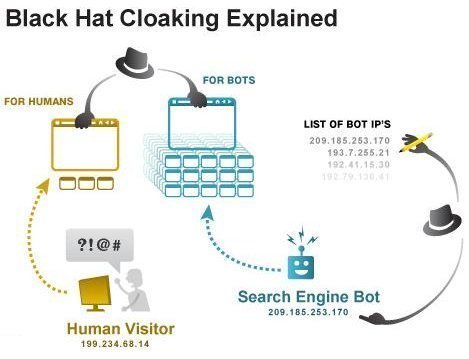
Another technique for identifying traffic from search engines is to cloak traffic coming from the domains of search engine operators or the IP addresses used by search engine operators.
For example, web site traffic from 64.62.82.x is most likely to be a visit from Googlebot.
The Benefits of Cloaking
Cloaking does work in many cases to achieve improved SERPs.
Detecting Cloaking
One technique for determing if a web page is using cloaking is to view Google's cache of that web page. Unless the web page has turned off Google caching, the Google cache will show you how Googlebot sees the web page. If the web page has turned off Google caching, that is also a possible indicator that cloaking is in use.
It is also possible to set your own user agent to spoof the user agent of a well known web robot, such as Googlebot. If the web page is using user agent cloaking, you will then see the cloaked page that is normally shown to Googlebot.
You can modify your user agent in Opera by selecting Tools > Preferences > Network, and then changing the "Browser identification" setting.
The User Agent Switcher Extension will enable you to change your user agent in Forefox and Mozilla.
Another good tool for detecting cloaking is WANNABrowser. WANNABrowser is a web-proxy which will show you the HTML source for any page on the Internet, while letting you set your user agent.
The Penalities for Cloaking
Cloaking is in violation of most search engine policies and is very likely to get your site banned.
Quoting from Google Information for Webmasters:
To preserve the accuracy and quality of our search results, Google may permanently ban from our index any sites or site authors that engage in cloaking to distort their search rankings.
Search engines have not been very good at automatically detecting and banning cloaking, but your competitors can easily send a spam SEO report to the major search engines.

Joe
It seems that it would be easy to detect IP-based spoofing with a transparent proxy running off of a non-search engine IP range… Something like the dynamic addresses delivered by home ISPs.
In fact, if they’re using IP-based cloaking, then of course people running Hide-My-*** VPN connections would be able to see the ‘real’ content, or else Google could use it to see the ‘fake’ content. The cloakers would have to choose which to show or block proxies outright.