

An Overview of DHCP
In TCP/IP based networks, a unique IP address must be assigned to each computer. An IP address is a unique numeric identifier that identifies computers on the network. The Dynamic Host Configuration Protocol (DHCP) is a service that can be implemented to automatically assign unique IP addresses to DHCP clients.
DHCP runs at the application layer of the TCP/IP protocol stack to provide the following functions in TCP/IP networks:
- Dynamically assign IP addresses to DHCP clients.
- Allocate the following TCP/IP configuration information to DHCP clients:
- Subnet mask information.
- Default gateway IP addresses.
- Domain Name System (DNS) IP addresses.
- Windows Internet Naming Service (WINS) IP addresses.
RFC 2131 defines the framework for the DHCP protocol. The DHCP protocol stems from the Bootstrap Protocol (BOOTP) protocol. The DHCP server is configured with a predetermined pool of IP addresses, from which it allocates IP addresses to DHCP clients. During the boot process, DHCP clients request IP addresses, and obtain leases for IP addresses from the DHCP server.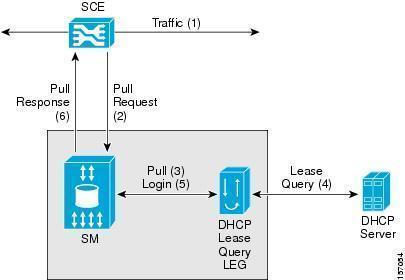
When the DHCP client boots up on the network, a negotiation process called the DHCP lease process occurs between the DHCP server and client. The DHCP lease process is also known as the DHCP negotiation process, and is a fairly straightforward process. The remainder of this Article focuses on the DHCP leasing and the DHCP lease process
DHCP Leases
The DHCP lease process is a process that occurs when a computer which is a DHCP client initially boots up on the network, to provide an IP address and any additional TCP/IP configuration parameters to these clients.
The terminology and concepts used when discussing DHCP leasing or the DHCP lease process is summarized below:
- DHCP lease: This is the amount of time for which a DHCP client is allowed to make use of a specific IP addresses. The default setting for the DHCP lease is 8 days.
- DHCP lease process: The process which occurs when the client initially boots up on the network. The DHCP lease process enables DHCP clients to automatically obtain IP addresses from a DHCP server.
- DHCP Discovery Broadcast message: This is a message sent over the network by a client computer that wants to obtain an IP address from a DHCP server.
- DHCP Offer message: This is message sent by DHCP servers that serves as a reply to a Discovery Broadcast message.
- DHCP Request Broadcast message: This message indicates that the client accepted an IP address offer from the first DHCP server which responded to it. The client broadcasts this particular message so that all the other DHCP servers that offered addresses to the client can withdraw their IP addresses.
- DHCP Acknowledge message: This message is sent by the DHCP server to the DHCP client, and is the process whereby which the IP address lease is assigned to the client.
- Unlimited lease duration: If you do not want the IP address assigned for a particular client to expire, you assign an unlimited lease duration.
- DHCP scopes: A scope can be defined as a set of IP addresses which the DHCP server can allocate or assign to DHCP clients. A scope contains specific configuration information for clients that have IP addresses which are within a particular scope. Scope information for each DHCP server is specific to that particular DHCP server only, and is not shared between DHCP servers. During the DHCP lease process, the DHCP scopes configured for a DHCP server is used to provide a DHCP client with an IP address.
- You can configure different lease duration settings for each DHCP scope.
- The lease duration rules which should be implemented when you determine the lease duration time for the scope of each of your subnets are:
- Use a shorter lease duration time if you have numerous mobile users, and if you are working in an environment that constantly has configuration changes.
- Use a longer lease duration time if the following statements are true:
- There are no mobile computers.
- The environment does not continually experience configuration changes.
- Increase the default setting of 8 days if the number of IP addresses for each subnet is by far greater than the number of DHCP devices within your environment.
- Use a shorter lease duration period if you have a limited number of IP addresses for each subnet, and you are near to meeting limit.
Understanding the DHCP Lease Process
The DHCP lease process is a four-step process that occurs when a DHCP client initially boots up on the network. The DHCP process remains unchanged since its initial introduction with Windows NT 4.0. During the DHCP lease process, negotiation for an IP address occurs between a DHCP server and a client that needs to obtain an IP address.
In a TCP/IP based network, to uniquely identify computers on the network, each computer must have a unique IP address. To communicate on the Internet and private TCP/IP network, all hosts defined on the network must have IP addresses. The 32-bit IP address identifies a particular host on the network. With DHCP, the system assigns IP addresses to clients, which in turn leads to less incorrect configurations of IP addresses. This is mainly due to IP configuration information being entered at one location, and the server distributing this information to clients. Duplicated IP addresses are also prevented.
The DHCP lease process that occurs between the DHCP server and client is a simple process. The negotiation process for an IP address consists of four messages sent between the DHCP server and the DHCP client.
- Two messages from the client.
- Two messages from the DHCP server.
When the server assigns IP addresses to DHCP clients, it starts allocating addresses commencing from the bottom of its scope range, and starts moving to the top of its scope range.
All unused addresses have to be used before the DHCP server:
- Allocates a previously used IP addresses to a new DHCP client. The DHCP server first assigns IP addresses that have not been used for the longest amount of time prior to assigning other previously used IP addresses.
- Allocates an expired IP addresses to a new DHCP client.
During the four-step DHCP lease process, the events that occur are defined by the types of DHCP messages which are exchanged between the DHCP server and DHCP client:
- DHCPDISCOVER message: This message is used to request an IP address lease from a DHCP server. The message is sent when the client boots up on the network. The message is sent as a broadcast packet over the network, requesting for a DHCP server to respond to it.
- DHCPOFFER message: This message is a response to a DHCPDISCOVER message, and is sent by one or numerous DHCP servers.
- DHCPREQUEST message: The client sends the initial DHCP server which responded to its request a DHCP Request message. The message basically indicates that the client is requesting the particular IP address for lease. The other DHCP servers who offered addresses withdraw those addresses at this point.
- DHCPACK message: The DHCP Acknowledge message is sent by the DHCP server to the DHCP client and is the process whereby which the DHCP server assigns the IP address lease to the DHCP client.
The four steps involved in the DHCP lease process is often called DORA:
- Discover.
- Offer.
- Request.
- Acknowledge.
The Different Types of DHCP Messages
A complete list of all the different types of DHCP messages are:
- DHCPDISCOVER message: Used by DHCP clients to request an IP address lease from a DHCP server.
- DHCPOFFER message: The DHCP server sends this message in response to a DHCPDISCOVER message.
- DHCPREQUEST message: The DHCP client sends this message to one of the DHCP servers that replied to its request to obtain an IP address.
- DHCPACK message: The DHCP Acknowledge message is sent by the DHCP server to the DHCP client, and is the process whereby which the DHCP server assigns the IP address lease to the DHCP client.
- DHCPNACK message: This message is sent by the DHCP server to the DHCP client to indicate that the requested IP address is not invalid any more.
- DHCPRELEASE message: This is a message which a DHCP client sends to a DHCP server before its specified lease duration limit is reached.
- DHCPDECLINE message: This is a message sent by the DHCP client to the DHCP server. A DHCPDECLINE message indicates that the DHCP client is refusing the IP addresses lease offered by the particular DHCP server.
- DHCPINFORM messages: This a message used by the DHCP client and the DHCP server for the following purposes:
- DHCP server end: This message is used when the DHCP service queries Active Directory to verify that the DHCP server is authorized to offer IP addresses to DHCP clients.
- DHCP client end: When the DHCP client has an IP address, the message is used to obtain DHCP options.
STEP 1: The Discover Phase
The discovery process is the initial step in the DHCP lease process.
The discovery stage is initiated when the following events occur:
- When a DHCP client boots up for the first time, and starts the TCP/IP stack.
- When you move from using a manually assigned IP address to using the DHCP protocol to dynamically assign IP addresses.
- When a particular IP address is requested, and is unavailable.
A DHCP client starts the DHCP lease process by broadcasting for an IP address. A DHCP client can be configured by selecting the Obtain An IP Address Automatically option in the TCP/IP addressing properties of the particular client.
The main events that occur, and points to remember about the initial step of the DHCP lease process can be summarized as follows:
- A DHCP client boots up for the first time and starts the TCP/IP stack.
- The client broadcasts a DHCPDISCOVER message over the network, requesting an IP addresses from a DHCP server.
- The DHCPDISCOVER message is sent on UDP port 68 and destination port 67.
- Because the client has no IP address at this stage, and does not know the IP address of the DHCP servers running in the network, the discover message uses the following standard address information:
- Address of client: 0.0.0.0
- Broadcast destination address: 255.255.255.255
- The discover message also contains the following information:
- Media Access Control (MAC) address of the requesting NIC.
- NetBIOS name of the client.
- The DHCP servers that responds to the discover message use the MAC address and NetBIOS name to identify the client computer, so that it can forward the correct client computer the DHCP offer message.
- After the client sends the initial discover message, the client waits for 1 second for an IP addresses offer from a DHCP server.
- If no offer is received from a DHCP server, the client tries again at intervals of 2, 4, 6, and 16 seconds.
- If no reply is received after this, the client automatically assigns its own IP address through Automatic Private IP Addressing (APIPA).
- The client continues though to broadcast the discover message at 5 minute intervals untl it obtains an IP address from a DHCP server.
STEP 2: The Lease Offer Phase
The DHCP servers listening on the segment of the client that broadcast the discover message, receives the broadcast message of the client. This step in the DHCP lease process occurs when the DHCP servers which have available valid IP addresses, offer the requesting client an IP address in the form of a DHCPOFFER message.
The DHCPOFFER message contains the following information:
- IP address of the DHCP server which is offering the IP address.
- MAC address of the DHCP server.
- The offered IP address.
- The subnet mask associated with the offered IP address.
- The lease duration/period.
- MAC address of the client.
When a DHCP server offers an IP address to a client, it reserves that particular IP address in its database for the DHCP client. This reservation prevents a DHCP server from offering the same IP address to a different DHCP client. Only when a client refuses an IP address, is the IP address no longer reserved in the database of a DHCP server.
The client accepts the IP address in the DHCP offer message from the first DHCP server which responds to its request. The client basically broadcasts a DHCPREQUEST message to indicate that it has accepted an IP address.
STEP 3: The Lease Selection Phase
The third step in the DHCP lease process occurs when the client selects an IP addresses from the responses which it received from the DHCP servers. The client sends the first DHCP server that offered an IP address, a DHCPREQUEST message. This message indicates that the client accepted the offer from the first DHCP server which responded to it. It also indicates that the client is requesting the particular IP address for lease. The client broadcasts the DHCPREQUEST message so that all other DHCP servers who offered addresses can withdraw those addresses. The DHCPREQUEST message contains the IP address of the DHCP server which it has selected.
STEP 4: The Lease Acknowledgment Phase
When a DHCP server receives the DHCPREQUEST message from a client, it responds to the particular client with a DHCPACK message. At this stage, the DHCP server flags the IP address which it offered to the client as being leased in its database.
The DHCPACK message contains the following information:
- IP address to be assigned to the client.
- Any other TCP/IP configuration information.
It is also possible for a DHCP server to reply to the DHCP client with a DHCPNACK message. This message basically indicates that the DHCP server is withdrawing its previously offered IP address. A DHCPNACK message is sent when the IP address which was previously offered is no longer valid. A DHCPNACK message is usually sent when clients attempt to renew a lease for a previously assigned IP address.
DHCP Lease Renewal
If you do not want the IP address assigned for a particular client to expire, and you have enough IP addresses to assign, you can specify the lease duration as an unlimited lease duration. In instances when the lease duration is not specified as an unlimited lease duration, the lease duration will expire.
A DHCP client sends the DHCP server a new lease request message when the DHCP lease period is half over (at 50 percent), requesting the DHCP server to allow it to continue using the same IP address. This process is called lease renewal. During lease renewal, the DHCP server resets the lease period, and passes the client any configuration option changes that need to be applied. If the DHCP server does not respond to a client’s initial lease renewal request, the client continues to use the IP addresses. The DHCP client sends another lease renewal request to the DHCP server when 87.5 percent of the lease period has elapsed. At this stage, if the DHCP server does not respond, any other DHCP server responds to the message.
The lease renewal process is an automatic process. A DHCP client can however manually initiate the lease renewal process. You can at any time, manually initiate the lease renewal process from the DHCP client end. The ipconfig command’s /renew and /release switches can be used to request a renewal of a lease, and to release an existing lease duration.
The functions carried out by the switches of the ipconfig command are:
- ipconfig /renew: Used to request a lease renewal by the DHCP client. This command is usually used in combination with the ipconfig /release command.
- ipconfig /release: Used to release an IP address lease. At this stage, the DHCP server flags the released IP address as being available again. The ipconfig /renew command usually follows the ipconfig /release command.
- ipconfig /setclassid classID: This command is used to set a class ID for the DHCP client.
Rubén
great *_*
Raj
very good to understand thanks for your post
praveen
good article about dhcp .easy to understand.
Sunil
An excellent and well written article. This provides a real good picture of how DHCP works.
Cheers,
Sunil