Home     Blog

How to Remove iTunes AAC Protection

Apple’s iTunes is a hugely popular music service with millions of dollars in sales over the last few years. The music that iTunes generally sells, is in a format called AAC. This format includes DRM (digital rights management). Unlike standard MP3′s, music in the AAC format will play fine on an iPod, but probably won’t be accessible for many other types of MP3 players.

For those customers that purchased music in the AAC format, it can be quite frustrating n to be unable to play your music whenever and wherever you would like. However, removing iTunes AAC protection is possible and actually rather simple. Here are some tips:

Removing iTunes AAC Protection with Third-Party Software

Perhaps the easiest way to remove iTunes AAC protection is with third-party software products. Generally speaking, there are usually three categories of third-party products including commercial products, shareware and freeware. Some popular software that removes iTunes AAC protection includes: SoundTaxi, TuneBite, FreeTunes and FairGame.how to remove itunes aac protection How to Remove iTunes AAC Protection
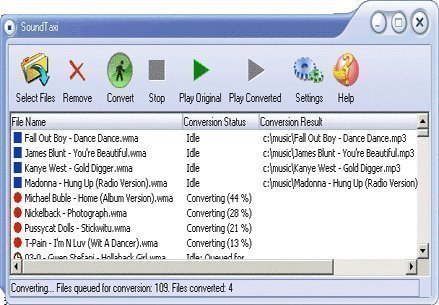
Using third party AAC removal software is usually quick and straightforward. Just download the software and install it. Most products have an intuitive user interface and a variety of features available such as the ability to choose a variety of compression levels and output formats and the ability to preserve ID3 tags, for album, artist, title name, etc.

Most software titles that remove iTunes AAC protection usually do this in two ways. The first way is with audio capturing software. In effect, this software plays the music and records it digitally without the AAC DRM protection. The second method uses lossless DRM removal software to remove AAC DRM protection from files. While both methods work properly, for those looking to preserve metadata, you might want to stick with the lossless method.

 

VN:F [1.9.17_1161]
Rating: 0.0/10 (0 votes cast)
Follow Will.Spencer on

Comments (1)


  1. John says:

    And how can I do that?????

    VA:F [1.9.17_1161]
    Rating: 0.0/5 (0 votes cast)

Leave a Reply

Related Posts

  • How to Copy iTunes to Another PC

    Are you one of the millions who have stored iTunes music on your PC? Are you now switching to a new PC? If so, you obviously want to take your music with you. Here are some simple tips for copying iTunes to another PC. If you have already visited apple.com or the iTunes Web site, [...]...


  • iTunes Network Connection Timed Out

    An error that most iTunes users will come across at some point is the “iTunes Network Connection Timed Out.” When this error is encountered, there are typically two root causes for the issue: 1 – There is an Internet connection issue or 2 – There is a computer security application or other program blocking the [...]...


  • How to Disable Mac OSx Firmware Password Protection

    Launch the Open Firmware Password Application. Click the authentication icon and enter your Administrator credentials. You will be prompted for a password. Locate and click the Change button. This will launch an Open Firmware Password window. In the Open Firmware Password window, locate and click to deselect/uncheck the “Require password to change Open Firmware settings” [...]...


  • How to Convert CD to MP3

    A common task that arises for consumers is converting music saved in CD or CDA format to MP3 to be used on MP3 or other multimedia players. This allows consumers to transfer music legally purchased online or in a brick-n-mortar store on CD to be played on portable music players without incurring additional cost. One [...]...


  • How to Convert WAV to MP3

    The WAV (Waveform Audio File Format) audio format is based on a format standard designed by Microsoft and IBM designed to store audio bit streams on personal computers (PCs). The format is the primary one used on Windows computers to store uncompressed or raw audio using the linear pulse-code modulation (LPCM) format. A common task [...]...