Home     Blog

Java Package

A Java package is a set of classes which are grouped together.

This grouping helps to organize Java classes and codevent multiple Java classes with the same name.

Using Java Packages

To use a package in your Java source code, you must either import the package or use the fully qualified class name each time you use a class.

Using Fully Qualified Class Names
This example uses the Ammunition class from the ballistics package:

ballistics.Ammunition caliber = new ballistics.Ammunition();

As you can imagine, using fully qualified class names can become a bit of a hassle.
Importing Classes
import java.util.ArrayList; // Import the ArrayList class from the java.util package import java.util.*; // Import all public classes from the java.util package java package Java Package
Optional Packages

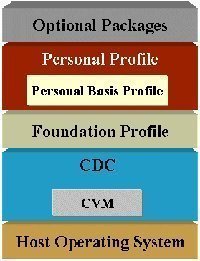
Optional Packages are packages of Java classes which are used to extend the core Java platform.

Optional Packages are created by Java developers much like any other Java code. Optional Packages are then made available to the Java Virtual Machine.

Java classes stored within Optional Packages can be used by the JVM without the need to be explicitly included in the CLASSPATH.

Optional Packages are usually stored in JAR files.

In earlier versions of Java, Optional Packages were known as Standard Extensions.

Installed Optional Packages

Installed Optional Packages are optional packages which have been copied into the JRE or JVM.

JAR files containing Installed Optional Packages are copied into the lib/ext subdirectory.optional Packages Java Package
Download Optional Packages

Download Optional Packages are optional packages which are loaded from outside the JRE/JVM file structure via a Class-Path header in a Manifest file.

For more information on Optional Packages, read the Optional Package Overview.
VN:F [1.9.17_1161]
Rating: 0.0/10 (0 votes cast)
Follow Will.Spencer on

Comments (2)


  1. mitchii says:

    this website really helps! :]
    i hope they will explain more clearer regarding of  java package too bad! its really hard for me to understand..

    VA:F [1.9.17_1161]
    Rating: 0.0/5 (0 votes cast)
  2. agarkar suhas says:

    you are good explain i am easy to understand

    VA:F [1.9.17_1161]
    Rating: 0.0/5 (0 votes cast)

Leave a Reply

Related Posts

  • Java Class

    A Java class is a group of Java methods and variables. Each Java source code file can contain one public class. The name of this public class must match the name of the Java source code file. If the public class is called “ballistics,” then the filename would be “ballistics.java.” Example Java Class class Ammunition [...]...


  • Java Method

    A Java method is a set of Java statements that can be included inside a Java class. Java methods are similar to functions or procedures in other programming languages. There are many different types of Java methods: Final Method Public Method Private Method Package Method Instance Method Protected Method Static Method Main Method The Main [...]...


  • Java vs. C++

    C++ supports pointers; Java does not (Java does have object references) C++ supports mutiple inheritance directly; Java supports multiple inheritance only through interfaces C++ supports operator overloading; Java does not C++ supports global variables; Java does not (sort of) C++ supports #define; Java does not C++ supports typedef; Java does not C++ supports enum; Java [...]...


  • Java Decompiler

    A Java decompiler is a special type of decompiler which takes a class file as input and produces Java source code as output. Java Decompilers Jode JODE is a Java package containing a decompiler and an optimizer for java. This package is freely available under the GNU GPL. The bytecode package and the core decompiler [...]...


  • Java Source Code

    Java source code is code that you write in the Java programming language. Java source code is converted to Java bytecode by the Java compiler. Java source code files usually have the .java extension. Sun recommends that Java source code files be no longer than two thousand lines. Larger source code files should be split [...]...