

Microsoft Cluster Service Overview
A cluster is the grouping of two or multiple physical servers that are perceived to the network as one network server. The servers in the cluster, called nodes, operate together as one network server to provide redundancy and load balancing to the corporate network by resuming operations of any failed server within the cluster. Servers in the cluster provide access to network resources on the network. In this manner, a cluster provides a higher level of availability for network resources and applications hosted in the cluster. Resources in this sense pertain to printers, files and folders. Services and applications in the cluster are called resources.
Applications contained in the cluster are either cluster aware applications, or cluster unaware applications. An application that supports TCP/IP and transactions; and stores its data in the conventional way, is implemented as a cluster aware application. File applications, and client database applications are cluster aware applications. Cluster unaware applications do not interrelate with the cluster, although they can be configured for basic cluster capabilities.
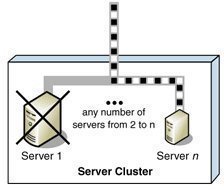
Each node in the cluster monitors the status of other nodes residing in the cluster to determine whether the node is online or available. The servers utilize heartbeat messages to determine the status of another node. Because each server in a cluster runs the same mission critical applications, another server is immediately able to the resume the operation of a failed server. This process is called failover. Another process, called failback, takes place when a failed server automatically recommences performing its former operations once it is online again.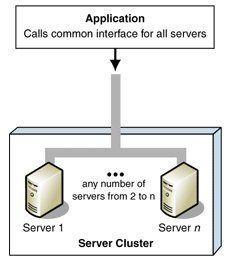
Microsoft provides the two clustering technologies listed below:
-
The Microsoft Cluster Service
-
The Network Load Balancing (NLB) Service
Microsoft Clustering Server (MSCS) was first introduced in Windows NT Server Enterprise Edition to enable organizations to increase availability for mission critical applications and services. This initial clustering implementation only supported two cluster nodes, and only a small number of applications could exist within the cluster. With the Windows 2000 Advanced and Windows 2000 Datacenter came enhancements to the clustering technology introduced in Windows NT Server Enterprise Edition. The technology became known as Microsoft Cluster Service in Windows 2000.
Clustering technologies should be implemented when your network services dictate a high degree of availability.
A few benefits of implementing clustering are listed here:
-
Implementing clustering technologies ensure high availability for mission critical applications and services because both hardware and software failures are quickly detected. The operations of a failed node are immediately resumed by another node in the cluster.
-
Nodes in the cluster are also able to automatically resume its previous operations if it is brought online again. This basically means that no manual configuration is necessary to initiate the failback process.
-
Clustering technologies provide increased scalability because servers can be expanded without any interruptions to client access. You can also easy integrate new hardware and software with existing legacy resources.
-
Clustering technologies reduce downtime associated with scheduled maintenance because you can move the operations of one node to another node before you perform any upgrades. Cluster Service enables access to resources and services during planned downtime. There is no need to interrupt client access.
-
Cluster technologies also reduce single points of failure on your network because they provide a higher level of availability.
-
The response time of applications can be improved because you can distribute applications over multiple servers.
-
All nodes and resources in the cluster can be managed as though hosted on a single server.
-
The cluster can be managed remotely.
-
Applications and services can be taken offline if you need to perform maintenance activities.
A few scenarios in which it is recommended to implement clustering are listed here:
-
If you need to increase server availability for your mission critical applications and services.
-
If you want to decrease downtime associated with unexpected failures.
-
If you need to use cluster aware applications (Microsoft SQL Server, Microsoft Exchange Server).
-
If you want to upgrade nodes and resources in the cluster without causing any disruptions to those users accessing resources in the cluster.
-
If you want to perform upgrades to the operating system that does not lead to interruptions in access to resources in the cluster.
Understanding Clustering Terminology
When discussing the Microsoft clustering technology, a few common concepts and terminology used, are listed here:
-
Active/Active; a cluster implementation that has the following characteristics:
-
When one node fails, another node can manage the resources of the failed node.
-
Each node can manage the resource groups in the cluster.
-
Each node can automatically take up the role of another node in the cluster.
-
-
Active/Passive; a cluster implementation that has the following characteristics:
-
A primary node contains the resource groups specifically defined for it.
-
When the primary node fails, the resources fail over.
-
The primary node manages the resources when it is online again.
-
-
Cluster; a grouping of two or multiple physical servers that function as one network server.
-
Cluster aware applications; applications that use cluster APIs to communicate with Cluster Service. These applications reside on the nodes in the cluster. Cluster aware applications DLLs are specific to a particular application.
-
Cluster unaware applications; applications that do not communicate with the cluster. They are basically unaware of the cluster.
-
Common resource; a resource which can be accessed by each node residing in the cluster.
-
Dependency; defines a relationship between two resources that have to operate in the same resource group.
-
Domainlet; an alternative to using the standard domain. A domainlet provides a set of capabilities for authentication, and groups and policies to reduce overhead.
-
Failback; process when a failed server automatically recommences performing its former operations once it is online again.
-
Failover; process when the resources of a failed node are resumed by another node in the cluster.
-
IsAlive check; used by the Resource Monitors to verify the status of a resource. When this check fails, the specific resource shifts to offline and the failover process initiates.
-
LooksAlive check; used by Resource Monitors to verify that resources are running. If this check's result in questionable, then the IsAlive Check starts.
-
Node; an independent server in a cluster. A server can be a node in a cluster if it is running either of the following Windows editions:
-
Windows 2000 Advanced Server
-
Windows 2000 Datacenter Server
-
Windows Server 2003 Enterprise Edition
-
Windows Server 2003 Datacenter Edition
Windows Server 2003 Enterprise Edition and Windows Server 2003 Datacenter Edition clusters can have between one and eight nodes. Windows 2000 Advanced Server clusters can only contain two nodes, while Windows 2000 Datacenter Server clusters can consist of up to four nodes.
A node in the cluster can be in one of the following states:
-
Down; the resources of the node have been taken up by another node.
-
Paused; the node is paused for an upgrade or testing.
-
Unknown; the state of the node cannot be determined.
-
Up; the node is operational.
-
-
Offline; a resource that cannot provide its associated service.
-
Online; a resource that can provide its associated service.
-
Quorum resource; a common resource which contains the synchronized cluster database. The quorum resource has to exist in order for a node to operate. The quorum resource exists on the physical disk of the shared drive of the cluster.
-
Resources; hardware and software components of the cluster. Services and applications in the cluster are called resources.
-
Resource group, group; contains all resources needed for a specific application. Each resource group has an IP address and network name which are unique. Resources that are dependent on another resource must reside in the same group, and on the same node.
Understanding Cluster Service Components
The components of Microsoft Cluster Service, and the cluster-specific functions associated with each component is listed here:
-
Checkpoint Manager; performs the following functions for the cluster:
-
Performs Registry check-pointing so that the cluster can failover cluster unaware applications. The check point data of a resource is stored in the quorum recovery log.
-
Updates the registry data of a resource that is offline, before the specific resource is brought online.
-
-
Communications Manager (Cluster Network Driver); performs the following functions for the cluster:
-
Manages communication between the nodes in the cluster through Remote Procedure Calls (RPCs).
-
Handles connection attempts to the cluster.
-
Transmits heartbeat messages.
-
-
Configuration Database Manager (Database Manager); performs the following functions for the cluster:
-
Manages the information within the cluster configuration database. The configuration database stores information on the cluster and on resources and resource groups of the cluster.
-
Ensures that the configuration database's information is consistent between the nodes in the cluster.
-
-
Event Log Manager; ensures that the nodes of the cluster contain the same event log information.
-
Event Processor; performs the following functions for the cluster:
-
Starts Cluster Service
-
Sends messages between the nodes.
-
-
Failover Manager; performs the following functions for the cluster:
-
When the cluster has multiple nodes, the Failover Manager determines which node should resume a resource for the failover process.
-
Initiates the failover process.
-
-
Global Update Manager; performs the following functions for the cluster:
-
Provides the interface and method for Cluster Service components to manage state changes.
-
Propagates state changes to all other nodes in the cluster.
-
-
Log Manager; writes all changes to the recovery logs of the quorum resource.
-
Membership Manager; performs the following functions for the cluster:
-
Manages membership to the cluster.
-
Starts a regroup event when a node fails or is brought online.
-
-
Node Manager; performs the following functions for the cluster:
-
Determines resource group management between the nodes in the cluster.
-
Each Node Manager communicates with the other Node Managers on the cluster nodes to identify any cluster failure situations.
-
-
Object Manager; manages objects of the Cluster and maintains a database of the objects (resources, nodes) within the cluster.
-
Resource DLL; provides the means for Cluster Service to communicate with the applications supported in the cluster.
-
Resource Manager; performs the following functions for the cluster:
-
Manages resources and dependencies.
-
Starts resource group failover.
-
Starts/stops resources.
-
-
Resource Monitor; verifies that the resources of the cluster are functioning correctly. Enables Cluster Service and a resource DLL to communicate.
Communication Methods used by Cluster Nodes
The methods by which nodes communicate are listed here:
-
Remote Procedure Calls (RPCs); used to communicate cluster information between online cluster nodes.
-
Quorum resource; used to communicate configuration changes stored in the quorum resource's quorum log when a node is online again after a failure.
-
Cluster heartbeats; sent by the Node Manager of each node to verify that the other nodes in the cluster are online. The first node in the cluster transmits a heartbeat message at 0.5 second intervals, with the other node replying before 0.2 seconds have passed. If a node fails to reply within 0.2 seconds, the first node starts sending 18 heartbeat messages to the assumed failed node:
-
4 heartbeat messages at 0.70 second intervals.
-
3 heartbeat messages in the following 0.75 seconds.
-
2 heartbeat messages at 0.30 second intervals.
-
5 heartbeat messages in the following 0.90 seconds.
-
2 heartbeat messages at 0.30 second intervals.
-
2 heartbeat messages in the following 0.30 seconds.
-
Understanding Standard Resource Types
A resource in a cluster refers to a physical or logical cluster entity that can be started, stopped, and managed. A single node in a cluster can own a resource. There are also certain resource types that have specific dependencies. A few standard resource types are already provided by Cluster Service. You can also add new resource types.
A few standard resource types are listed here:
-
DHCP resource type; supported by Cluster Service to implement the DHCP service. DHCP resource type dependencies are the Physical Disk, IP Address, and Network Name resources.
-
File Share resource type; used when the cluster performs like a file server.
-
Generic Application resource type; used to implement a cluster unaware application.
-
Generic Service resource type; used to implement a cluster unaware service.
-
IP Address resource type; used to configure an IP address.
-
Network Name resource type; used with the IP Address resource type to configure a virtual server. The Network Name dependency is the IP Address resource.
-
Physical Disk resource type; used to manage and control the cluster's shared drives. The node that has control over a resource has to be specified. There are no dependencies.
-
Print Spooler resource type; used to enable the cluster to support network printers. The cluster must though have the necessary ports and drivers for the network printer. Print Spooler Dependencies are the Physical Disk, and Network Name resources.
-
WINS resource type; supported by Cluster Service to implement the WINS service. WINS resource type dependencies are the Physical Disk, IP Address, and Network Name resources.
Resources can be grouped to form resource groups. The specific properties of the resource group and the application or service determine the manner in which the resource group is moved to the offline state by Cluster Service.
Resource groups have the following elements:
-
Name
-
Preferred Owner
-
Description
-
Failover properties
-
Failback properties
The resource types which are typically included in a resource group are:
-
IP Address
-
Network Name
-
Physical Disk
-
Application/service hosted
Cluster Design Models
Each cluster design model is aimed at particular scenario. The cluster design models available are:
-
Single Node: This cluster design model has the following characteristics:
-
The cluster has one node.
-
No failover can occur for the cluster.
-
An external disk is not necessary because the local disk can be set up for storage purposes.
-
Multiple virtual servers can be created.
-
When a resource fails, Cluster Service will try to automatically restart applications and resources.
-
Typically used for development.
-
-
Single Quorum: This cluster design model has the following characteristics:
-
The cluster has two or more nodes.
-
A node can be configured as the hot standby device.
-
A node can be configured to host different applications.
-
Each node in the cluster must connect to the storage devices of the cluster.
-
A single quorum device is located on the storage device.
-
One copy of the cluster's configuration exists on the quorum resource.
-
Most commonly used cluster design model.
-
-
Majority node set (MNS): This cluster design model has the following characteristics:
-
Each node in the cluster does not need to connect to the storage devices of the cluster.
-
Cluster Service ensures that configuration between the nodes are constant.
-
Each node has and maintains its own cluster configuration information.
-
Quorum data synchronization occurs over Server Message Block (SMB) file shares.
-
Cluster Service Configuration Models
The configuration model chosen affects cluster performance, and the degree of availability ensured during a failure. The different configuration models are:
-
Virtual Server Configuration Model: A single node exists in the cluster. No failover capabilities exist in the cluster. Virtual servers can be implemented to respond to clients' requests. At a later stage, when additional nodes are implemented for the cluster, resources can be grouped into the virtual servers without needing to reconfigure any clients.
-
High Availability with Static Load Balancing Configuration Model: The nodes each have particular resources that they are accountable for. To ensure availability during failover, each node has to be sufficiently capable of supporting another node's resources. This configuration model leads to decreased performance for the duration of the failover.
-
Hot Spare Node with Maximum Availability Configuration Model: A single primary node manages the resources. The hot spare node is not utilized at the same time as the primary node. This node only manages the resources when the primary node has a failure. This model ensures high availability and high performance during failover.
-
Partial Cluster Service Configuration Model: This model builds on the principles of the former model. When failover occurs, the cluster unaware applications stay unavailable for the duration of the failover. Cluster unaware applications are not part of this process and performance for these applications is greatly reduced at times of failover. This configuration model provides high availability for resources that are included in the failover process.
-
Hybrid Configuration Model: This model can be regarded as a grouping of the above configuration models. In this configuration model, each node in the cluster manages its own resources. Because this model is a grouping of the other models, availability during failover is ensured for those resources specified for failover.
Yusuf
What is the source of numbers you pasted under sub-topic
Communication Methods used by Cluster Nodes
Yusuf
hi can you paste details of your sources at the Ms forum link as below – http://social.technet.microsoft.com/Forums/en-US/winserverClustering/thread/cd113604-a47d-4863-be36-bccc7deb80e3