

Cisco IOS software is installed in the manageable Cisco switches for better LAN management. It delivers network services and enabled networked applications. The Cisco IOS has a command line interface that helps users to execute the Cisco IOS commands.
Cisco Switch Commands
The Cisco switch IOS has different EXEC modes with distinctive prompts. These modes execute different Cisco switch commands. Each mode has a set of specific commands.
The fundamentals of the Cisco IOS User Interface are as follows :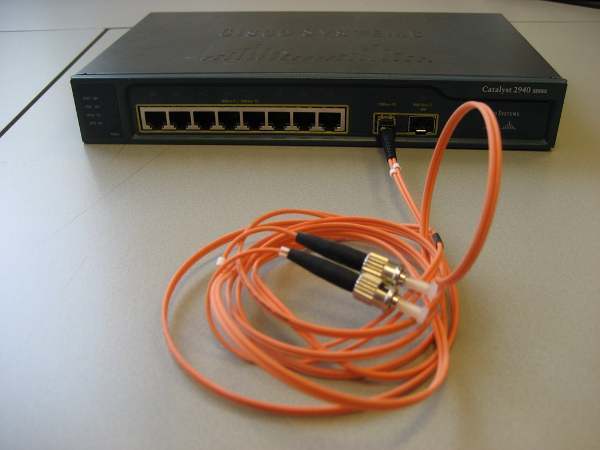
- Uses a command line interface
- Operations vary on different series of switches
- Type or paste entries in the console command modes
- Enter key instructs device to parse and execute the commands
- Two primary EXEC modes are user mode and privileged mode
- Command modes have distinctive prompts
Cisco IOS Software Exec
There are two main EXEC modes for entering the Cisco switch commands:
User Mode
- Limited switch examination
- Command prompt on the switch is switch
Privileged Mode
- Detailed switch examination
- Enables configuration and debugging
- Prerequisites for other configuration modes
- Command prompt on the router is switches#
Cisco Telnet Commands
There are two primary ways to access a Cisco manageable switch to use command line interface.
- Out of band Console connection
- Via Ethernet through Telnet
Telnet is a utility used for remotely logging into a device. To telnet a Cisco IOS switch from a computer, type the following command on the CMD computer’s terminal:
Telnet ip address of the switch
Just like:
Telnet 192.168.0.253
Cisco Catalyst 1900 Switch Commands
The following are some basic Cisco Catalyst 1900 switch commands:
- Show running-config: This command displays the memory status of the Cisco Catalyst 1900 switch
- Show interfaces: This command displays detailed information about all the interfaces of Cisco Catalyst 1900 switch.
- Show interfaces Ethernet 0/1: This command displays detailed information about a specific 10baseT Ethernet interface of the Cisco Catalyst 1900 switch
- Show interfaces Fast Ethernet 0/26: This command displays the detailed information about a specific 100baseT Fast Ethernet interface of the Cisco Catalyst 1900 switch
- Show ip: This command displays the ip configuration of the Cisco Catalyst 1900 switch
- Show Mac-address-table: This command displays the Mac addresses of the devices that are currently connected to the Cisco Catalyst 1900 switch.
- Show Mac-address-table security: This command displays the address table size and the addressing security of each interface of the Cisco Catalyst 1900 switch.
- Show VLAN: This command displays the status of current VLANs enabled on the Cisco Catalyst 1900 switch.
- Show VLAN-membership: This command displays the VLAN membership of all the ports on the Cisco Catalyst 1900 switch.
- Show Spantree 1: This command displays the complete information about the spanning tree protocol 1 that is enabled by default on the Cisco Catalyst 1900 switch.
- Copy nvram tftp: //host/dst_file: This command sends the configuration to a TFTP server.
- Copy tftp: //host/src_file nvram: This command downloads the configuration from a TFTP server.
- Delete nvram: This command resets the system configuration to factory defaults.
Show Cisco Switch Commands
Here are some show commands of Cisco switches:
- Show version: This command displays the hardware and software status of the Cisco switch
- Show flash: This command displays the files and directories in the flash of the Cisco switch
- Show interfaces: This command displays the detailed information about all the interfaces of the Cisco switch
- Show interfaces fast Ethernet 0/x: This command displays the detailed information about the specific interface of the Cisco switch
- Show interfaces VLAN 1: This command displays the ip address configuration of VLAN 1
- Show running-config:This command displays the status of RAM
- Show startup-config:This command displays the status of NVRAM
- Show-mac-address-table: This command displays the MAC address of the devices that are directly connected to any switch port.
- Show port-security: [interface] [address]: This command displays the port security options on the interface
- Show history: This command displays the last ten commands that are executed in the switch configuration
- Show line: This command is used to view the brief information about all the Cisco switch lines
- Show line console 0: This command is used to view the detailed information about the specific line of the Cisco switch
- Erase startup-config: This command is used to erase the nvram of the Cisco switch
Cisco Switch Configuration Commands
- Configure terminal: This command is used to enter the global configuration mode of the Cisco switch
- Hostname: This command assigns the Cisco switch’s hostname
- Enable password: This command sets the enable password of the Cisco switch
- Enable secret: This command sets the encrypted password of the Cisco switch that is used for entering into the privileged mode
- Interface VLAN 1: This is a global configuration command used to configure the VLAN interface of the Cisco switch
- Interface fast Ethernet 0/x: This command configures the specific interface of the Cisco switch
- IP address: This command configures the ip address of any interface of the Cisco switch
- IP default-gateway: This is an interface configuration command to set the default gateway
- Speed: This command sets the speed for the interface of the Cisco switch
- Duplex: This command sets the duplex setting for the interface of the Cisco switch
- Line console 0: This command is used to enter in the specific line configuration mode of the Cisco switch
- Password: This command sets the password of any line of the Cisco switch
Dzu
Nice stuff it is much valuable and helpful.
Subhash Bhattacharjee
Hello,
I am really amazing after watching this cisco.
It is useful for everyone to enhance knowledge.
Regards,
Subhash Bhattacharjee
Narinder
Good ……It’s usefull for everybody to enhance knowledge!
Marlon Franco
Thanks Narinder. We will continue to provide you with helpful tech faqs.
Nadee
good.all the best cisco
jin
Nice…..tHANK YOU..
Sabarinivas
Great reference list.
parthiiban
Really this is very usefull to pre-ccna users.
thank to this site
mukesh
it is vry nice for practice.. if anybody do pratice on cisco switches then it is vry benifitial to us..
bob
This is good for pre-ccna/ccna people I think it would be a good idea to change the title of the article to something like “most common switch command”.
Other than that not bad. also sorry about the bogus email… but i don’t know you.