

DNS is the primary name registration and resolution service in Windows 2000 and Windows Server 2003. It provides a hierarchically distributed and scalable database, name registration, name resolution and service location for Windows 2000 and Windows Server 2003 clients, and locates domain controllers for logon. A DNS server is a computer running the DNS Server service that provides domain name services. The DNS server manages the DNS database that is located on it. The information in the DNS server’s database pertains to a portion of the DNS domain tree structure or name space.
A DNS zone is the contiguous portion of the DNS domain name space over which a DNS server has authority or is authoritative. A zone is a portion of a name space, it is not a domain. A domain is a branch of the DNS name space. A DNS zone can contain one or more contiguous domains. A DNS server can be authoritative for multiple DNS zones. Zone files store resource records for the zones over which a DNS server has authority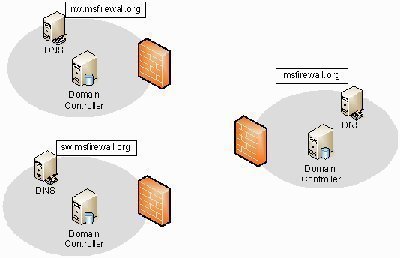
In DNS, a standard primary DNS server is the authoritative DNS server for a DNS zone. There are a number of zones used in Windows Server 2003 DNS. The different types of zones used in Windows Server 2003 DNS are listed below:
- Primary zone: This is the only zone type that can be edited or updated because the data in the zone is the original source of the data for all domains in the zone. The DNS server that is authoritative for the specific primary zone updates the primary zone. Users can also back up data from a primary zone to a secondary zone.
- Secondary zone: A secondary zone is a read-only copy of the zone that was copied from the master server during zone transfer.
- Active Directory-integrated zone: a zone that stores its zone data in Active Directory. DNS zone files are not needed. This type of zone is an authoritative primary zone. Zone data of an Active Directory-integrated zone is replicated during the Active Directory replication process. Active Directory-integrated zones also enjoy the Active Directory’s security features.
- Stub zone: a new Windows Server 2003 feature. Stub zones only contain those resource records necessary to identify the authoritative DNS servers for the master zone.
The main zone types used in Windows Server 2003 DNS environments are primary zones and Active Directory-integrated zones. Both primary zones and secondary zones are standard DNS zones that use zone files. The main difference between primary zones and secondary zones is that primary zones can be updated. Secondary zones contain read-only copies of zone data.
An Active Directory-integrated zone can be defined as an improved version of a primary DNS zone because it can use multi-master replication and the security features of Active Directory. The zone data of Active Directory-integrated zones are stored in Active Directory. Active Directory-integrated zones are authoritative primary zones.
A few advantages that Active Directory-integrated zone implementations have over standard primary zone implementations are:
- Active Directory replication is faster, which means that the time needed to transfer zone data between zones is far less.
- The Active Directory replication topology is used for Active Directory replication and for Active Directory-integrated zone replication. There is no longer a need for DNS replication when DNS and Active Directory are integrated.
- Active Directory-integrated zones can enjoy the Active Directory’s security features.
- The need to manage Active Directory domains and DNS name spaces as separate entities is eliminated. This, in turn, reduces administrative overhead.
- When DNS and Active Directory are integrated, the Active Directory-integrated zones are replicated and stored on any new domain controllers automatically. Synchronization takes place automatically when new domain controllers are deployed.
How to create an Active Directory-integrated Zone
- Click Start, Administrative Tools, and DNS to open the DNS console.
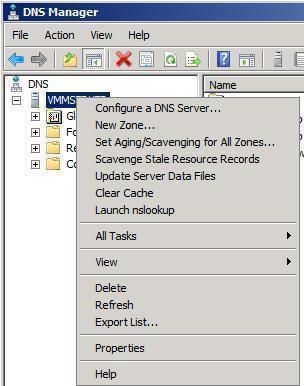
- In the console tree, select the DNS server that will be creating a new DNS zone.
- From the Action menu, click the New Zone option.
- On the New Zone Wizard’s initial page, click Next.
- Select the zone type to be created. The options are Primary – to create a new standard primary zone, Secondary – to create a copy of the primary zone, and Stub – to create a copy of zone but for only the NS record, SOA record, and the glue A record.
- Select the default selected option – Primary zone.
- To integrate the new zone with Active Directory and if the DNS server is a domain controller, select the Store the zone in Active Directory (available only if DNS server is a domain controller) checkbox.
- Click Next.
- On the Active Directory Zone Replication Scope page, accept the default setting for DNS replication: To all domain controllers in the Active Directory domain. Click Next.
- Select the Forward lookup zone option on the following page, which the New Zone Wizard displays and click Next.
- Enter a zone name for the new zone. Click Next.
- The options that users can select on the following page pertain to dynamic updates. The Allow only secure dynamic updates (recommended for Active Directory) option is only available if the user is using Active Directory-integrated zones. Click Next.
- Click Finish to add the new zone to the DNS server.
Related Articles on DNS
- What is DNS?
- How do I flush DNS?
- How do I find my DNS servers?
- What are public DNS servers?
- How do I perform a DNS lookup?
- What is reverse DNS?
- What is a dynamic DNS?
- What are DNS root servers?
- Understanding DNS

Follow Us!