

The iPod is a handheld digital device used for storing, transferring, and playing music and video files. There are several different models but they all have a similar basic design which consists of a “click-wheel”, a screen, and a lock/unlock switch at the top that prevents the controls from being accidentally activated. The earlier models of the iPod consisted of a hard drive but as technology improved, the newer models were equipped with flash memory, which can be found in any USB-based device. Flash memory allowed for the iPod to be smaller in size while able to hold more information at the same time. The iPod should not be confused with the iPhone, which is similar in functionality but is capable of much more than just playing music. The iPod itself has improved and comes with more functions, including a digital camera, voice recorder, and FM/AM radio.
What Does iPod Stand For?
The iPod is perhaps one of the most popular gadgets of the decade. The name “iPod” actually came from two unrelated events. The “i” part of the name is the result of the usage of the lowercase “i” in many of Apple’s products, which started when the company first came out with the iMac (the “i” standing for “Internet”). The word “Pod” came from a suggestion made by Vinnie Chieco, a freelance copywriter hired by Apple to market the device. The device resembled the evacuation pods of the Discovery One spaceship in the movie “2001: A Space Odyssey”.
Not Just an Ordinary MP3 Player
The Apple iPod is usually categorized as a portable music device that, among other things, plays music files such as MP3s. MP3s are digital files that can be played on most computers today. These are music files that have been changed into a digital format (0s and 1s) and stored on a hard drive or flash memory unit, or in the case of the iPod, a miniature digital hard drive. It should be noted that besides the ability to play MP3s, most iPods can play AAC, WAV, AIFF, Apple Lossless, and Audible 2, 3, and 4 formats.
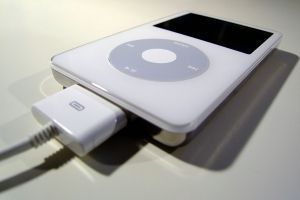
A normal audio CD stores only 80 minutes of music (about 800 megabytes of data). The Apple iPod can store hours of music because it uses codecs that compress MP3s or other compatible types of digital music formats. Codecs stand for compression decompression algorithms and are formulas that shrink the size of large files into very small and manageable files. The Apple iPod has a digital audio chip (DAC) that is able to read these files and create high quality audio files.
iTunes
“iTunes” is both software and the name of the sub-company of Apple. The software offers users an easy way to organize, synchronize, and download music, videos, and other files to an iPod. iTunes allows you to search your computer for a specific file or folder to upload to your iPod library and the program is required to transfer files onto your iPod. The program is free, although users have the option to browse the iTunes Store for cheap downloads.
iTunes is Apple’s music and video store that sells digital files that users can download. These files come in a format called AAC and include DRM (Digital Rights Management) and there are limitations to how these files can be used. Usually, an iPod can easily sync up with iTunes with the help of a computer and transfer the music from the iTunes site directly to the iPod via a USB cable.
The iPod also plays music files from CDs or MP3s. Users can easily sync their iPod with their home computer or computing device and send these files from one device to another. Depending on the type of iPod, users can transfer music files and view music videos, TV shows, full length motion pictures, and even digital photos.
iTrip
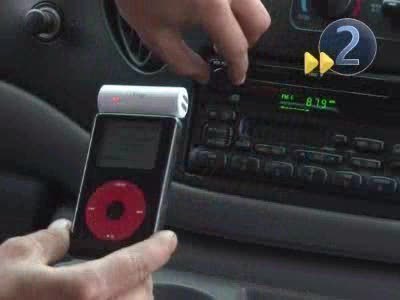
The iTrip, invented by Griffin Technology and released in March of 2006, is a device that can be plugged directly into an iPod via the headphone socket and converts the audio output of the iPod into a constant FM radio signal that can be picked up by any radio within 15 feet. The iTrip, suggested by its name, is great for long road trips or just being in the car as you can use your vehicle’s stereo to remotely play the songs from your iPod’s playlist. The iTrip comes in 8 different models including the original iTrip, the iTrip Black, the iTrip Mini, the iTrip with LCD, the iTrip with Dock Connector, the iTrip Auto, the iTrip for Nano, and the iTrip for PSP.
iPod Hardware
One of the reasons why the iPod is so popular is its sleek and simple design. The device is very easy to use.
Storage
Today, there are many different types of iPods available. They include traditional iPods, video iPods, the iPod Nano, and the iPod Shuffle. These different types of iPods usually use one of two types of storage – miniature hard drives or flash memory.
Miniature hard drives can be smaller than 2 inches and fit as much as 80 gigabytes of data, making it extremely easy to store an entire music collection and download several full length motion pictures. On smaller sized units such as the iPod Nano and iPod Shuffle, a different type of storage media called flash memory is used. This type of storage unit usually holds from 1 to 8 GB of data. The advantage of using flash memory is that it is even smaller than miniature hard drives and extremely thin, allowing an even smaller device to be created.
Battery
The battery included in most standard iPods is a 700 mah 3.7 volt battery that is rechargeable. The battery usually lasts between 300 to 500 recharge cycles, which, for some users, can last less than a year before the battery needs to be replaced. The battery is created this way probably due to the form factor. In order to make the iPod smaller and thinner, it was probably necessary to create a battery that fit the iPod’s exact specifications instead of using standard AAA or AA batteries. The only inconvenience is that the user cannot open up the iPod and remove the battery when the battery fails, and it has to be sent back to Apple to be changed.
Click Wheel
The Click Wheel is perhaps the most convenient iPod feature. All iPods have a click wheel that makes it extremely easy to browse and find music on the iPod and play it. The click wheel can be described as a touch-sensitive ring. Instead of pressing buttons, users can either slide their finger gently around the wheel’s ring or click the button to execute a command. There are four buttons on the click wheel: play/pause, back, forward, and menu. Using these 4 buttons plus the center button, which is the select button, users can easily control all iPod functions.
Transferring audio and video files to an iPod is very easy. Most people transfer files to their iPods by either using iTunes or using their computer.

feo
sharon and mulonkicha ….. 100% suit
feo
REECE MASTIN IS SOOOO hot .. haha love him !!1 yeeyah !! bundii !!
kuroots !!
diya
I have aproplem please hlep me I have ipod mp4
it was working good but recently the sound can be heard by the headphone and speaker bothe at the same time imagine that when you are at public plase
my second proplem is when i went to buy it the seller tell me that their is radio in it when i use it thier was nit can i have radio on it pleas help me
care
YEP HAHAH JUST BUY A RADIO !@! USE URE BRAIN !!
jasmin
i dont unders stad this beacuse i cant reed well yall shoud put more pics insted of advertisement
Tyler
this really helped me with my assignment. thats mate for all your hard work! keep it up.
Brian Paterson
As an apprentice I built a Radio in my 1st year (great fun when it was first operated-Radio 1),
now my greatest sense of wellbeing was when I programmed my Classic(60GB), what an amazing
accomplishment in such a short time
brenna
you rule
BBq rarar
this all true me just look at dis website and boom got answers XD X3
lolz346
dude totally good keep rigthin good info
care
i love sharon togiatomai (:
feo
hahahaha !! sharon !! yu MOARI !! HAHA
jag
thanks for this needful information…
pandaboy272
i agree how does the author come up with this stuff! and I’m still confused. can you give more information please on this. thanks :sigh:
care
careing every1 hahaha curry !!! DRY
kakatielynn
Can anyone tell me who the auther is of this post and when it was posted. It would hepl me with my research paper alot. Thank you very much.