

Before you can use your Sony Walkman MP3 player, you have to set it up and get music onto the device. To do this, insert the installation disc into the computer. Follow the installation to the end so that your computer can recognize the device, but also so that the SonicStage software is installed–this is used to transfer songs onto the Walkman. Once you have installed the software, plug the USB cable into the computer and into the Walkman. If the software was installed correctly, the launcher will appear.
To start the SonicStage software and get music onto the device, select the “music” option from the list of different choices. Then click Transfer and select “ATRAC Audio Service.” This is the name used to describe the Walkman. What you’ve just done here is selected what device to transfer files to and, more importantly, what type of files you’re going to be transferring.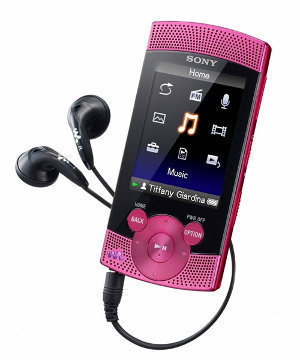
Once you’ve selected the device, all of the music that you have on your computer will appear. To the left of each music file is the option to place a check. Select the songs that you want to transfer over. Once you’ve done that, press to the right arrow button and the songs will begin to transfer over to the Walkman. The time it takes for songs to be transferred depends on the size of each file and the number of songs that are being transferred. Once the files have been transferred, disconnect the Walkman from the computer.
Playing Music on a Walkman
With the Walkman in hand, click the “Music Library” button. This brings up a list of different music filters such as Album, Artist and Genre. Press the play button over a specific option. This takes you to the specific category. Then, you can pick a category within that one. For example, if you chose Artist, you could then scroll down to Eric Clapton. Once you have reached that category, click the play button once again.
This is where each song by the artist–or in the album if you chose that category–is listed. You’ll scroll until you find the song that you want and then hit the play button. The song will start soon after. To pause the song, hit the play button again. To go to the next song, hit the right arrow button. To go to the previous song, hit the left button. This will allow you to go through your extensive list of songs.

Lavi
What would happen if i plug my sony walkman into another computer