

Access lists are used to control and manage access of interesting and non interesting traffic. Access lists are powerful tools for controlling access both to and from network segments. They can filter uninteresting packets and be used to implement security policies. Using the right combination of access lists, network managers will be armed with the power to enforce nearly any access policy they can invent. After the lists are built, they can be applied to either inbound or outbound traffic on any interface. By applying access lists can effect router to analyze each packet by crossing the interface at specific direction and also take action.
Basic Rules for IP Access Lists
There are a few important rules that a packet should follows when it's being compared with an access list: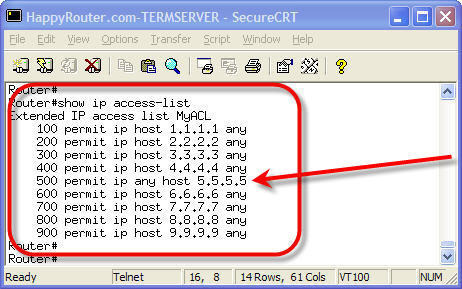
-
It's always compared with each line of the access list in sequential order, it mean that it will always start with line 1, then go to line 2, then line 3, and so on.
-
It is compared with lines of the access list only until a match is made. Once the packet matches a line of the access list, no further comparisons take place.
-
"deny all" is used to end of each access list. This means that if a packet doesn't match up to any statement of the access list, it'll be discarded.
Types of IP Access Lists
There are two types of IP access lists used:
-
Standard access lists: The standard IP access lists use only the source IP address in an IP packet to filter the network. This basically permits or denies an entire protocol suite.
-
Extended access lists: The extended access lists check for source and destination IP address, protocol field in the layer 3 header, and port number at the layer 4 header.
After creating an IP access list, you apply it to an interface with either an inbound or outbound list:
-
Inbound access lists: The packets are processed through the inbound access list before being routed to the outbound interface.
-
Outbound access lists: The packets are routed to the outbound interface and then processed through the outbound access list.
Guidelines for Creating and Implementing IP Access Lists
There are also some guidelines that should be followed when creating and implementing IP access lists on a router:
-
You can only assign only one access list per interface, per protocol, or per direction. It means if you are making IP access lists you can use only one inbound and one outbound access list on each interface.
-
You should have organized the access lists so that the more specific tests are at the top of the access list.
-
Whenever a new statement is added to the access list, it will be placed at the bottom of the list.
-
You cannot remove one specific line from an access list. You have to remove the entire list. You can copy access configuration to notepad before editing it. The only exception is named access lists.
-
The access list should end with a permit command, all packets will be discarded if they do not meet any of the lists' tests. Each access list must have one permit statement and also you can shut down interface.
-
You have to create the access lists and then apply them to an interface. Access list which is implemented to an interface will not ever filter traffic.
-
The access lists are designed to filter traffic going through the router. They will not filter the traffic which is originated from the router.
-
You have to place the IP standard access lists as close to the destination as possible.
-
You have to place the IP extended access lists as close to the source as possible.
Standard IP Access Lists Example
The standard IP access lists filter the network by using the source IP address in an IP acket. You could create a standard IP access list by using the access list numbers 1-99.
Router # configure terminal
Router (config) # access-list 10 deny 172.16.40.0 0.0.0.255
Router (config) # access-list 10 permit any
Router (config) # interface e0
Router (config-if) # ip access-group 10 out
Extended IP Access Lists Example
The extended IP access lists allow you to choose your source and destination IP address as well as the protocol and the logical port number, which identify the upper-layer protocol or application. By using extended IP access lists, you can effectively allow access to a physical LAN and stop them from using certain services. You'll use the extended IP access list range from 100 to 199.
Router # configure terminal
Router (config) # access-list 110 deny tcp any host 172.16.10.5 eq 21
Router (config) # access-list 110 deny tcp any host 172.16.10.5 eq 23
Router (config) # access-list 110 permit ip any any
Monitoring IP Access Lists
It is important to be able to verify the access list configuration on a router. The following commands can be used to verify the access list configuration
Show access-list: This command displays all access lists and their parameters configured on the router. This command does not show you that on which interface the list is set.
Show ip access-list: This command shows only the IP access lists configured on the router.
Show ip access-list access list no: This command displays the detail of the specific IP access list configured on the router.
Show ip interface interface no: This command shows that which interfaces have access lists set and in which direction.
Show running-config: This command shows the access lists configuration and the interfaces status.

Danny
Fix the information in your IP Access List tutorial. Also, proof reading is a good thing. Try it once you get the erroneous data in the article corrected.
PETER MUGABO
The information is very great and helpful to me,becouse am trying to how to secure networks.its relly good.