

Removing the vocals from songs is a really great way to get custom karaoke and voiceless music without the distracting lyrics. The process is relatively simple and can be done with software that is available for free online.
Using Free Software
A free option to try is Wavosaur, which is available at www.wavosaur.com. It is an audio editor that is compatible with many different types of sound files and music formats. Download and run the free Wavosaur software onto your system.
Note: You may need a decompressing software for Zip Archives to extract the Wavosaur software once the download is complete.
Open up a music file that you want to try removing the vocals from. Choose the file by going through the “File” tab and selecting the “Open” option in the Wavosaur program. Use the file browser to find the song on the hard disk that you wish to open in Wavosaur. You may need to select a different file type from the drop down list if it does not show up right away.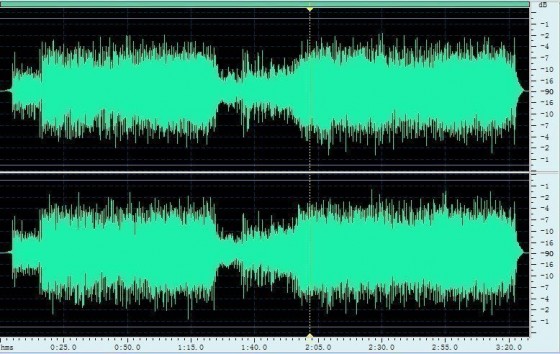
The file loads into the Wavosaur program once you open it. Choose the “Process” tab and select the “Vocal Remover” option from the drop down list. The process is automated and will remove the vocals from the song that was selected.
Note: This process does not always work because the algorithm used in the “Remove Vocals” command is only designed to alter the song file information at the normal vocal frequencies. Songs that have been digitally altered to change voice frequencies will have varying results. The song may be processed with a murmuring tone in such instances.
Saving Songs With Vocals Removed through Wavosaur
In order to resave your new vocal free (or satisfactory vocal reduction) music into an MP3 format you will need to make use of additional software. The LAME MP3 Encoder software is available for free through The LAME Project at http://lame.sourceforge.net/index.php or through an alternate server at http://lame.buanzo.com.ar/. Download the appropriate version of LAME for Wavosaur and place it in the Wavosaur directory. If you need additional help with this step, the Wavosaur support forum is a great place to clarify any questions you may have regarding Wavosaur.
Once you have put LAME into the Wavosaur directory, you will be able to save your new vocal free music in MP3 format. Remember to use the ‘save as’ option to save your music or you will end up saving over your original files.
It is possible to run a batch process to remove the vocals from a list of songs you choose with a few easy steps. Open Wavosaur and select the “Tools” tab. Choose the “Batch Processor” item from the list and choose the directory on your hard disk that has the files that the vocals will be removed from. Once you select the appropriate directory, ensure that you choose a directory where the files with the removed vocals will be stored. Select the “Vocal Removal” Function before you select the run button. Wavosaur will then batch process the files that you have selected.
Note: Using the batch process takes varying amounts of time depending on the number of songs selected. Make sure that you have adequate storage space on your hard disk to store the processed files. There are many other free software options to try if Wavosaur cannot provide the results you need.
Commercial Song Vocal Removal
There are a wide variety of vocal removal options available. They have settings that can be changed to ensure better results from the vocal removal process. Many of these options are inexpensive. Be sure to try a free option before spending money on expensive vocal removal software.
Note: As with free software, there is no guarantee that purchased software will be able to completely remove vocals from a song. Tweaking of settings may be required but some songs are simply incapable of having their vocals removed for a variety of reasons. Take into account the original song itself and notice trends in the vocals such as digital editing, which causes the vocals to sound unnatural. This can cause commercial vocal removal software to be inefficient.
LearnChineseWords
Thank you for this very well-written article. It was exactly what I needed.
Biswajit haflongber
i need to have this software, this is very good and easy.
rhea
help me