

Domain Name System (DNS) is the primary name registration and resolution service used in Windows Server. DNS provides a hierarchically distributed and scalable database; provides name registration and name resolution services, and service location for Windows clients; and locates domain controllers for logon. A DNS server is a computer running the DNS Server service that provides these domain name services.
The common threats to DNS servers are:
Denial-of-service (DoS) attacks: DoS attacks occur when DNS servers are flooded with recursive queries in an attempt to prevent the DNS server from servicing legitimate client requests for name resolution. A successful DoS attack can result in the unavailability of DNS services, and in the eventual shut down of the network.
Footprinting: Footprinting occurs when an intruder intercepts DNS zone information. When the intruder has this information, the intruder is able to discover DNS domain names, computer names, and IP addresses which are being used on the network. The intruder then uses this information to decide on which computers he/she wants to attacks.
IP Spoofing: After an intruder has obtained a valid IP address from a footprinting attack, the intruder can use the IP address to send malicious packets to the network, or access network services. The intruder can also use the valid IP address to modify data.
Redirection: A redirection attack occurs when an intruder is able to make the DNS server forward or redirect name resolution requests to the incorrect servers. In this case, the incorrect servers are under the control of the intruder. A redirection attack is achieved by an intruder corrupting the DNS cache in a DNS server that accepts unsecured dynamic updates.
DNS security recommendations
A few DNS security recommendations are listed here:
- Your DNS servers should not respond to name resolution requests from any unauthorized networks. DNS servers should respond to requests from internal interfaces only.
- To prevent other servers from discovering DNS zone records that contain important information, zone transfers should be targeted at specific DNS servers.
- To protect your DNS servers from spoofing of DNS records, you should use the only secure dynamic updates option for dynamic update.
- To further enhance security for DNS zone files data, consider using Active Directory Integrated zones if you are using Active Directory. An Active Directory-integrated zone is a zone that stores its zone data in Active Directory. DNS zone files are not used to store data for these zones. An Active Directory-integrated zone is an authoritative primary zone. Active Directory-integrated zones enjoy the security features of Active Directory.
- You should consider configuring the Secure cache against pollution option to further protect your DNS servers from an intruder that might be attempting to pollute the DNS cache with the incorrect information.
To enable only secure dynamic updates,
- Click Start, Administrative Tools, and then click DNS to open the DNS console.
- In the console tree, right-click the DNS zone that you want to configure, and then select Properties from the shortcut menu.
- Verify that the zone type configured for the zone on the General tab is Active Directory-integrated zone.
- In the Dynamic Updates drop-down list box, select the Secure only option
- Click OK.
To configure the Secure cache against pollution option,
- Click Start, Administrative Tools, and then click DNS.
- In the console tree, right-click the DNS server that you want to configure, and then select Properties to open the DNS Server’s Properties dialog box.
- Click the Advanced tab.
- In the Server Options list, click the Secure Cache Against Pollution checkbox.
- Click OK
For DNS zones that are not stored in Active Directory, it is recommended that yu implement the following security strategies:
- Change the permissions on the zone file or on the folder that contains the zone files to only allow the Full Control permission to the System group.
- In the Registry, in HKEY_LOCAL_MACHINESystemCurrentControlSetServicesDNS, secure the DNS registry keys.
For DNS servers that do not respond to client requests directly, and who are not DNS forwarders, implement the security strategy listed below. DNS forwarders are the DNS servers used to forward DNS queries for different DNS namespace to those DNS servers who can answer the query. A DNS server is configured as a DNS forwarder when you configure the other DNS servers to direct any unresolved queries to the specific DNS server:
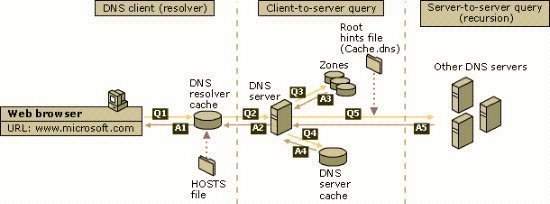
- Disable recursion: If a DNS server cannot find the queried name in its zone information, or in its cache; the DNS server performs recursion to resolve the name. This is the default configuration for DNS servers. Recursion is the process whereby which the DNS server queries other DNS servers for the client.
To disable recursion,
- Click Start, Administrative Tools, and then click DNS to open the DNS management console.
- In the console tree, right-click the DNS server that you want to configure, and then select Properties to open the DNS Server’s Properties dialog box.
- Switch to the Advanced tab.
- In the Server Options list, enable the Disable recursion (also disables forwarders) checkbox so that the DNS server no longer performs recursion to resolve client queries.
- Click OK.
For DNS servers that do not resolve Internet names, implement the security strategy listed below:
- Configure the root hints to point to only those DNS servers for your root domain. Root hints is a collection of resource records which the DNS Server service utilizes to locate DNS servers who are authoritative for the root of the DNS domain namespace structure. If you are using Windows Server DNS, a preconfigured root hints file named Cache.dns already exists. Cache.dns contains the addresses of root servers in the Internet DNS namespace, and is preloaded to memory when the DNS Server service initiates. If you want to create your own custom root hints, then you have to delete the Internet root servers and add the correct information for your environment.
To configure the root hints to point to only those DNS servers for your root domain,
- Click Start, Administrative Tools, and then click DNS to open the DNS management console.
- Click the Action menu item, and select the Properties command.
- Switch to the Root Hints tab.
- If you want to add a root server, click the Add button and enter the DNS server name and IP address that should be added to the list.
- If you want to delete an existing root server, select the specific server and then click the Remove button.
- Click OK.
Microsoft specifies three levels of implementing DNS security. The high-level security configuration provides the most security for DNS servers. The high-level security configuration consists of a DNS server hosted on a domain controller, with DNS zone information being stored in Active Directory.
A few high-level security configuration characteristics are listed here:
- Internal DNS servers are not exposed to the Internet.
- DNS servers are hosted on domain controllers.
- Active Directory-integrated zones are the only zone type configured.
- Zone data is stored in Active Directory, and only secure dynamic updates are allowed.
- DNS zone transfer only takes place to specific IP addresses
Basic Security Measures for DNS Servers
Basic security measures for securing the DNS server role are listed here:
- Physically secure your DNS servers.
- The NTFS file system should be utilized to protect data on the system volume.
- Apply and maintain a strong virus protection solution.
- Software patches should be kept up to date.
- If applicable, programs should only be allowed to be installed when they have trusted sources.
- All unnecessary services and applications not being used on DNS servers should be deleted.
- Secure the Administrator and Guest well-known accounts.
Recommendations for Securing DNS Servers Attached to the Internet
A few recommendations for securing DNS servers that are attached to the Internet are listed here:
- DNS servers that are attached to the Internet should be placed in a perimeter network so that internal network resources can be secured from the public Internet.
- Use a firewall solution to configure access rules and packet filtering to filter both source and destination addresses and ports.
- Remove all unnecessary services from these DNS servers.
- Limit the number of DNS servers that are allowed to start a DNS zone transfer. Zone transfer should also only be allowed to specific IP addresses
- Consider using IPSec to secure zone replication traffic.
- Consider adding a second DNS server on a different subnet to further augment protection from DoS attacks.
- Regularly monitor your DNS servers and the DNS log files.
Recommendations for Securing DNS Servers not Attached to the Internet
A few recommendations for securing DNS servers that are not attached to the Internet are listed here:
- Access to internal DNS servers from the Internet should be prohibited.
- To use the additional security features of Active Directory, use Active Directory-integrated zones as the DNS zone type.
- Allow only secure dynamic updates.
- Limit the number of DNS servers that are allowed to receive zone transfer data.
- Regularly monitor your DNS servers and the DNS log files.
Understanding the DNS Security Levels
Microsoft has defined three basic levels of DNS security (guidelines) to assist you in implementing a DNS security strategy for a Windows Server DNS infrastructure.
- Low-level security: Low-level security should be used when there is no threat to DNS data being intercepted. Microsoft describes low-level security as being the default configuration settings when Windows Server DNS is installed.
The characteristics of the low-level security configured on DNS servers are:
- The DNS infrastructure and namespace is completely open to, and exposed to the Internet.
- Port 53 is open on your firewall for source and destination addresses.
- The DNS servers in your DNS environment all use standard DNS name resolution.
- The DNS servers are configured with root hints that point to the root servers for the Internet.
- DNS servers that have multiple IP addresses are configured to listen for DNS queries on all interfaces.
- The DNS servers are allowed to transfer zone data to any server that requests a copy of zone data.
- All your DNS zones can accept dynamic updates from DNS clients. Dynamic updates is allowed on the DNS server, and clients are free to update their own resource records at any time.
- The configuration setting which prevents cache pollution is disabled on your DNS servers.
- Medium-level security: The medium-level security configuration provides more protection than what low-level security offers. In medium-level security, zone data can be stored in primary and secondary zone files. However, the Active Directory security features which are available when Active Directory-integrated zones are used are not available with the medium level of DNS security.
The characteristics of the medium-level security configured on DNS servers are:
- The DNS infrastructure and DNS namespace’s exposure to the Internet is limited. Specified traffic is permitted to and from the DNS server.
- DNS zone transfer is limited to only the DNS servers which are listed in the NS records for the particular zone(s) being transferred. The list can be viewed on the Name Servers tab.
- DNS zones do not accept dynamic updates.
- The internal DNS servers are specified to utilize a defined list of forwarders.
- DNS servers that have multiple IP addresses are set up to listen for DNS queries on only specific IP addresses.
- The default configuration setting which prevents cache pollution is enabled on your DNS servers.
- Internet DNS root hints only exist on the DNS servers external to your firewall.
- The only external DNS servers allowed to communicate with your internal DNS servers are those DNS servers for which you have authority.
- High-level security: The high-level security configuration has the same characteristics as those offered by the medium-level security configuration, but high-level security includes additional security enhancements. The main difference between the two DNS security levels is that the high-level security configuration includes a DNS server and a domain controller. DNS zone information is stored in Active Directory.
The characteristics of the high-level security configured on DNS servers are:
- Your internal DNS servers do not communicate with Internet servers.
- A private internal root namespace is implemented, and is authoritative for all DNS zones.
- The DNS servers are hosted on domain controllers.
- The DNS zone type configured for zones is Active Directory-integrated zones. Only authorized users are able to create, delete, and change the DNS zones.
- DNS zone transfer is limited to specific IP addresses.
- The resource records stored in Active Directory-integrated zones have DACLs that only enable certain users to create, delete, and change zone data.
- The only dynamic updates allowed are secure dynamic updates. This means that zone data have to be stored in Active Directory.
- The root hints file for internal DNS servers point only to internal DNS servers that contain host root information for the internal namespace.
- The DNS servers are configured to listen for DNS queries on only a specific set of IP addresses.
Understanding the DNS Security Extensions Protocol
The DNS Security Extensions (DNSSEC) protocol consists of a number of extensions to DNS that make it possible for resource records to be authenticated. The DNS Security Extensions (DNSSEC) protocol works by using public key cryptography with digital signatures. It provides the means for the party that requested information or resource records to authenticate the source of that specific information. The DNSSEC protocol was designed to provide protection to the Internet from specific types of attacks. The protocol can verify that a query response can be tracked back to a source that is considered trusted. With DNSSEC, each DNS zone has a public and private key pair. The key pair is used to encrypt and decrypt digital signatures.In addition to the key pair, DNSSEC uses the following records:
- NXT key: Creates a series of certificate owners.
- KEY record: Stores the public key information for a DNS zone.
- SIG record: Store a digital signature that is associated with a set of records.
The process that occurs to resolve queries when DNSSEC is used is outlined below:
- The resolver queries the root server to determine the DNS server that is authoritative for the specific zone. The resolver also needs to determine the public key for the specific zone. For the query, the resolver uses the public key of the root server.
- Next, the resolver sends the query to the DNS server that is authoritative for the specific zone.
- When the authoritative DNS server obtains the query, it sends the requested information (resource record) to the resolver with the SIG record that is associated with the specific zone.
- When the resolver obtains the resource record and accompanying SIG record, it uses the public key to authenticate the resource records.
- The information received from the authoritative DNS server is accepted if the resolver is able to authenticate the resource record and SIG.
- The information received from the authoritative DNS server is discarded if the resolver is unable to authenticate the resource record an SIG.
DNS Security Recommendations for an External DNS Implementation
The DNS security recommendations for an external DNS implementation are summarized below:
- You should harden your DNS servers, and also place these servers in a DMZ or in a perimeter network.
- Ensure that access rules and packet filtering is defined on your firewalls to control both source and destination addresses and ports.
- Install all the latest service packs on your DNS servers, and remove all unnecessary services from these servers.
- Try to eliminate all single points of failure.
- It is recommended to host your DNS servers on different subnets. Also ensure that your DNS servers have different configured routers.
- Ensure that zone transfer is only allowed to specific IP addresses.
- Secure zone transfer data by using VPN tunnels or IPSec.
- You can use a stealth primary server to update secondary DNS servers which are registered with ICANN.
- The following recommendations exist for Internet facing DNS servers:
- Disable recursion
- Disable dynamic updates
- Enable protection against cache pollution
- Monitor your DNS logs. DNS logging is enabled by default. The DNS service generates DNS logging information that you can use to monitor for attacks on your DNS servers. To view DNS logging information:
- 1. Click Start, Administrative Tools, and then click DNS to open the DNS console.
- 2. In the console tree, expand Event Viewer.
- 3. Click DNS Events, to display the DNS logging information in the details pane of the DNS console.
DNS Security Recommendations for an Internal DNS Implementation
The DNS security recommendations for an internal DNS implementation are summarized below:
- Try to eliminate all single points of failure.
- You should never permit access to your internal DNS servers from the Internet.
- Use Active Directory-integrated zones so that zone data is stored in Active Directory and Active Directory replication is used to replicate zone data between DNS servers. Zones that store their data in Active Directory can use the security features provided by Active Directory.
- Ensure that only secure updates are allowed on your Active Directory-integrated zones.
- You should limit the number of DNS servers that are allowed to receive zone transfer data.
- If you want to increase security for your internal DNS infrastructure, you should use a separate, internal namespace.
Managing DACLs on DNS servers Configured as Domain Controllers
When DNS servers are configured as domain controllers, you can use DACLs to control permissions for Active Directory users and groups for the DNS Server service. It is recommended to limit and change the default users and groups, and their associated permissions for the DNS Server service to only those users and groups, and permissions that are necessary.The DACL of a DNS server configured as a domain controller can be managed through:
- The Active Directory object
- The DNS console
The default users and groups, and their associated permissions which are created for DNS servers running as a domain controller:
- Enterprise Admins: Full Control, Read, Write, Create All Child objects, and Delete Child objects.
- Enterprise Domain Controllers: Special Permissions.
- System: Full Control, Read, Write, Create All Child objects, and Delete Child objects
- Domain Admins: Full Control, Read, Write, Create All Child objects, and Delete Child objects.
- DnsAdmins: Full Control, Read, Write, Create All Child objects, and Delete Child objects.
- Administrators: Read, Write, Create All Child objects, and Special Permissions.
- Authenticated Users: Read, and Special Permissions.
- Creator Owner: Special Permission
- Pre-Windows 2000 Compatible Access: Special Permissions
Managing DACLs on DNS Zones Stored in Active Directory
It is recommended to limit and change the default users and groups and their associated permissions for DNS zones to only those users and groups, and permissions that are necessary.The default users and groups, and their associated permissions which are created for DNS zones stored in Active Directory are:
- Enterprise Admins: Full Control, Read, Write, Create All Child objects, and Delete Child objects.
- Enterprise Domain Controllers: Full Control, Read, Write, Create All Child objects, Delete Child objects, and Special Permissions
- System: Full Control, Read, Write, Create All Child objects, and Delete Child objects
- Domain Admins: Full Control, Read, Write, Create All Child objects, and Delete Child objects
- DnsAdmins: Full Control, Read, Write, Create All Child objects, and Delete Child objects.
- Administrators: Read, Write, Create All Child objects, and Special Permissions.
- Authenticated Users: Create All Child objects
- Everyone: Read, and Special Permissions
- Creator Owner: Special Permissions
- Pre-Windows 2000 Compatible Access: Special Permissions
Managing DACLs on DNS Resource Records in Active Directory
If DNS is integrated with Active directory, you can manage the DACLs on the DNS resource records. It is important to limit both user and group permissions to only those permissions which are necessary.The default users and groups, and associated permissions on resource records in Active Directory are listed below:
- Enterprise Admins: Full Control, Read, Write, Create All Child objects, and Delete Child objects.
- Enterprise Domain Controllers: Full Control, Read, Write, Create All Child objects, Delete Child objects, and Special Permissions
- System: Full Control, Read, Write, Create All Child objects, and Delete Child objects
- Domain Admins: Full Control, Read, Write, Create All Child objects, and Delete Child objects
- DnsAdmins: Full Control, Read, Write, Create All Child objects, and Delete Child objects.
- Administrators: Read, Write, Create All Child objects, and Special Permissions.
- Authenticated Users: Create All Child objects
- Everyone: Read, and Special Permissions
- Creator Owner: Special Permissions
- Pre-Windows 2000 Compatible Access: Special Permissions
How to secure DNS servers
The methods which you can use to secure DNS servers:
- If you are using DNS zone files to store zone data, change the zone file permissions or the folder’s permissions that stores the zone files to only allow Full Control to the System group.
- The DNS registry keys stored in HKEY_LOCAL_MACHINESystemCurrentControlSetServicesDNS should be secured as well.
- If you have a DNS server that is not configured to resolve Internet names, you should configure the root hints to point to those DNS servers hosting the root domain.
- If you have a DNS server that is not configured with forwarders, and the DNS server does not respond to any DNS clients directly, then it is recommended that your disable recursion for the DNS server.
- Configure the Secure cache against pollution option to protect the DNS server from an intruder that might be attempting to pollute the DNS cache with the incorrect information.
- Limit the number of IP addresses that the DNS server listens to for DNS queries
How to configure the root hints to point to those DNS servers hosting the root domain
- Click Start, Administrative Tools, and then click DNS.
- In the console tree, right-click the DNS server that you want to configure, and then select Properties to open the DNS Server’s Properties dialog box.
- Click the Root Hints tab.
- If yo want to add a root server, then click the Add button and enter the name and IP address of the list.
- If you want to edit an existing root server, then click the Edit button.
- If you want to copy root hints from the DNS server, click the Copy From Server button.
- If you want to remove an existing root server, select the root server, and then click the Remove button.
- Click OK.
How to disable recursion
- Click Start, Administrative Tools, and then click DNS to open the DNS console.
- In the console tree, right-click the DNS server that you want to disable recursion for, and then click Properties from the shortcut menu.
- When the DNS server Properties dialog box opens, click the Advanced tab.
- In the Server Options list, click the Disable Recursion checkbox.
- Click OK.
How to configure the Secure cache against pollution option
- Click Start, Administrative Tools, and then click DNS.
- In the console tree, right-click the DNS server that you want to configure, and then select Properties to open the DNS Server’s Properties dialog box.
- Click the Advanced tab.
- In the Server Options list, click the Secure Cache Against Pollution checkbox.
- Click OK.
How to limit the number of IP addresses that the DNS server listens to for DNS queries
- Click Start, Administrative Tools, and then click DNS.
- In the console tree, right-click the DNS server that you want to configure, and then select Properties from the shortcut tab
- Click the Interfaces tab.
- Select the Only the following IP addresses option.
- Specify the IP addresses that the DNS server should listen to in the IP Address field.
- Click OK.
How to enable secure dynamic updates
- Click Start, Administrative Tools, and then click DNS to open the DNS console.
- In the console tree, right-click the DNS zone that you want to configure, and then select Properties from the shortcut menu.
- Verify that the zone type configured for the zone on the General tab is Active Directory-integrated zone.
- In the Dynamic Updates drop-down list box, select the Secure only option
- Click OK.
How to limit zone transfers
- Click Start, Administrative Tools, and then click DNS to open the DNS console.
- In the console tree, right-click the DNS zone that you want to configure, and then select Properties from the shortcut menu.
- When the DNS Zone’s Properties dialog box pens, click the Zone Transfer tab.
- If you want to disable zone transfers, uncheck or clear the Allow Zone Transfers checkbox.
- If you want to allow zone transfer, select the Allow Zone Transfers checkbox.
- It is strongly recommended to not select the To Any Server option because zone transfers would be allowed to any server that requests a copy of zone data.
- The Only To Servers Listed On The Name Servers Tab option only provides medium-level DNS security.
- It is recommended to select the Only To The Following Servers option which provides the most security.
- After selecting the Only To The Following Servers option, specify which DNS servers, based on IP addresses, can request zone transfers.
- Click OK.
Follow Us!