

Cisco IOS
As you know that Cisco is the worldwide leader in providing the hardware solutions as well as the software solutions of LAN and WAN. The hardware solutions mean that the hardware devices such as switches and routers etc but what is the meaning of software solution? The software solution actually means that Cisco manufactures manageable devices with a CLI based Cisco IOS Software installed in these devices. With the help of this software you can better manage your network and internetwork environment.
Once you have performed and inspection on the physical components of the Cisco switches and the routers, locate and record the IOS version being used by the router or switch with the show version command. In the display of show version command, the second line lists the following IOS running on a router or switch like:
4500 Software (C 4500-JS-M), version 11.2 (11)
-
The IOS was developed for a 4500 model router.
-
The major release 11.2 with the maintenance release (11)
-
The IOS runs from RAM (-M)
This is reconfirmed in the middle of the show version display with the following line:
System image file is "flash: c4500-js-mz_112-11.bin", booted via flash
This line list the file name as it appears in the flash memory of router.
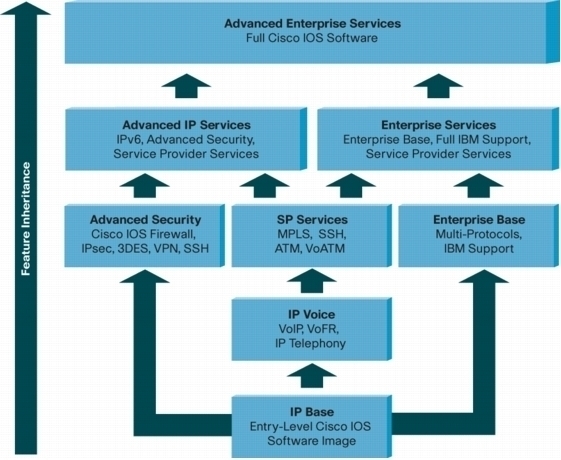
Knowing how to determine what release and what type of IOS is running on a switch or router is important and critical for proper router administration and configuration. Different IOS images possess different capabilities and features for example, if the IOS is pre-11.2 release, you can not configure integrated routing and bridging or NAT on that router or there is no support of named access lists on that router. Selecting the correct set of IOS feature and the exact version is essential to maintain optimal router and switch performance.
Cisco IOS Download
To download Cisco IOS for a given router or switch, three key elements to be aware of are as follows:
-
The platform of router and switch
-
Release
-
Software Feature Set
If you have the proper Cisco maintenance agreement then you have the privileges to download multiple IOS images directly from the official website of Cisco. Cisco has an"IOS planner" that guides you through the selection process of Cisco IOS under Software Centre on the Cisco website.
If you use the Cisco IOS planner, the first parameter to be selected is the platform of router or switch. Once a platform has been selected, then a major release must be selected. The recent router IOS releases are:
-
Cisco IOS release 10.3
-
Cisco OS release 11.0
-
Cisco IOS release 11.1
-
Cisco IOS release 11.2
-
Cisco IOS release 11.3
-
Cisco IOS release 12.0
-
Cisco IOS release 12.1
-
Cisco IOS release 12.2
-
Cisco IOS release 12.3
If you want the latest IOS releases then select Cisco IOS 12.4 download from the Cisco website.
Cisco IOS Commands
Here are the some basic Cisco IOS commands including in the Cisco IOS command line reference book and are used for configuring and verifying the configuration of the Cisco routers and switches:
-
ip address [address][subnet mask]: This command is used to configure ip address on an interface of the Cisco routers and switches.
-
bandwidth: This command is used for setting the bandwidth of the specific interface of the Cisco routers and switches.
-
shutdown: This command is used to shutdown a specific interface of the Cisco routers and switches.
-
interface fast Ethernet 0/x: This command is used for entering in the interface configuration mode of the Cisco routers and switches.
-
hostname [name]: This command is used to assign the hostname to Cisco routers and switches.
-
line vty 0 5: This command is used for entering in the lie VTY configuration mode of the Cisco routers and switches.
-
line con 0: This command is used for entering in the line console configuration mode of the Cisco routers and switches.
-
line aux 0: This command is used for entering in the line auxiliary configuration mode of the Cisco routers and switches.
-
login: This command tells the Cisco routers and switches to ask for password.
-
password [password]: This command is used to set the line password in the Cisco routers and switches.
-
enable password [password]: This command is used to set the password for entering the privileged mode of the Cisco routers and switches.
-
enable secret [password]: This command is used to set the encrypted password for entering the privileged mode of the Cisco routers and switches.
-
configure terminal: This command is used to enter the global configuration mode of the Cisco routers and switches.
-
show interfaces serial 0: This command displays the detailed information about a specific interface.
-
show interfaces: This command displays detailed information about all the interfaces of Cisco routers and switches.
-
show line: This command displays the status of all the lines in the Cisco routers and switches.
-
show running-config: This command displays the current configurations of the Cisco routers and switches.
-
show startup-config: This command displays the saved configurations of the Cisco routers and switches.
-
show version: This command displays the hardware and software status of the Cisco routers and switches.
-
show flash: This command displays the files and directories reside in the flash of the Cisco routers and switches.
-
show history: This command displays the last ten commands that you were performed in the Cisco routers and switches.
-
erase startup-config: This command erases the nvram of the Cisco routers and switches.

Chris Angulo
Currently, I believe Junipers Junos is a heavy competitor with Cisco devices. Signed by Cisco