

DNS Queries Overview
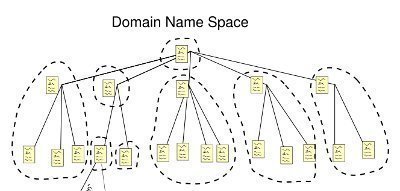
The naming system used by DNS is a hierarchical namespace, called the DNS namespace. The DNS namespace has a unique root. The root can contain numerous subdomains. Each subdomain also can contain multiple subdomains. Each domain registered in DNS is connected to a DNS name server. The DNS server of a domain provides authoritative replies to queries for that particular domain.
The DNS server manages the DNS database that resides on it. DNS server is authoritative for the contiguous portion of the DNS namespace over which it resides. Primary DNS servers own the zones defined in its DNS database, and can make changes to these zones. Secondary DNS server obtains a read-only copy of zones through DNS zone transfers.
Three query types exist for querying a DNS server for name resolution:
-
Iterative queries
-
Recursive queries
-
Inverse queries
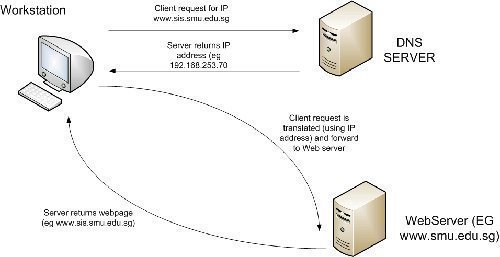
A DNS client queries a DNS server to resolve a host name into an IP address. The query contains the following important information: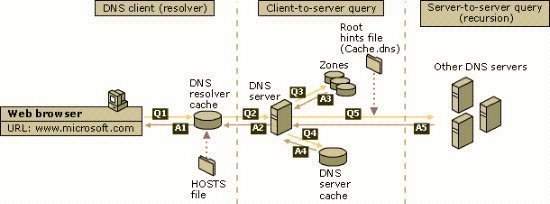
-
The DNS domain name in the FQDN format.
-
The query type
-
The class for the DNS domain name
When a DNS server is queried it can do one of the following:
-
Respond to the request directly by providing the requested information.
-
Provide a pointer (referral) to another DNS server that can assist in resolving the query
-
Respond that the information is unavailable
-
Respond that the information does not exist
The different query response types which can be returned from the DNS server are:
-
Authoritative answer: This is a positive response which is returned to a client. The authority bit set in the DNS message indicates that the reply was received from a DNS server that has direct authority for the name queried in the message.
-
Positive answer: This response type returns the queried resource record that corresponds to the name and record type queried in the original query.
-
Referral answer: A referral response is returned if the DNS server does not support recursion. A referral contains additional resource records for resolving the request.
-
Negative answer: A negative answer is returned to the client when the following events occur:
-
The name queried does not exist in the DNS namespace. This information is obtained from an authoritative server.
-
The authoritative server indicated that the name queried does exist in the DNS namespace. However, there are no resource records of this type present for the requested name.
-
If a DNS server cannot find the queried name in its zone information, or in its cache; the DNS server performs recursion to resolve the name. This is the default configuration for DNS servers. Recursion is the process whereby which the DNS server queries other DNS servers for the client. By the initial DNS server querying the other DNS servers, recursion actually ends up making the initial DNS server a DNS client! In order to perform recursion, root hints assist the DNS server in determining where in the DNS namespace it should commence searching for the queried name.
Root hints is a collection of resource records which the DNS Server service utilizes to locate DNS servers who are authoritative for the root of the DNS domain namespace structure. If you are using Windows Server 2003 DNS, a preconfigured root hints file named Cache.dns already exists. The file can be found in the WINDOWSSystem32Dns directory. Cache.dns contains the addresses of root servers in the Internet DNS namespace, and is preloaded to memory when the DNS Server service initiates. If however recursion is disabled for the DNS server, and the DNS server cannot find a match for the queried name in its zone information, or in its cache; the client begins to perform iterative queries. The root hint referrals from the DNS server are used for iterative queries. When a client erforms iterative queries, the client sends repeated requests to different DNS servers to resolve the queried name.
The process that occurs to resolve a name requested in a query is outlined below:
-
The resolver sends a recursive DNS query to its local DNS server, to request the IP address of a particular name.
-
Because the local DNS server cannot refer the resolver to a different DNS server, the local DNS server attempts to resolve the requested domain name.
-
The local DNS server checks its zones.
-
If it finds no zones for the requested domain name, the local DNS server sends an iterative query for the requested name to the root DNS server.
-
The root DNS server is authoritative for the root domain. It responds with an IP address of a name server for the specific top-level domain.
-
The local DNS server next sends an iterative query for the requested name to this name server who in turn replies with the IP address of the particular name server servicing the requested domain name.
-
The local DNS server then sends an iterative query for the requested name to the particular name server servicing the particular domain.
-
The name server responds with the requested IP address.
-
The IP address is returned to the resolver.
Understanding Recursive Queries
When a client sends a recursive query to a DNS server, the DNS server has to return either of the following responses.
-
The resource record containing the IP address that is associated with the host name that was requested.
-
An error message can also be returned to the client, stating that the host name or domain does not exist. When the DNS server does not find the queried name in its zone information, it starts querying other DNS servers. The error is only returned to the client when it cannot obtain the required information from any of the other DNS servers.
You can use the DNS console to disable recursive queries for a specific DNS server. In this case, the DNS server will only be able to use iterative queries.
Understanding Iterative Queries
When a client sends an iterative query to a DNS server, the DNS server returns the best answer which it can to the client.
The response can be either of the following:
-
The requested resolved name.
-
A referral to a different DNS server that could provide the information which the client requested.
Referrals are just pointers to a DNS server that has authority for a lower portion of the DNS namespace.
Understanding Inverse Queries
In an inverse query, the DNS resolver sends a request to a DNS server to resolve the host name associated with a known IP address. Only a thorough search of all domains would provide the correct answer. DNS resolvers are programs that use DNS queries to request information from the DNS servers. In Windows Server 2003, the DNS Client service performs the function of the DNS resolver. A DNS resolver can communicate and issue name queries to remote DNS servers, or to the DNS server running locally.
Understanding Forward Lookups and Reverse Lookups
These types of lookups or queries are defined below:
-
Forward Lookups: Forward lookups are also called forward queries. Forward lookups are used to resolve host names to IP addresses in the DNS domain.
Forward queries contain the following:-
SOA resource record.
-
NS resource record.
-
Any other record that ties the IP address to the FQDN (excludes the PTR resource record).
When forward queries are issued, they are dealt with as follows:
-
A resolver requests the IP address for a host name.
-
The forward lookup is sent to the DNS server.
-
The DNS server searches for an A type resource record that is associated with the host name in the request.
-
If the DNS server finds a matching A type resource record, the IP address is returned o the client.
-
If the DNS server does not find a match, it proceeds to query the other DNS servers.
-
-
Reverse Lookups: Reverse lookups are also known as reverse queries. The process that occurs when reverse lookups are sent is illustrated below:
-
A resolver requests the domain name for a specific IP address.
-
The reverse lookup zone is used to resolve the query. A reverse lookup zone contains PTR resource records. These records are used for reverse lookups to point to A resource records.
-
How to disable recursive queries for a specific DNS server
-
Click Start, Administrative Tools, and then click DNS to open the DNS console.
-
In the console tree, select the specific DNS server that you want to disable recursive queries for, and then select Properties from the shortcut menu.
-
When the Properties dialog box of the DNS server opens, click the Advanced tab.
-
Select the Disable Recursion option in the Servers Options list.
-
Click OK
Related Articles on DNS
Follow Us!