

Mcshield.exe is a third party software process that belongs to the McAfee On-Access Anti-virus Scanner. It is a real-time shield of the McAfee anti-virus software that continuously monitors files, folders, and programs that the user, the computer, and/or third party applications access in order to detect possible threats. Mcshield.exe is generally considered a safe program and does not pose a threat to the computer, although it does use large amounts of CPU memory and may slow the computer down.
How Mcshield.exe Works
Mcshield.exe works in the same way as other real-time shields as it monitors files that the user accesses. As Mcshield.exe analyzes each file, it compares that file to its built-in database of malicious programs and prevents the file from running if a match is made. While Mcshield.exe does not automatically remove malicious files that it recognizes, it alerts the user to the file’s presence and allows him/her to decide whether or not to remove the file.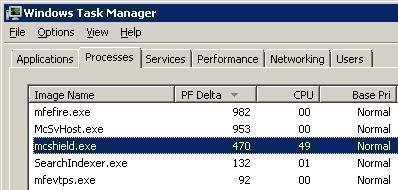
Is Mcshield.exe Harmful?
Mcshield.exe is not a harmful program, but viruses such as trojans, worms, spyware, and keyloggers may attempt to disguise themselves as Mcshield.exe in order to hide from the user’s anti-virus software. Users should be extra cautious if Mcshield.exe is found in the primary hard drive’s Common Files folder, as the real Mcshield.exe program is located in the Program Files folder’s subfolder. In order to be sure whether an instance of Mcshield.exe is the true software, the user should run an anti-virus software, such as Spyware Terminator, Advanced SystemCare, or Malwarebytes’ Antimalware, and frequently run additional scans to make sure any threat that is encountered does not return.
How to Remove Mcshield.exe
Mcshield.exe is a critical component of the McAfee Anti-virus software and disabling it will severely impact the program’s capabilities. However, if Mcshield.exe is using too much CPU or causing other problems, it can easily be prevented from running. The user can prevent Mcshield.exe from running by opening the Task Manager (Ctrl + Alt + Del), clicking the Processes tab, right-clicking Mcshield.exe, and selecting “End Process.” The user can also prevent Mcshield.exe from running when the computer starts up by opening the Start Menu, selecting “Run…,” entering “msconfig,” and clicking OK. The user can now click on the Startup tab in the window that appears, uncheck the checkbox for Mcshield.exe, click Apply, and click OK. The computer must be restarted before changes will take effect, but this can be done at any time.


Follow Us!