

Host Name Resolution Overview
In networks running the TCP/IP protocol suite, IP address information is used to forward packet to the destination computer. The packets that are transmitted over the network contain the IP address of the computer sending the packet; and the IP address of the destination computer intended to receive the packet. The IP addresses of computers therefore have to be both unique and correct so that they can be forwarded to the correct destination. IP addresses contain the network address and the host address.
A host name is assigned to a computer to identify a host in a TCP/IP network. Host names are assigned to computers by administrators. The maximum length of a host name is 255 characters, and can consist of both alphabetic characters and numeric characters. A host name can be defined in a number of ways. The more common methods used are:
-
A nickname: This is an alias to an IP address which individuals can assign and utilize.
-
A domain name: This is a set structured name that adheres to Internet standards.
Name resolution has to occur whenever the host name is used to connect to a computer and not the IP addresses. Host name resolution resolves the host name to an IP address. This name resolution has to take place so that the IP address can be resolved to the hardware address for TCP/IP based communication to occur.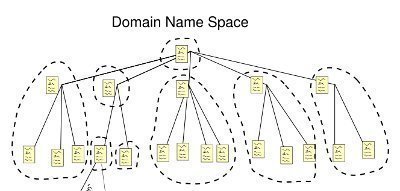
The common methods used to resolve host names are listed below:
-
NetBIOS name resolution: This is the process of mapping the NetBIOS name of the computer to an IP address. With NetBIOS, communication occurs between NetBIOS hosts via name discovery, name registration, and name release. The mechanisms that are used for NetBIOS name resolution are:
-
The local NetBIOS name cache can be used to perform a name lookup.
-
WINS server query: WINS is an enhanced NetBIOS name server (NBNS) which was designed by Microsoft to resolve NetBIOS computer names to IP addresses and at the same time eliminate the usage of broadcasts for name resolution. WINS registers NetBIOS computer names, and stores these client name registrations in the WINS database. The WINS database stores and maintain NetBIOS computer names to IP addresses mappings.
-
NetBIOS broadcasts to query the local network.
-
The local LMHOSTS file can be used to perform a name lookup.
-
-
HOSTS file: This is a text file that contains host names to IP addresses mappings. The HOSTS file is stored locally. Each entry in the HOSTS file has an IP address that is associated with one or multiple host names.
-
DNS server: DNS resolves host names and fully qualified domain names (FQDNs) to IP addresses in TCP/IP networks. The DNS server manages a database of host name to IP address mappings. This is the primary method used for name resolution in Windows Server 2003. The mechanisms that are used for DNS name resolution are:
-
The local DNS client cache can be used to perform a name lookup when a DNS query is received from a client.
-
A DNS server query.
-
You can configure a number of methods to resolve host names to IP addresses. You can specify the use of a DNS server, name resolution via the HOSTS file or with a DNS server, network broadcast, WINS server, and through LMHOSTS. When one method fails to resolve the host name to IP address, another method can be used. Only after each of the configured name resolution mechanisms fail to yield a host name to IP address mapping, does the specific IP address need to be provided to service the request.
DNS Overview
DNS is a hierarchically distributed database that creates hierarchical names that can be resolved to IP addresses. The IP addresses are then resolved to MAC addresses. DNS is the primary name registration and resolution service in Windows Server 2003. DNS provides a hierarchically distributed and scalable database; provides name registration, name resolution and service location for Windows 2000 and Windows Server 2003 clients; and locates domain controllers. The namespace used by DNS is a hierarchical namespace, or hierarchical system.
The DNS components and concepts are summarized below. While the remainder of this Article focuses on planning and implementing a DNS namespace, the DNS components and concepts listed below are used throughout the discussion.
-
Fully qualified domain name (FQDN): This is the DNS name that is used to identify a computer on the network. FQDNs have to be unique. The FQDN usually consists of a Host name, Primary DNS suffix, and Period.
-
DNS Name: A DNS name is a name that can include a number of labels that are segregated by a dot. When a DNS name displays the entire path, it is known as the Fully Qualified Domain Name (FQDN).
-
Alias: This is name used instead of another name. The Canonical Name (CNAME) is an alias name in DNS.
-
Primary DNS suffix: Computers running in a Windows Server 2003 network are assigned primary DNS suffixes for name registration and name resolution purposes. The primary DNS suffix is also referred to as the primary domain name, or domain name.
-
Connection-specific DNS suffix: This is a DNS suffix which is assigned to an adapter. The connection-specific DNS suffix is called the adapter DNS suffix.
-
DNS server: This is a computer running the DNS Server service that provides domain name services. The DNS server manages the DNS database it hosts. The information in the database of a DNS server pertains to a portion of the DNS domain tree structure or namespace. This information is used to provide responses to client requests for name resolution. The following types of DNS servers exist:
-
Primary DNS server: This DNS server owns the zones defined in its DNS database, and can make changes to these zones. A standard primary DNS server is a name server that obtains zone data from the local DNS database, thereby making the primary DNS server authoritative for the zone data that it contains.
-
Secondary DNS server: This DNS server obtains a read-only copy of zones via DNS zone transfers. A secondary DNS server cannot make any changes to the information contained in its read-only copy. DNS Notify is a mechanism that enables a primary DNS server to inform secondary DNS servers when its database has been updated. The mechanism informs secondary DNS servers when they need to initiate a zone transfer so that the updates of the primary DNS server can be replicated to them.
-
Caching-only DNS servers: These servers do not host zones, and are not authoritative for any DNS domain. The information stored by caching-only DNS servers is the name resolution data that it has collected through name resolution queries. A caching-only DNS server basically performs queries and then stores the results of these queries.
-
-
Root servers: A root server performs the following functions when a query cannot be resolved from the local zone files:
-
Returns an authoritative answer for a particular domain.
-
Returns a referral to another DNS server that can provide an authoritative answer.
-
-
DNS client: This is a machine that queries the DNS server for name resolution. To issue DNS requests to the DNS server, DNS resolvers are used.
-
DNS zones: A DNS zone is the contiguous portion of the DNS domain name space over which a DNS server has authority, or is authoritative. A DNS zone can contain one or more contiguous domains. A DNS server can be authoritative for multiple DNS zones. Zone files store resource records for the zones over which a DNS server has authority. The different types of zones used in Windows Server 2003 DNS are listed below:
-
Primary zone: This only zone type that can be edited or updated because the data in the zone is the original source of the data for all domains in the zone. Updates made to the primary zone are made by the DNS server that is authoritative for the specific primary zone.
-
Secondary zone: These zones store only a read-only copy of the zone that was copied from the master server during zone transfer. A secondary zone cannot be directly edited, and can only be updated through zone transfer.
-
Active Directory-integrated zone: This zone type stores its data in Active Directory. Zone data of an Active Directory-integrated zone is replicated during the Active Directory replication process.
-
Reverse lookup zone: A reverse lookup zone is an authoritative DNS zone. These zones are mainly used to resolve IP addresses to resource names on the network.
-
Stub zone: Stub zones only contain those resource records necessary to identify the authoritative DNS servers for the master zone.
-
-
Zone Transfer: A zone transfer is the process that occurs to copy the resource records of a zone on the primary DNS server to secondary DNS servers. A secondary DNS server can also transfer its zone data to other secondary DNS servers, who are beneath it in the DNS hierarchy. In this case, the secondary DNS server is regarded as the master DNS server to the other secondary servers. The different zone transfer methods are:
-
Full transfer: When you configure a secondary DNS server for a zone, and start the secondary DNS server, the secondary DNS server requests a full copy of the zone from the primary DNS server. A full transfer is performed of all the zone information.
-
Incremental zone transfer: With an incremental zone transfer, only those resource records that have since changed in a zone are transferred to the secondary DNS servers. During zone transfer, the DNS databases on the primary DNS server and the secondary DNS server are compared to determine whether there are differences in the DNS data. If the DNS data of the primary and secondary DNS servers are the same, zone transfer does not take place. If the DNS data of the two servers are different, transfer of the delta resource records starts.
-
Active Directory transfers: These zone transfers occur when Active Directory-integrated zones are replicated to the domain controllers in a domain. Replication occurs through Active Directory replication.
-
-
Queries: The types of DNS queries which can be sent to a DNS server are:
-
Iterative queries: The DNS server provides the best answer it can. This can be the resolved name or a referral to a different DNS server that can resolve the requested name.
-
Recursive queries: The DNS server has to reply with the requested information, or with an error. The DNS server cannot provide a referral to a different DNS server.
-
Inverse queries: The query sent to the DNS server relates to resolving the host name associated with a known IP address. All the domains have to be queried to provide a correct answer to the query.
-
-
DNS resolvers: These are programs that use DNS queries to request information from the DNS servers. In Windows Server 2003, the DNS Client service performs the function of the DNS resolver. A DNS resolver can communicate and issue name queries to remote DNS servers, or to the DNS server running locally. When a DNS resolver receives a response from a DNS server, the resolver caches the information locally. The local cache is used the following time that the same information is requested.
-
Resource records: The DNS database contains resource records (entries) that are used to resolve name resolution queries sent to the DNS server. Each DNS server contains the resource records it needs to respond to name resolution queries for the portion of the DNS namespace for which it is authoritative.
Determining DNS Requirements for the Network
One of the initial steps in designing a DNS namespace is to determine the DNS requirements for your network. For any network user to access the Internet, a DNS server is needed. When it comes to accessing the Internet, there are two options available. You can implement and manage DNS servers within your environment or you can use the DNS servers of your ISPs.
The requirements for hosting a internet domain are summarized below:
-
Register a second-level domain name.
-
Your DNS servers should have a registered IP address. The IP address must also be available on the Internet.
-
The IP addresses of your own DNS servers must be passed to the domain registrar.
If you choose to implement and manage your own DNS servers, you are not dependent on a third party when changes need to be made. You can change the configuration of your DNS servers, manage security for your DNS environment, and add and delete resource records hosted in zones. While you can use the DNS servers of your ISP, modifying any aspect of DNS could become cumbersome and costly.
The requirements for hosting Internet servers are summarized below:
-
Access to a registered domain hosted on the Internet.
-
Authoritative DNS servers for adding resource records which can assign host names to these servers.
Once again, you can use and register your own domain or you can use the DNS servers of your ISP.
The requirements for using Active Directory and DNS are summarized below:
-
A minimum of one DNS server running within your environment.
-
The DNS Server service must be supported.
-
The DNS server can support Active Directory clients irrespective of whether it has a internet domain name and registered IP address.
If you are planning to implement DNS name resolution for medium size and large size networks, it is recommended to deploy at least two DNS servers so that you can provide for fault tolerance.
To determine the route that your DNS namespace design should follow, you need to resolve the following issues:
-
Whether the organization has a registered domain name for Internet usage, and what that particular name is.
-
Whether the organization already has the use of a DNS server to host the domain.
-
Whether the DNS servers will operate on the Internet, or on the private network.
-
Whether a naming convention exists in the organization that should be adhered to when you define the computers' domain names.
-
Whether the DNS design should support your Active Directory environment.
Considerations for Creating Internet Domains
Domain names must be unique on the Internet. The public domain must be registered with the Internet Corporation for Assigned Names and Numbers (ICANN) through the use of an authorized registrar. This ensures that the public domain namespace remains unique. It is also important that an internal domain namespace be unique as well. The top-level domain names are basically used up already. Because of this, most organizations register a single second-level domain name and then use it for the purpose of hosting Internet servers.
If you cannot use the domain name which you want to, consider the following:
-
You can register the domain name which you want to use in a different top-level domain.
-
You can consider purchasing the existing domain name that you want to use from its owner.
-
Select a different domain and then use this name instead.
The methods in which you can deploy multiple sites on the Internet are:
-
You can register multiple second-level domains by paying for each name which you need. This strategy is recommended for an organization that has numerous operations or product lines. When registering multiple second-level domains, remember that you have to manage a distinct DNS namespace for each inividual domain.
-
You can alternatively register a second-level domain, and create numerous subdomains underneath your registered second-level domain.
Considerations for Creating Internal Domains
If you want to create internal domains, you can also create both domains and subdomains to mirror the structure of the organization. If you have an existing Active Directory structure, then the DNS namespace design for your internal network should correspond to your existing Active Directory directory service hierarchy.
The names which you select for your internal domains have to adhere to certain standards and rules:
-
It is recommended to not have more than five levels stemming from the root.
-
It is important to have acceptable administration costs, and FQDNs which you can administer.
-
The domain names which you choose should represent the organization.
-
You should use unique names throughout the organization.
-
The domain names should be short names, but descriptive enough so that you can remember them. The longer the domain name, the longer the FQDNs would be.
-
Choose simple, easy to spell domain names.
-
Only legal characters should be used for the domain names. Legal characters are characters which are supported by the operating systems being used.
-
It is also important to steer clear of using vague abbreviations for your domain names. If you have to use abbreviations, use ones that can be recognized.
-
If you are going to be creating subdomains, it is important to establish a standard naming convention and abide by it.
If the internal namespace is for a network which accesses the Internet, a few additional domain name naming rules apply:
-
It is recommended to use registered domain names, even though this not a stringent requirement.
-
You should use characters which are compliant with the Internet standard. RFC 1123: Requirements for Internet Hosts-Application and Support defines a set of naming rules for host names:
-
Uppercase letters: A – Z
-
Lowercase letters: a – z
-
Numbers: 0 – 9
-
The hyphen (-)
-
-
You should refrain from using top-level domain names or domain names of well-known companies and products.
Designing a DNS Namespace that includes Internal and External Domains
If the DNS namespace which you have to design needs to consist of internal domains and external domains, use either of the following strategies:
-
You can use different names for the internal namespace and external namespace. This solution eliminates the likelihood of name resolution conflicts which are typically caused when the same domain name is used for both the internal and external namespace. The main disadvantages of using different names for the internal namespace and external namespace are the cost associated with registering both names, and the administrative effort required to manage different namespaces.
-
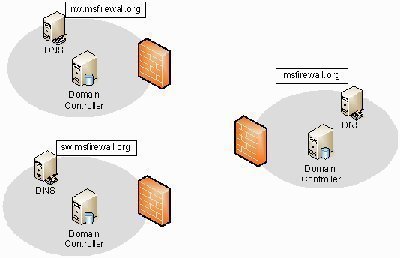
You can register and use one Internet domain name for the external namespace, and then create subdomains below it for the internal network. This is the solution which is recommended by Microsoft. The advantages associated with this strategy are:
-
The administrative effort required to manage and maintain the DNS namespace can be minimized.
-
Users can easily connect to resources when the same contiguous namespace is used.
-
-
You can use the same domain name for both the internal namespace and external namespace. It is fairly obvious that this strategy is not recommended!
The DNS Namespace Design and Networking Services Integration
Active Directory Integration
When DNS and Active Directory are integrated, the DNS server is used to locate the domain controllers in Active Directory domains. Active Directory provides a centralized repository of information, or data sore that can securely manage the resources of an organization. Active Directory makes it possible for different types of information to be stored in a centralized distributed database. The Active Directory directory services ensure that network resources are available to, and can be accessed by users, applications and programs. Because all information stored in Active Directory is located in one centralized, distributed data store; administrative requirements are reduced, the availability of security information is increased, and there is an improvement in the structure of information.
The advantages of integrating DNS with Active Directory are summarized below:
-
The need to manage your Active Directory domains and DNS namespaces as separate entities is eliminated. This in turn reduces administrative overhead.
-
When Active Directory-integrated zones are used, the zone data is stored in Active Directory and not in the Zones file. An Active Directory-integrated zone is a zone that stores its zone data in Active Directory. The Active Directory replication topology is used for Active Directory replication, and for Active Directory-integrated zone replication. There is no longer a need for DNS replication when DNS and Active Directory are integrated.
-
Active Directory replication is faster, which means that the time needed to transfer zone data between zones is far less.
-
When DNS and Active Directory are integrated, the Active Directory-integrated zones are replicated and stored on any new domain controllers automatically. Synchronization takes place automatically when new domain controllers are deployed.
-
Active Directory-integrated DNS zones can use the security features of Active Directory. You can use Access Control Lists (ACLs) to secure DNS objects which are stored in the Active Directory database.
DHCP Integration
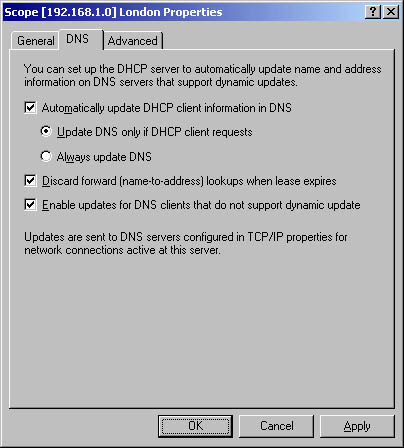
If you have the Windows 2000 or Windows Server 2003 DHCP service installed, you can configure the DHCP server to register the A resource records and PTR records for DHCP enabled clients. DHCP can also be used to configure down-level clients as DHCP clients. You can set up the DHCP server for DNS integration using a few methods:
-
Configure the DHCP server to never register and update information in DNS.
-
Configure the DHCP server to update A and PTR records only if requested by DHCP clients.
-
Configure the DHCP server to update A and PTR records for DHCP clients that do not request updates.
-
Configure the DHCP server to always dynamically update A and PTR records.
-
Configure the Discard A and PTR records when lease is deleted option.
WINS Integration
When WINS and DNS are integrated, DNS is able to query the WINS server database on behalf of its clients for name resolution after the query cannot be resolved in DNS. WINS registers NetBIOS computer names, and stores these client name registrations in the WINS database. The registrations are used when clients query for host name resolution and service information. WINS can resolve NetBIOS names for local hosts and remote hosts.
The process that occurs to resolve names when DNS and WINS are integrated is illustrated below.
-
The name resolution query is sent to the preferred DNS server.
-
This preferred DNS server than passes the query to the authoritative DNS server for the particular zone.
-
The authoritative DNS server sends the request for name resolution to its specified WINS lookup server.
-
The specified WINS lookup server resolves the name into its associated IP address.
-
The IP address is returned to the authoritative DNS server for particular zone.
-
The authoritative DNS server returns the IP address to the preferred DNS server.
-
The preferred DNS server returns the resolved query to the original client that sent the query for name resolution.
Determining DNS Zone Requirements
A standard primary zone typically includes the deployment of:
-
A primary DNS server, which can be updated
-
One or multiple secondary DNS servers which are contain read-only copies of zone data.
When determining zone requirements for your DNS design, consider the events that trigger zone transfers between primary and secondary DNS servers:
-
The DNS Server service is initiated on a secondary DNS server.
-
The master server informs the secondary DNS server that its zone data has been updated, and therefore needs to be replicated.
-
The refresh interval for the particular zone is reached.
-
The secondary DNS server starts a zone transfer from its configured master server.
If you are going to be implementing Active Directory-integrated zones, you can choose between the following zone replication scope options:
-
To All DNS Servers In The Active Directory Forest option: Zone data is replicated to all DNS servers running on domain controllers in the Active Directory forest.
-
To All DNS Servers In The Active Directory Domain option: Zone data is replicated to all DNS servers running on domain controllers in the Active Directory domain.
-
To All Domain Controllers In The Active Directory Domain option: Zone data is replicated to all domain controllers in the Active Directory domain.
-
To All Domain Controllers Specified In The Scope Of The Following Application Directory Partition option: Zone data is replicated based on the replication scope of the particular application directory partition.
Determining the Number of DNS Servers
The factors to consider when you plan the number of DNS servers needed for your environment are summarized below:
-
A Windows Server 2003 DNS server on a 700 MHz Pentium III computer with 256MB RAM can cope with as many as 10,000 queries per second.
-
The recommendation for a Windows Server 2003 DNS server are:
-
Pentium II computer running at 400 MHz
-
256MB RAM
-
4GB hard drive
-
Network adapter
-
-
A DNS server can host a number of different zones.
-
A DNS server can have more than one role.
-
The more zones you plan to host, the more RAM each server should have.
-
The size of the zone file, and the resource records which are going to be stored in the DNS zone would influence the server which you need for the specific zone.
-
If you are dealing with unreliable WAN links, consider implementing secondary DNS servers on the remote network.
-
If you are dealing with reliable, high-speed WAN links, consider using a central DNS server to resolve queries from clients which are in remote subnets.
-
Consider deploying multiple DNS servers for the following reasons:
-
If you are primarily dependent on DNS name resolution, you should deploy the number of DNS servers which would ensure that two copies of each zone are online. This strategy provides redundancy.
-
If your DNS server is constantly going to be flooded with queries from clients, consider deploying multiple DNS servers to load balance client requests.
-
If you want to speed up the name resolution process, and at the same time load balance DNS query requests, deploy multiple DNS servers on different subnets.
-
If your network has LANS at many sites that are connected by multiple WAN links, you should deploy a DNS server at each site. This strategy reduces WAN traffic.
-
If you want to ensure improved name resolution performance for your DNS clients, deploy multiple DNS servers.
-
If you are integrating DNS and Active Directory, consider deploying multiple DNS servers to support Active Directory requirements.
-
If you want to delegate administrative authority of the DNS namespace, you need to break up the namespace into a number of domains. You can deploy a DNS server for each domain if it is appropriate for your networking environment.
-
Determining DNS Server Placement
When you are determining where to locate your DNS servers, remember that placement of your DNS servers should: Ensure both DNS Server service and Active Directory directory service availability. A few recommendations and considerations for determining placement of your DNS servers are summarized below:
-
You should install two (minimum) authoritative DNS servers on segmented LANs.
-
You should deploy an authoritative DNS server for each geographic region.
-
If DNS zone transfer is generating too much traffic over slow WAN links, you should use a forwarding server in remote areas.
-
Because DNS requires at least two DNS servers for each zone, place these servers at each zone to ensure fault tolerance.
-
For remote subnets that have users which are greatly dependent on DNS for name resolution, consider deploying a secondary DNS server to cater for occasions where the DNS server's router fails.
Determining DNS Server Roles
There are a number of DNS server roles that you can install if you are running Windows Server 2003. Each server role and its associated function are briefly discussed in the following section.
Authoritative name servers are name servers which obtain zone data from the local DNS database. You should deploy at least two authoritative name servers for each DNS zone that you plan to create.
The following types of authoritative name servers can be installed and deployed:
-
Primary master DNS server: This is an authoritative name server which contains the zone file database and resource records that can be updated. You can configure a Windows 2000 domain controller or a Windows Server 2003 domain controller as a primary master DNS server. For all zone types, other than Active Directory-integrated zones, there should only be a single primary master DNS server for each zone of authority.
-
Secondary DNS server: These servers contain a read-only copy of zone information. A secondary DNS server obtains zone data from its configured primary master DNS server during DNS zone transfer.
You can store zone information in Active directory if you are running Windows Server 2003 or Windows 2000. The Active Directory directory service ensures that zone information remains synchronized between the DNS servers.
In addition to authoritative DNS name servers, you can also install and configure the following DNS server roles:
-
Caching-only name servers: When a server is configured with the caching name server role, the server only performs queries for DNS. The server is not authoritative for any DNS zones. Once a query forwarded by a caching-only name server is resolved, the caching-only server caches the response from the DNS server, and then uses its local cache to respond to queries from clients.
-
Forwarding servers: A forwarding server sends queries to a predefined number of name servers or forwarders until it receives a response. A server is a forward-only server if recursion is disabled. A conditional forwarder is another role which can be configured; by configuring the domain name and IP addresses of the name servers which resolve host names in your domains.
-
Nonrecursive servers: These are servers that can only respond positively to queries for resource records in zones that they are authoritative for. Recursion is disabled on nonrecursive servers.
When planning for deploying forwarders, consider the following:
-
You can use forwarders instead of using secondary zone files over slow WAN links.
-
You can use forwarders to reduce the number of DNS servers which need to communicate among each other over firewalls.
-
You can deploy multiple forwarders, and enable recursion for queries that fail, to ensure fault tolerance.
How to create a DNS Namespace
-
Insert the Windows 2003 Server CD-ROM into the CD-ROM drive.
-
Click Start, Control Panel, and then select Add or Remove Programs.
-
Click the Add/Remove Windows Components.
-
Select Network Services from the list of components, and then select Details.
-
Select the checkbox alongside Domain Name System (DNS) in the Network Services Subcomponents dialog box. Click OK.
-
Click Next to install the DNS service.
-
Click Finish.
-
Click Start, Administrative Tools and then click DNS to open the DNS console.
-
Click the This Computer option when you are prompted to connect to the DNS server, and then click OK.
-
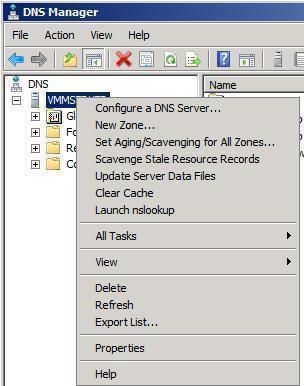
When the DNS console opens, right-click the DNS server name, and then select Configure a DNS server from the shortcut menu.
-
The Configure a DNS Server Wizard starts.
-
Click Next on the initial screen of the Configure a DNS Server Wizard.
-
For the type of server to configure, click Create forward and reverse lookup zones and then click Next.
-
Click the Yes, create a forward lookup zone now option to create the forward lookup zone immediately. Click Next.
-
Select the Primary Zone and then click Next.
-
Enter a name for your DNS zone, and click Next.
-
Accept the default filename and click Next.
-
Ensure that the Do not allow dynamic updates option is selected, and then click Next.
-
To immediately create a reverse lookup zone, click the Yes, create a reverse lookup zone option. Click Next.
20. Select the Primary Zone type and then click Next. -
Enter network ID for the zone, and click Next.
-
Accept the default filename for the reverse lookup zone file and click Next.
-
Ensure that the Do not allow dynamic updates option is selected, and then click Next.
-
Select the No, it should not forward queries option when prompted for information on forwarders. Click Next.
-
Click Finish to create the DNS namespace.
Follow Us!