

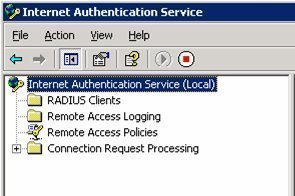
Internet Authentication Service (IAS) is Microsoft's implementation of a RADIUS (Remote Authentication Dial-in User Service) server and proxy. As a RADIUS server, IAS performs centralized connection authentication, authorization, and accounting for many types of network access, including wireless and VPN (Virtual Private Network) connections. As a RADIUS proxy, IAS forwards authentication and accounting messages to other RADIUS servers.
The Authentication and Authorization Processes
When a user tries to connect to a dial-up connection server or a Network Access Server (NAS)/Virtual Private Network (VPN) Server the following authentication requests are performed:
- When the clients has been connected successfully over PPP initially the NAS server will negotiate the connection terms with the client to use the most securest form of authentication protocol to the least secure protocol supported by the client. For example, a NAS server will negotiate the protocols in the following order, EAP, MS-CHAP V2, MS-CHAP, CHAP, SPAP and PAP.
- Next, the NAS server would be configured to forward the authentication request to either an IAS (RADIUS) server or a Domain Controller directly.
-
If the NAS server has forwarded the request to RADIUS then, the RADIUS Access-Request packet will be sent from the NAS server (which will be configured as a RADIUS-Client) to the IAS Server. IAS server will look into the packet to identify the RADIUS-client source IP address. Once it has been verified that the request has arrived from a trusted RADIUS-client, the IAS server matches the digital signatures (containing the Shared-Secret) which are enabled on the RADIUS-Client. A shared secret is a text string or challenge, used a password to verify the RADIUS Client-Server trust without which the connection would probably break. Therefore, it is very important to configure the RADIUS server and client with this shared secret. Make sure following steps are followed in setting up a Shared secret:
- Shared secret text string must match on both server and client
- The text string is case sensitive
- The text string can be made up of standard alphanumeric or special character set.
- Once is the IAS server finds a digital signature present in the Access-Request packet, it will go ahead and verify that. And incase the verification fails for some reason or is not present then IAS will kill those packets without any notification to the NAS server. NAS would keeping the connection until the TTL (time to live) value expires it retires to connect to the backup IAS server and incase of failure it throws up an error and disconnects the user. Now if the primary IAS server is unable to reach the DC, call gets redirected to the backup IAS and if the backup server is unable to find the DC, then the IAS server will kill the packets silently.
- The IAS server validates the user credentials against the Domain Controller.
- Once the user credentials have been validated the IAS server then checks the user properties and permission against the remote access policies configured at the dial-in tab under user properties in active directory. Once the conditions mentioned in the remotes access policies matches along with the user dial-in permission, remote access policy properties and finally the remote access profile properties, the IAS server will send the Access-Accept packet to the client in reply to the Access-Request by authorizing the user connection to the NAS server. Now, incase the user credentials do not pass through the Active Directory or the condition specified in the remote access policies , the IAS server send an Access-Reject packet to the NAS and the NAS kills the user connection.

Follow Us!