

In most cases, disabling the firewall on a Netgear router is a really bad idea. In fact, it is such a bad idea that Netgear does not even make a button in their GUI that does this.
Nevertheless, users can effectively disable a Netgear router firewall just by adding a rule or two to the firewall configuration.
Netgear Router Firewall Default Rules
Netgear devices with firewalls have two default rules:
- Outbound Services: Allow all access from the inside to the outside.
- Inbound Services: Block all access from the outside to the inside, except responses to requests from the inside.
How to Disable the Netgear Router Firewall
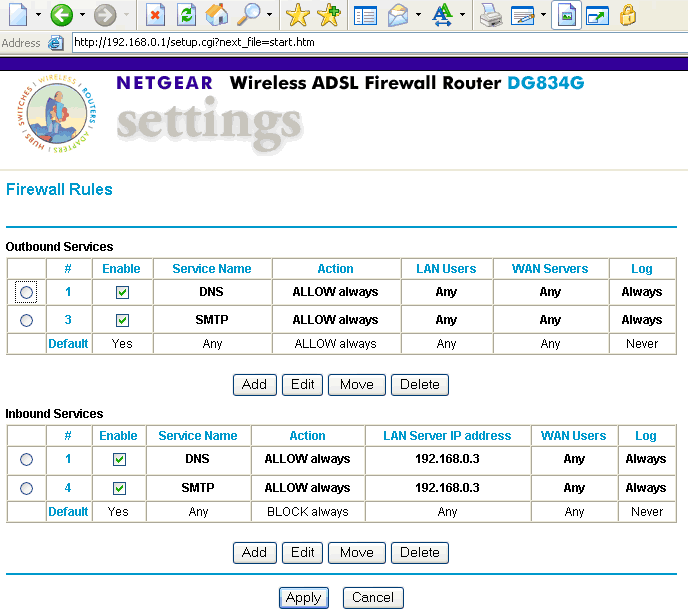
To disable the Netgear Router Firewall, add a new rule that allows all access from the outside to the inside.
To do this, type the router’s address (the default is either 192.168.0.1 or 192.168.1.1) in the Web browser
Enter the username and password in the prompt that appears. The default username is admin and the default password is password.
From the main menu, choose Security -> Rules
Add a new rule for Inbound Services with a service name of “ANY” and an action of “ALLOW always.”
Then, move the new rule up until it is the first rule in the Inbound Services section.
Finally, make certain that this rule is enabled by checking the Enable column.
The Netgear Router firewall is now disabled and the internal network is now completely unprotected and open to attack from the Internet.

disqus_bmeFh72Y1Q
so what if the firewall blocks the browser? cause it did it to me.. ?
SententiaeDeo
Is there a way to change the DNS server of this router? thanks
Kusi
My neatgear router wireless is detected on my Window 7, Samsung laptop, but there is no internet access when connected to my modem.
What solutions exit for me please?
Kerouac
Pay your internet bill.
any
I didnt ask neatgear to block any sites on my computer. I suddeny cant get on facebook and need to know what to do to get this site unblocked???
thank you much!
becky henning
Netgear popped up out of the blue and now i’m unable to change sound or access certain AARP games
becky henning
netgear popped up above the sound icon and now i can’t change or enable sound on my computer?
Mosquito Magnets
Thanks for the tip. I’m going to try this. Do you have similar guides for other routers, as well?
grec530
DI-524 linksys is blocking access to only certain websites and I cannot figure out why. Did the 192.168.0.1 and looked around; nothing is blocked nor does it list any websites. Also looked at the Hosts file and that doesn’t list anything either. Have used my laptop on a different WAN and all websites work. Tired connecting wirelessly with a friends comp and it blocks them for him too. HELP
BET
My question is somewhat different than most here… my Netgear WGR614V4 has worked flawlessly for about 7 or 8 years. Now, however, it has suddenly STOPPED displaying the “blocked by Netgear” page for a blocked site and simply displays one of those wonderfully vague “Internet explorer is unable to display the page….” screens. I reset the modem back to factory defaults and then restored the settings from the current backup file with no change. I’m considering re-loading the firmware, but Netgear’s download site appears to be down for maintenance at the moment… any suggestions on how to restore the “blocked by netgear…” page?”
Thanks
Aquah Moses
my skype have been block by netfearfirewall
alexis
hello.. at 1 am i can’t open some websites anymore.. it says website blocked by netgear firewall.. so basically.. there is a timer.. if I’m still fb before 1 am.. then i’m good.. but if it’s already 1 am and i’m about to open a facebook.. then it won’t allow me.. i need help for this..
jose
Help please, is it ok, if i have my Netgear firewall and my Avg firewall running at the same time? should i disable Netgear firewall?…
carter
I didnt ask neatgear to block any sites on my computer. I suddeny cant get on facebook and need to know what to do to get this site unblocked???
thank you much!
Anon
Okay so my situation is this:
I have a Netgear router firewall block on several sites I use. That’s fine, he doesn’t know about proxies (and it’d be a bitch to try and block all of them anyways), so it doesn’t really impede my ability to navigate the web.
However, the problem is that one of the sites that is blocked, is the one which allows me to connect to an online game (it’s an actual computer game, not some flashgame I can use a proxy to play). I was wondering, since the default password/username of my Netgear has been changed (and resetting it would obviously alert the person who knows the username/password), if there’s anyway I can still play the game?
Is it possible through a VPN? Is there anyway to do this?
If worst comes to worse, could I buy my own router and still get it to go through the Airport Extreme tied to the Netgear, without that Netgear being used? How does that work?
I would be very grateful if someone could answer any of those questions.
baljinder
my brother block the facebook nad youtube site only….
when i try to open facebook and youtube….and then netgear firewall block like that msg coming…..how can i use this sites…
Jasmine
Ok so I go to a private school and they blocked youtube && some gaming sites && we wanted to know how to disable the firewall…
Megan
the same thing happened to me but I don’t want to disable it beacause it says it is a bad I idea I have no clue what to do
Joe Luck
Hello !
I was locked out of facebook and youtube by an admin at work soI followed these instructions and then reached the part where it said to enter the username and password. So i tried “admin” as the username and “password” as the password and it didnt work, so looking on the back of the router i noticed a tiny hole and I remembered from experience with a games console I used to have that this could be a reset button so I pushed a paperclip in and held it there for 10 seconds. The lights flashed and suddenly I could get into the admin section. I gave it a new password and then was hapily surfing the web and was just about to take a work break for 15 minutes when a few of the IT guys came bounding in and started looking at the router. They knew someone had been at it and s about 200 computers in the office upstairs could no longer connect. The boss asked me if I had done it and I just said no but he didnt believe me and then one of the IT workers pointed out that it could only have been one of three people so suspicion fell on me a second time. I managed to get revenge though as later I went into the server room and randomly rewired all the servers, routers and telephone systems.
memenode
Dude, you’re obviously not afraid to live dangerously, but that was very bad what you did. 😛
I’m guessing the revenge was for losing your job, right?
jessica
I want both site that default netgear firewall but is authorized.I guess troubleshooting is blocking it.Can someone help me?
mykiell winneme
pls why is facebook blocked by netgear. how do i unblock this and get back to work?
zeffan
Netgear devices do not inherently block Facebook. If it is blocked, then it may have been done by your network administrator. If it is your home router, then you may want to try setting it back to factory defaults (info on how to do this is in your manual). If that doesn’t work then you may ask an IT-savvy friend to look into it for you.
Richard
Hi,
Basically I have the username and password for my router and am blocking some sites. However, i wish to use the sites but not let anyone else use them. How can I use my privileges to get around the system?
Thanks
Will.Spencer
When routing packets, the router doesn’t know whose packets they are. A good router will let you apply an access list to only some IP addresses inside your network. This would enable you to allow packets to from the IP address of your computer, but not the IP addresses of the other computers in your network. I do not know if this is within the capabilities of your NetGear device.
Tijuana
I am attempting to enable the wifi on my samsung blu ray player. I am not able to connect to the internet. I talked with a samsung tech and he told me that i had to disable my firewall on my router. I have tried to use the directions given but i am not finding where it says security–rules. I could use some help…..thank you
Will.Spencer
What model of NetGear router do you have? What do you see on your screen?
Tijuana
netgear WNR2000
When setting up the wireless part of the blu ray everything seems to be going ok. after it “connects” to the access point, it asks to connect IP automatically or manually. If i do automatically it reads: Mac Address “check”, then where it has IP address, subnet mask, gateway, DNS server there it is marked “X”
Tijuana
i attempted to do it manually and when i do the network test the mac address, and IP address, subnet mastk, gateway, DNS serve arer all “check”
Now the Gateway Ping is marked “X”
Raja BD
Respected Sir
I am using FRING software on wifi mobile. before on my previous router I disable Firewall Option then that software works properly but now on new NETGEAR DGN1000 Router I didn’t found Firewall option.
Kindly Please advise how I can disable firewall for using FRING software.
memenode
Look for NAT (Network Address Translation) in basic settings in the router. There should be a disable option under that according to the manual.
BallerSupreme
Are you playing the game on a Pc, Mac, iPhone, PS3 or XBOX360?
vicky wallbank
🙁 ive got a new game but cant play it online due to the netgear box ive tried turning off firewall but still its not working any ideas??
Daniel Memenode
Originally posted by Killer Moon: “Originally posted by May.Rich: “Hi, my dad recently blocked me from a site using Netgear Firewall. I was wondering, how do i unblock a site from that Firewall? -Thanks! :D”
Thats really what I want to know too. I tried a proxy. The first time it worked great. But then the next time it was really slow and weird, and I think it gave me a virus.”
Proxies are sometimes slow so it didn’t necessarily give you a virus.
To unblock a site from a firewall you need access to the router. The article explains the rest. If you don’t have the username and password and the default ones don’t work then the only other thing you can do is reset the router by pressing the reset button, if you’re allowed to. Then the default username and password should work.
Killer Moon
Originally posted by May.Rich: “Hi, my dad recently blocked me from a site using Netgear Firewall. I was wondering, how do i unblock a site from that Firewall? -Thanks! :D”
Thats really what I want to know too. I tried a proxy. The first time it worked great. But then the next time it was really slow and weird, and I think it gave me a virus.
Shawk
I tried to unblock a site according to your instructions, but unfortunately the default username and password is not accessible.
what I have to do?
Daniel Memenode
Originally posted by katy: “what do you mean by To do this, type the router’s address (the default is either 192.168.0.1 or 192.168.1.1) in your Web browser
im having trouble figuring out where to put those numbers… do we but them before the http? or instead of the http?”
You don’t have to put the “http” in. Just enter that address into the address bar (where you usually put in www addresses).
katy
what do you mean by To do this, type the router’s address (the default is either 192.168.0.1 or 192.168.1.1) in your Web browser
im having trouble figuring out where to put those numbers… do we but them before the http? or instead of the http?
Ender
i tryed it but is does not work 🙁
Daniel Memenode
Employee, the person will know that the block was removed and that someone accessed, but I’m not sure if he (or she) would know it was you who did it. If they have some kind of a tracking method, especially if you use company computers, then they might know.
If something was blocked at work though it’s probably not the best idea to unblock it by yourself. If you really have to get to the blocked site you could use a proxy instead.
EMPLOYEE
THE ADMIN. @ MY WORK BLOCKED ONE OF MY FAVORITES’ SITES USING THE NETGEAR
I WANT TO ASK, IF I TRIED TO UNLOCK THIS BLOCK, WILL THAT PERSON KNOW THAT I REMOVED THE BLOCK, AND ACCESSED THE ROUTER
Daniel Memenode
You could try the instructions in the article above to get into the router, and then look for firewall settings. It might very well be blocked as a rule among Security -> Rules. See if you can find it.
If you unblock it though chances are your dad will see it and just block it again, or worse. :S
I would then suggest using a proxy to visit the blocked site. This way you still get to access it, and the parent wont even know, and you wouldn’t have to touch the router.
Of course, if your parent uses this tactic to keep you behaved, I think you need to have an honest talk with him about values and boundaries. Both of you should know prohibition never yielded good results.
May.Rich
Hi, my dad recently blocked me from a site using Netgear Firewall. I was wondering, how do i unblock a site from that Firewall? -Thanks! 😀