

On occasion, Facebook and other popular sites such as Orkut, YouTube, and Hulu may block users. Fortunately, users may use a proxy to unblock themselves. However, this may not work as Facebook and similar sites rely heavily on javascript for basic functionality. That is to say, although the user will be able to visit the site, using any web proxy without javascript enabled will not work.
Therefore, Javascript enabled proxies may solve this problem. Many proxies do not support this, but those that do are not enabled by default. There is often a "Remove Scripts" checkbox that should be unchecked for javascript to work. "Allow cookies" should be checked. The same should apply for other javascript heavy sites. Hulu users must find a proxy in the US.
This proxy list may have some web proxies that work, but most of them have problems accessing Facebook and other pages. Some of them are infested with ads that make it impossible to enter login information.
HTTP port proxies are probably the best options. They are IP addresses and ports that are entered into the browser proxy settings so the browser goes through them when it tries to fetch a web site. Such proxies can be found on Anonymous, High Anonymity, CoDeeN, Transparent, and Non Transparent proxy lists.
Here are a few recently tested CoDeeN proxies. If they stop working, please alert the author of this article in the comments section so that the list can be updated:
- 203.178.133.2:3124 (Japan)
- 174.142.24.201:3128 (California)
- 222.165.130.82:3128 (Sri Lanka)
- 149.169.227.129:3127 (US)
- 189.115.182.22:3128
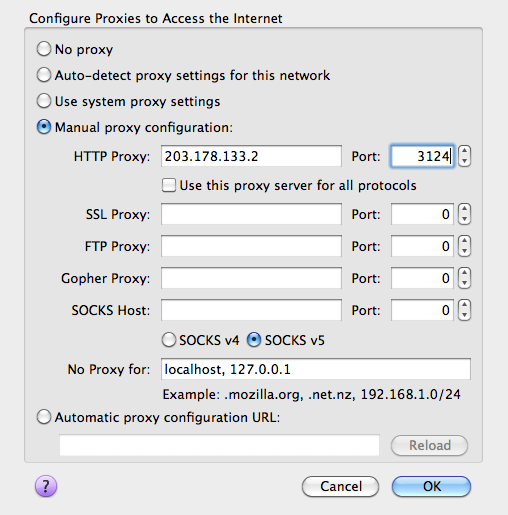
To use these proxies in Firefox, open Firefox preferences by going to Tools, Options (or Firefox > Preferences on Mac), then to Advanced Network, and click Settings to get to a page for configuring proxies. Click "Manual proxy configuration" and put the IP address in the HTTP Proxy field, and the port in the Port field. The port is the number after : in the above addresses.
It should look something like this when the first proxy above is entered in:
Chrome users should go to the Chrome menu (  ), then Preferences, then go to the "Under The Hood" tab and click on the "Change proxy settings" button in the Network section to access the operating system's proxy settings.
Once the proxy is set up, go to Facebook.com and the browser should load over a proxy. If the proxy does not work, go back to the list and try another until one works.
After logging on to Facebook successfully, the site might tell the user that he/she is visiting from an unknown location (the location of the proxy server) and that it wants to verify the account. Just follow the steps and everything will be fine. Account verification might involve answering a captcha, answering one of the user's secret questions, or recognizing and selecting friends from pictures.


huirangi
what if the proxy site has been blocked by the admin?? then what could i do??
Malayakanta Parida
any body blocked my facebook site in my laptop..so plz help me anyway to active this..
Mark Ackley
You can access Facebook From School using AnchorFree’s Hotspot Shield VPN.
Check it out here: http://www.access-facebook-from-school.com
Its reliable and easy to use and provides unlimited bandwidth.
Brian
It`s No wonder these FB Pricks had their stock fall 25% in 1 week.
I always said that they were way over rated & Over Valued.
What people need is a New site to go on to meet friends & play games.
That will make Facebook disappear the way MySpace did !
mouni
by mistake i clicked on block images from external.ak.fb and all the images and profile pictures of my facebook account were not getting displayed please sent me the relevant answer.
rey
i want to remove the program that blocks all of my system, please help me
diya
my facebook accound as blocked i try to open it but i cant plz help me on this
isa
Is it possible to access sites blocked by a network firewall by configuring a proxy this way?
I tried but I always get the “Problem loading page” message
Thanks
memenode
I think it’s possible, but your firewall might be blocking some of these IP addresses or at least ports. You could try an easy ProXPN VPN to get around the firewall, but I’m not 100% sure it will work. I think it depends on what exactly is the firewall blocking.
Jenqin Shi
hey, im in china and i cant go through my facebook account.. im a windows 7 user.. how can i unblock my facebook? 🙁 help plss.
joeboyyyyy
i really wanna get on fb but i just simply cant