

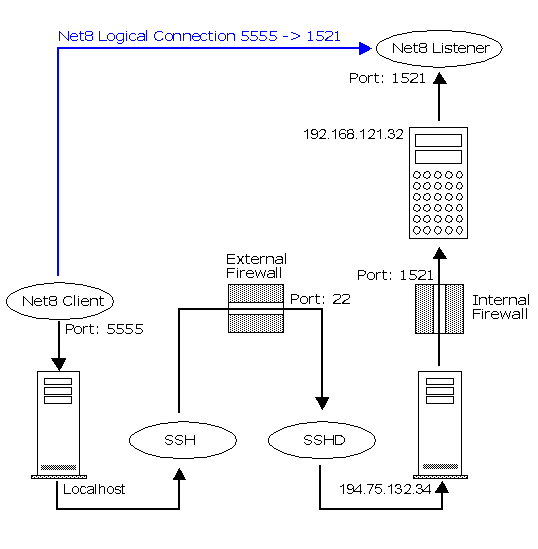
Port forwarding, also known as tunneling, is basically forwarding a network port from one node to the other. This forwarding technique allows an outside user to access a certain port (in a LAN) through a NAT (network address translation) enabled router.
Advantages of Port Forwarding
Port forwarding basically allows an outside computer to connect to a computer in a private local area network. Some commonly done port forwarding includes forwarding port 21 for FTP access, and forwarding port 80 for web servers. To achieve such results, operating systems like the Mac OS X and the BSD (Berkeley Software Distribution) will use the pre-installed in the kernel, ipfirewall (ipfw), to conduct port forwarding. Linux on the other hand would add iptables to do port forwarding.
Downsides of Port Forwarding
There are a few downsides or precautions to take with port forwarding.
- Only one port can be used at a time by one machine.
- Port forwarding also allows any machine in the world to connect to the forwarded port at will, and thus making the network slightly insecure.
- The port forwarding technology itself is built in a way so that the destination machine will see the incoming packets as coming from the router rather than the original machine sending out the packets.
Common Applications of Port Forwarding
Port forwarding is widely used, especially in offices, schools, and homes with many computers connected to the Internet. This is basically when computers are doing port forwarding within itself. If a computer is using a shared IP address it must do port forwarding within itself. If the Internet connection is being shared among many computers, all these computers must do port forwarding in its own system. Also, if a router has NAT enabled, the computers connected to it must also do port forwarding within itself.
For example, in a household with a local area network setup, there basically will be a DSL or a cable modem connected to a router. This router is then connected the computers either by Ethernet or through a wireless, Wi-Fi. As explained, in this port forwarding situation, the router is like the ambassador of all the computers connected to it in the eyes of the Internet. Basically, to the Internet, the computers are invisible behind the router. Obviously, port forwarding is necessary as then the computers will send in requests to the router, who will then present those requests to the Internet. Without port forwarding, the Internet would not be shared among multiple computers.
Port forwarding is also commonly done with Unix systems, as ports below 1024 can only be accessed by the root administrator. As running as a root user can be risky, people will often redirect the incomings of a low number to a higher port number. An example of this is when server administrators redirect the traffic from port 80 (a restricted port) to a safer port, 080. This is done through either or both the TCP protocol and the UDP protocol.
Double Port Forwarding and Reverse Port Forwarding
There are many variations to port forwarding too. One of them is the double port forwarding. As its name suggest, double port forwarding is networking computers using multiple routers. So, one router's ports would be forwarded to another router or a gateway (with an external IP address) which would then again forward to a host on a local area network.
There is also reverse port forwarding, also known as a reverse port tunneling. This is basically composed of usually a session server and a session client. The session server connects with the session port and the session client connects with the session server component, thus a session server. For example, when a connection is established, the session server will tune into a port is to be forwarded. When a connection is done, this connection would be directly forwarded to the session client, with a destination accessible to that session client. This is usually done when an access needs to be made to a port behind a outer or a firewall, but that router or that firewall is not allowing such access. In this case, reverse port forwarding would be necessary.

Follow Us!