

Unix file permissions are based upon an octal code. Unix file permissions are stored in a ten character array.
The first character of the file permissions stores the file type. The standard file types are:
| Character | Meaning |
|---|---|
| – | Plain file |
| d | Directory |
| c | Character device |
| b | Block device |
| l | Symbolic link |
| s | Socket |
| = or p | FIFO |
The next nine characters are divided into three groups of three characters, each of which represents a different role on the system:
- User permissions govern what a user can do with his own files.
- Group permissions govern what another user on the same system, in the user group to which the file belongs, can do with the file.
- Other permissions govern what any other user on the same system can do with the file.
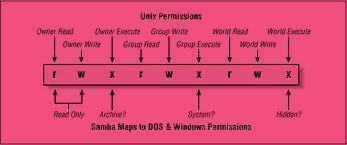
The three sets of three characters represent the permissions to the file for each role. The three permissions which may be granted to each role are:
- Read permission grants the ability to view the contents of the file.
- Write permission grants the ability to save changes to the contents of the file.
- eXecute permission grants to ability to execute the file. This is useful for programs and shell scripts.
A Unix File Permissions Example
A sample set of file permissions:
-rw-rw-r-- 1 will staff file-permissions.shtml
The file permissions for this file are:
| Role | Permissions |
|---|---|
| User | rw- |
| Group | rw- |
| Other | r– |
This means that the user, or a member of the “web” group, can Read or Write this file. Any other user on the system can Read this file.
Unix File Permissions SUID and SGID Bits
File permissions are also used to make a program or shell script SUID (Set User ID) or SGID (Set Group ID). If a file is SUID, it will run with the privileges of the files owner, instead of the privileges of the person running the program. If a file is SGID, it will run with the privileges of the files group owner, instead of the privileges of the person running the program.
SUID and SGID programs are used to enable normal system users to accomplish tasks which would otherwise require privileged access.
The `passwd` program allows users to change their passwords. This requires the ability to write to the /etc/passwd file (and most often the shadowed password file), which unprivileged users should not normally have.
The file permissions of /usr/bin/passwd are:
-r-sr-xr-x 2 root wheel /usr/bin/passwd
The ‘s’ in the space normally occupied by the first ‘x’ signifies that this file is SUID. No matter who executes this program, it will always run with the privileges of the user root.
Expressing Unix File Permissions in Octal
Unix file permissions are sometimes expressed in octal notation. r is equal to the value 4, w is equal to the value 2, and x is equal to the value 1.
Mathematically, rwx equals 7, because 4+2+1=7. Similarly, rw- is equal to 6 and r-x is equal to 5.
Setting Unix File Permissions
Unix file permissions are set using the `chmod` program. For example, the command `chmod 644 file.txt` will set a files permissions on file.txt to -rw-r–r–.

Lakhveer Kaur
Deeply explained. Such a simple description. Like it!!!