

WMI (Windows Management Instrumentation) is a part of the Microsoft Windows OS. Developers use Windows Management Instrumentation to create applications for event monitoring, the purpose of which is to alert PC users in case of a problem. Scripts and management applications use WMI to execute operations or get data in different languages. Programmers who work with Microsoft Visual Basis and C++ use WMI. Windows Management Instrumentation is used for finding, controlling and setting information about networks, applications and desktop systems.
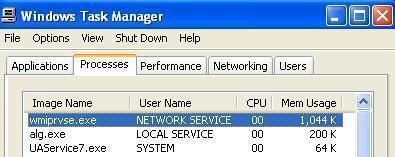
WMI is located in a shared service host, with other services. In order to prevent all services from stopping, in case of a provider failure, providers are loaded into wmiprvse.exe – a separate host process. The location of Wmiprvse.exe file is C:WINDOWSSystem32Wbem.Wmiprvse.exe is a system process and you should not stop it. It is necessary for Windows OS to work normally.
Several wmiprvse.exe instances can run simultaneously under different accounts, such as LocalSystem, NetworkService, Local Service, etc.
Wmiprvse.exe is considered CPU intensive. CPU intensive processes sometimes manipulate CPU and make the system slower. However, this is not the only problem you can experience with Wmiprvse.exe.
Wmiprvse.exe Errors
The “referenced memory” is one of the most common wmiprvse-exe errors (Wmiprvse.exe-Application error: “The instructions at “0x7c910de3″ referenced memory at “0xfffffff8”). Other common errors are related to RAM memory usage (over 90%), failures of Windows services, spiking CPU processor to 100 percent usage in Vista, Windows XP and 2003, locking the quick launch icons and task bar, restarting the system and preventing the user from accessing the hard drive.
Fixing Wmiprvse.exe Error
Wmiprvse.exe is automatically loaded in Windows. It is an autonomous process that handles system requests. The ‘real’ file is safe, but if you think it uses too much memory, your Wmiprvse version might not be the original version and it could easily be a virus.
Some users have tried to resolve the problem by terminating all processes that started with HP. That prevented wmiprvse.exe from hogging CPU resources. However, no one can guarantee this will solve your problem.
Wmiprvse.exe errors can occur after a malware or spyware attack. If that is the case, error messages will keep popping up. As mentioned, Wmiprvse.exe should not be stopped because it is necessary for the operating system to function normally. Most errors occur due to malware, so the only way to resolve this problem is to locate the malicious file and delete it.
Go to “My Computer”, then “C”, open “Windows” and then go to “System 32”. Open the “wbem” folder and look for Wmiprvse.exe. Don’t delete this one, because it is the ‘real’ Windows system file. Malicious files are usually found in other locations (mostly in C:WINDOWSSystem32).

Biggus Dickus
I do have this virus and it is running under the name of wmiprvse.exe. I just can’t figure out where it is located, and what its name is in the system 32 folder… There are just way too many files in that folder to easily scope it out.
WillSpencer
I’d run an antivirus program. Then I’d reinstall Windows. Then I’d run the anti-virus program again.
http://www.tech-faq.com/free-antivirus-software.html
Vildstige
C:WindowsSystem32wbem
Dv8AVENGER
you need mcafee its the only anti virus software that actually works better than norton and the securtiy essentials and all that stuff ……….baaaiclly what im saying is go buy mcafee and be happy and get on with ur lives thanks and have nice day btw mcafee is great thing to have it also does realtime scanning
Jarred Davis
HAHAHA B***S*** McAfee is over price crapware! I would never buy or suggest anyone buy it, unless I’m this user and work for McAfee
Nic-Jan
I found 6 files called Wmiprvse.exe, in:
C:\Windows\System32\wbem
C:\Windows\SysWOW64\wbem
C:\Windows\winsxs\amd64_microsoft-windows-wmi-core-providerhost_31bf3856ad364e35_6.1.7600.16385_none_6c57b032a516106e
C:\Windows\winsxs\amd64_microsoft-windows-wmi-core-providerhost_31bf3856ad364e35_6.1.7601.17514_none_6e88c3faa2049408
C:\Windows\winsxs\wow64_microsoft-windows-wmi-core-providerhost_31bf3856ad364e35_6.1.7600.16385_none_76ac5a84d976d269
C:\Windows\winsxs\wow64_microsoft-windows-wmi-core-providerhost_31bf3856ad364e35_6.1.7601.17514_none_78dd6e4cd6655603
of different size and from different date.
Is that normal?
Sydney
When wimprvse.exe is running my entire computer completely freezes to a standstill. Because it is happening at work, I cannot type, cannot open a web browser … basically have to stop working. There are times when I cannot even utilize CONTROL/ALT/DELETE in order to launch Task Manager to kill it. It is a scourge that happens frequently throughout the day that significantly disrupts my workflow.
Is there anyway to stop it from running at times when I most need the computer?
Hugh Carter
I wish someone would provide an answer. I found this site by Googling this topic because my computer also grinds to a halt when this is running, which happens about every 15-20 minutes or so. Odd thing is when I open Task Manager very little memory (5,000K or so) is being used, but as soon as I kill the operation my computer immediately goes back to normal.
I have scanned my computer thoroughly using Malwarebytes, AVG, Viper Rescue and ESET and they are not discovering any trojan, malware or virus issues that have not already been previously cleaned.
Is there a way to prevent this service from launching? I am at wits end on this.
nemi
you can disable windows managment instrumentation but i don’t recommend it
or you can use a software called process lasso and set it up when this process”wmiprvse.exe” is reaching some amount of memory or cpu to auto kill it
hope it works
Vildstige
One solution that i’ve come across is to give NETWORK SERVICE READ,WRITE and EXECUTE rights. on wimprvse.exe
Melanie
Every time I reboot my computer I get an error message referencing memory and not finding the file path for an wmiprvse.exe file. I search my computer and I have three extentions for that 1) C:Windows\Prefetch, 2) C:Windows\SerivcePackFiles\i386 and 3) C:Windows\system32\wbem I have read some comments that these files are unneccesary and can be deleted as they just slow the computer and cause issue. Can I delete these? I called microsoft and after them telling me to call dell and explaining that I was sure they could answer quickly my question as to whether or not these could just be deleted they said yes, but then I thought I’d double check here as I’m not sure I really had someone with technical support knowledge on the phone. Thanks in advance for help!
memenode
If support guys from Dell and MS told you so then I don’t think it’s unsafe to delete. I have no experience with this stuff so can’t confirm any better, but I can suggest you try it and see what happens (it’s unlikely to entirely crash your system). Have a backup of these files and if you notice any troubles just put them back.
ReBride
In task manager I found it in processes all users (but I am the only user??)and also in applications as wmiprvse.exe – Opera. Could not ‘end’ process, it just immediately turned back on. Never noticed it before SP1 (Win 7).
memenode
There are also internal system users which run certain processes. This could be normal. It could be starting back up when you close it because the system needs it, but I tried to find it in my processes (also on Win7 SP1) and couldn’t so I’m not sure.
But if it’s not in an unusual location, as the article says, and updated anti-virus software isn’t warning you of anything you’re probably fine.
Julie
Other than in Wbem, I also found wmiprvse.exe in C:\Windows\ServicePackFiles\i386 AND a file with additional characters in the name in C:\Windows\Prefetch. I scanned both files with AVG and it found nothing. Do I have anything to worry about? Help.
Will.Spencer
I would not worry about ServicePackFiles or Prefetch, and the AVG results just give more reason not to worry. 🙂