

What is Authentication
Authentication is the process whereby the system identifies legitimate users from unauthorized users. It is the process in which a user identifies his/her self to the system. How effective an authentication process is, is determined by the authentication protocols and mechanisms being used. Windows Server 2003 provides a few different authentication types which can be used to verify the identities of network users, including:
-
Kerberos authentication protocol
-
NT LAN Manager (NTLM) authentication protocol
-
Secure Sockets Layer/Transport Security Layer (SSL/TLS)
-
Digest authentication
-
Smart cards
-
Virtual Private Networking (VPN) and Remote Access Services (RAS)
The Kerberos version 5 authentication protocol is the default authentication type for a Windows Server 2003 environment. Kerberos version 5 makes use of a 'ticket' strategy to authenticate valid network users, and provides mutual authentication between users and resources. Windows Server 2003 supports the NTLM authentication protocol to provide compatibility for the earlier operating systems (OSs) such as for Windows NT 4 compatibility. Secure Sockets Layer/Transport Security Layer (SSL/TLS) and digest authentication is typically used for Web applications. SSL/TLS is based on X.509 public-key certificates, and enables mutual authentication between the client and server.
A few authentication features introduced with Windows Server 2003 are outlined below:
-
Windows Server 2003 includes support for smart cards, as well as support for a few different multifactor authentication mechanisms. Windows Server 2003 can also support a number of authentication protocols, such as NTLM, NTLMv2, and Kerberos version 5.
-
With Windows Server 2003 Active Directory, the Active Directory directory service stores the security credentials, such as the passwords of users, which are used for the authentication process. Active Directory directory service can store security credentials for each authentication protocol. The service also enables users to log on to computers in an Active Directory environment that contains multiple domains and forests.
-
A user can log on to any computer through a single domain account. This is known as single sign-on. A user basically only needs to log on to a domain account once, and with one password. The sign-on security information of the user is stored in Active Directory. Whenever a user attempts to access a resource within a domain, network authentication takes place.
The remainder of this Article focuses on the different authentication types which you can implement to enforce an authentication strategy within your environment.
Kerberos Authentication Protocol
The foremost authentication protocol type used within a Windows Server 2003 Active Directory domain is the Kerberos version 5 authentication protocol. The Kerberos authentication protocol provides the following authentication features:
-
Verifies the identify of network users
-
Verifies whether the network service that a user is attempting to access is valid. This security feature prevents users from accessing any fake network services which could have possibly been created by unauthorized network users. These fake services are normally created to deceive network users into disclosing their logon credentials.
The terminology used to describe the process by which both the identity of users, and the identity of services being accessed are verified, is mutual authentication. The name of the Kerberos authentication protocol is derived from Greek mythology (three headed dog). This is because of the following three components of the protocol:
-
A client requesting authentication or a service
-
A server on which the service that the client requests, resides.
-
A computer which both the client and server trusts. This is typically a Windws Server 2003 domain controller on which the Key Distribution Center service is running.
The Kerberos authentication type does not transmit passwords during the authentication process. Instead, it uses tickets. Tickets are specially formatted data packets that allow a client to access a resource. The ticket contains the identity of the user in an encrypted data format. When decrypted, the data or information verifies the identity of the client. Because the Kerberos authentication type makes use of tickets, it offers more security for the authentication process.
The Kerberos authentication type is dependant on the Key Distribution Center (KDC) to issue tickets. Each network client makes use of DNS to find the closest available KDC to obtain a Kerberos ticket. The ticket usually remains active for about 8 or 10 hours. The Key Distribution Center (KDC) is a service which runs as a component of Active Directory. In fact, each domain controller in a Windows Server 2003 domain operates as a Key Distribution Center (KDC). It is the Key Distribution Center (KDC) which manages the database of security account information for each security principal within a domain. Security principals that form the foundation of the Active Directory security architecture are user accounts, security groups, and computer accounts. Administrators of domains assign permissions to security principals to access network resources, and to perform certain actions on these resources. The KDC holds the cryptographic key which is only known by the particular security principal, and the KDC. This cryptographic key, also called a long term key, is formed from the logon password of the user, and is used when the KDC and security principal interact. Because each domain controller in Windows Server 2003 domains operates as a KDC, fault tolerance is enabled for the domain. When one domain controller is unavailable, any other domain controller in the domain is able to issue tickets.
Kerberos authentication can be used by clients and servers running the following operating systems (OSs):
-
Windows 2000
-
Windows XP Professional
-
Windows Server 2003
Windows 2000, Windows XP Professional, and Windows Server 2003 computers which are members of a Windows 2000 or Windows Server 2003 domain use the Kerberos protocol for network authentication for domain resources. This is the default configuration for these domains. When a down level client attempts to access a Kerberos secured resource, NTLM authentication is used; and not Kerberos authentication.
How the Kerberos authentication process work
The steps outlined below describe the Kerberos authentication process.
-
The user provides his/her user name and password. The computer transmits these details to the KDC.
-
The KDC creates a session key, and a Ticket Granting Ticket (TGT). A TGT is a ticket that enables a client to receive temporary tickets from the ticket granting service for each authentication, and it includes the following:
-
A copy of the session key
-
The name of the user
-
An expiration time
-
-
The TGT is encrypted by the KDC through its master key.
-
The client computer then receives this information from the KDC. At this point the client computer holds the session key and TGT, and is authenticated to the domain. The session key and TGT is stored in volatile memory because it offers better security than storing the information on the hard disk.
-
A Kerberos client passes its TGT and a timestamp encrypted with its session key, to the KDC when it needs to access resources hosted on a server which is a member of the same domain. The KDC utilizes its master key to decrypt the TGT, and it utilizes the session key to decrypt the timestamp. Since the user is the only individual that can use the session key, the KDC is able to verify that the request to access resources originated frm the particular user.
-
At this point, the KDC generates a ticket for the client and a ticket for the server hosting the resources which the client wants to access. Each ticket has a new key which the server and client will share between each other, and contains the following information:
-
The name of the user
-
The recipient of the user request
-
A timestamp which indicates the time that the ticket was created.
-
The expiration time of the ticket
-
-
The server master key is used by the KDC to encrypt the ticket of the server. The ticket of the server is stored within the ticket of the client. The session key which the KDC shares with the particular user is then used to encrypt the entire set of information. This is then transmitted to the user.
-
The user decrypts the ticket it receives using the session key. The user encrypts the timestamp through the new key, and then transmits this information and the ticket of the server hosting resources which it wants to access. Next, the server uses the server master key to decrypt the server ticket. The new key is then used to decrypt the timestamp.
NT LAN Manager (NTLM) Authentication Protocol
The NT LAN Manager (NTLM) authentication protocol is the main authentication type used to enable network authentication for versions of Windows earlier than Windows 2000, such as for a Windows NT 4. The authentication protocol is essentially used for authentication between machines running Windows NT and Windows Server 2003 machines.
The NTLM authentication type is typically used in the scenarios listed below:
-
By Workstations and standalone servers that are members of workgroups.
-
By Windows 2000 or Windows XP Professional computers accessing a Windows NT 4.0 primary domain controller or backup domain controller.
-
By Windows NT 4.0 domain users when trusts exist with a Windows 2000 or Windows Server 2003 Active Directory domain or forest.
-
By Windows NT 4.0 Workstation clients who want to authenticate to a Windows NT 4.0, Windows 2000 or Windows Server 2003 domain controller.
Windows Server 2003 supports the following forms of challenge- response authentication methods:
-
LAN Manager (LM): The LM authentication protocol is used to enable backward compatibility with the earlier OSs such as Windows 95, Windows 98, Windows NT 4.0 SP 3, and earlier Os's. LM authentication is considered the weakest authentication protocol because it is the easiest to compromise. LM authentication should not be used in Windows Server 2003 environments.
-
NTLM version 1: NTLM version 1 is more secure than LM authentication because it uses 56-bit encryption, and user credentials are stored in the NT Hash format. This format is more secure than the level of encryption used in LM authentication.
-
NTLM version 2: NTLM version 2 utilizes a 128-bit encryption, and therefore offers the highest level of encryption.
NTLM authentication works by encrypting the logon information of the user. This is done by applying a hash to the password of the user. A hash is a mathematical function. The security account database contains the value of the hash which is generated when the password is encrypted by NTLM. The password of the user is not transmitted over the network. What happens is that the client applies the hash to the password of the user, prior to it actually sending the information to the domain controller. The value of the hash is also encrypted.
How the NTLM authentication process works
-
The client and server negotiate the authentication protocol to use.
-
The client transmits the name of the user and the name of the domain to the domain controller.
-
At this point, the domain controller creates a nonce. This is a 16-byte random character string.
-
The nonce is encrypted by the client using the hash of the user password. The client forwards thi to the domain controller.
-
The domain controller then obtains the hash of the user password from the security account database to encrypt the nonce.
-
This is then compared to the hash value which the client forwarded.
-
Authentication occurs when the two values are identical.
Secure Sockets Layer/Transport Layer Security (SSL/TLS)
Secure Socket Layer (SSL) is a Windows Server 2003 security protocols which utilizes a public-key technology to provide a secure channel for applications communicating over a non-secure network such as the Internet. SSL is typically used by Web browsers and Web servers for secure communication channels.
The Secure Socket Layer (SSL) protocol functions at the OSI model's network layer to provide encryption for the following protocols:
-
HTTP
-
LDAP
-
IMAP
The SSL protocol provides the following functions:
-
Server authentication makes it possible for the user to verify that the Web server he/she is accessing is, in fact the server it is portrayed as being.
-
Client authentication enables the server to verify the identity of the user.
-
Encrypted connections enable data confidentiality, because information passed between the server and client are encrypted and decrypted.
Before a client and server can partake in secure Internet communication, the client and server have to perform a security handshake. The security handshake is a process that authenticates each entity involved in communication, and also establishes the level of security to use for communication.
The following events occur when a client and server partake in a security handshake:
-
The client sends a request for a secure channel connection to the server.
-
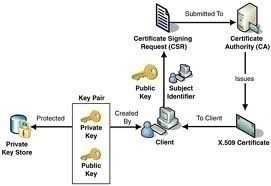
The server sends its public-key certificate to the client. The server can also request the certificate of the client for mutual authentication.
-
The client then verifies the authenticity of the certificate of the server. At this stage, the client sends its certificate to the server if the server requested it in Step 2. The server proceeds to verify the client's certificate.
-
The client produces a session key, and encrypts the session key with the public key of server.
-
The server and client now have a secure channel for communication, because information passed between the two are encrypted and decrypted with the session key.
The Transport Layer Security (TLS) protocol, currently being development by the Internet Engineering Task Force (IETF), will replace the SSL protocol as the new protocol for securing Internet traffic.
Digest Authentication
Digest authentication is typically used for authenticating Web applications running Internet Information Services (IIS). Digest authentication utilizes the Digest Access Protocol in the authentication process. The Digest Access Protocol employs a challenge-response mechanism for applications using HTTP or Simple Authentication Security Layer (SASL) communications. Once a client is authenticated, the session key of the client is located on the Web server. When digest authentication transmits user information over the network, it does so using an encrypted hash. This prevents unauthorized users who may be attempting to access network resources, from intercepting the credentials of the user. Any ensuing authentication requests submitted by the same client are dealt with by using this session key. Because of this feature of digest authentication, the client does not need to authenticate with a domain controller each time that it submits an authentication request.
A few conditions have to be met prior to using digest authentication on IIS servers. These are listed below.
-
Any client that wants to access a digest authentication secured resouce has to be running Internet Explorer 5 or later.
-
The IIS server has to be running Windows 2000 or above.
-
The domain, to which the IIS server is a member of, has to include a domain controller that is running Windows Server 2003 or Windows 2000.
-
The IIS server and a user that wants to log on to the IIS server has to belong to the same domain. They can however be joined through trusts.
-
Each user that needs to be authenticated must have a legitimate account in Active Directory, on the particular domain controller.
-
The passwords of users have to be stored in a reversibly encrypted format in Active Directory. You can use the Active Directory Users and Computers console to access the Account tab of the Properties dialog box of a user, to enable reversible encryption.
Web sites that utilize passport authentication make use of a central Passport server to authenticate users. Passport authentication works with Microsoft Internet Explorer, Netscape Navigator, and even with some Unix systems and browsers. This is due to the fact that passport authentication is not proprietary. Passport encryption utilizes the following Web technologies:
-
SSL encryption
-
Symmetric key encryption
-
HTTP redirects
-
Cookies
A few features of passport authentication are listed below:
-
All Web pages which are used to manage sign-in and sign-out operations are located in a central repository.
-
These Web pages make use of SSL encryption to transmit information on user names, and user account passwords.
-
The Web site does not receive the actual passport of the user. Instead, it receives a cookie which includes the encrypted timestamps which was generated when the user initially signed in.
-
Web sites using passport authentication make use of encrypted cookies to enable users to access multiple sites, with the user not being required to resubmit his/her login credentials. The actual cookie files utilize strong encryption.
-
The central Passport server uses encryption when it sends sign-in credentials and any other user information to a Web site enabled with passport authentication.
Smart Cards
Windows Server 2003 supports smart card authentication. Smart cards can be used to secure the following items:
-
The certificates of your users
-
Public and private keys
-
Passwords and other confidential data.
A smart card is a device similar in size to that of a credit card. Smart cards are dependent on the Windows Server 2003 public key infrastructure (PKI). A smart card is used in conjunction with an identification number (PIN) to enable authentication and single sign-on in the enterprise. The smart card actually stores the private key of the user, public key certificate and logon information. The user attaches the smart card into the smart card reader that is attached to the computer. The user next inserts the PIN when prompted for the information.
Smart cards are typically used for interactive user logons to provide further security and encryption for logon credentials. Smart card readers can be installed on servers, so that you can require administrators to use smart card authentication when using an administrator account. You can also require remote access logons to use smart card authentication. This assists in preventing unauthorized users from using VPN or dial-up connections to launch an attack on your network. Through smart cards, you can encrypt confidential files and other confidential user information as well.
The cost associated with implementing and administering a smart card authentication strategy is determined by the following elements:
-
The number of and location of users that are to be enrolled in your smart card authentication strategy.
-
The method which the organization is going to utilize to issue smart cards to users.
-
The procedures which are going to b implemented to deal with users who misplace their smart cards.
In addition to the above, with smart card authentication, each computer has to have a smart card reader, and one computer has to be configured as the smart card enrollment station. It s recommend to use only plug and play Personal Computer/Smart Card (PC/SC) compliant smart card readers. The user responsible for the smart card enrollment station has to be issued with an Enrollment Agent certificate. The owner of this certificate can issue smart cards for users.
Internet Authentication Service (IAS)
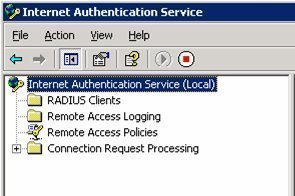
The Internet Authentication Service (IAS) functions as a remote Authentication Dial-In User Service (RADIUS) server, and can be used to manage the login process of users by providing the following key features:
-
Management of user authentication: IAS can be used for dial-up and VPN access, and for wireless access.
-
The IAS service provides the RADIUS protocol which it utilizes to pass authentication and authorization requests to the proper Active Directory domain.
-
Verification of the user to access network resources
-
Tracking of user activity
Internet Authentication Service (IAS) is supported in the following editions of Windows Server 2003:
-
Windows Server 2003 Standard Edition
-
Windows Server 2003 Enterprise Edition
-
Windows Server 2003 Datacenter Edition
The default authentication protocols supported by IAS are:
-
Point-to-Point Protocol (PPP): The following PPP protocols are supported by IAS:
-
EAP-MD5
-
Extensible Authentication Protocol-Transport Level Security (EAP-TLS)
Although EAP-TLS is considered the strongest remote access services authentication method, it can only be used when clients are running Windows 2000, Windows XP or Windows Server 2003. EAP-TLS utilizes public key certificate based authentication to provide authentication for wireless connections.
-
-
Extensible Authentication Protocol (EAP): The following EAP protocols are supported by IAS:
-
Password Authentication Protocol (PAP): Windows Server 2003 supports PAP for backward compatibility. With PAP, user information (user name and password) is transmitted in clear text.
-
Challenge Handshake Authentication Protocol (CHAP): CHAP encrypts the user name and password of the user through MD5 encryption. A requirement of CHAP is that user password information has to be stored using reversible encryption in Active Directory.
-
Microsoft Challenge Handshake Authentication Protocol (MS-CHAP): MS-CHAP provides better security than that provided by CHAP. The passwords of users do not have to be stored using reversible encryption.
-
Microsoft Challenge Handshake Authentication Protocol version 2 (MS-CHAP version 2): MS-CHAP version 2 includes the security capability of mutual authentication. Mutual authentication occurs when the server and client both verify the identity of each other. MS-CHAP version 2 utilizes separate encryption keys for sending and receiving security information.
-
Once IAS has authenticated the user, it can use a few authorization methods to verify that the authenticated user is permitted to access the network resource(s) he/she is requesting to access. This includes the following:
-
Automatic Number Identification/Calling Line Identification (ANI/CLI): With ANI/CLI, authorization is determined by the number which the user is calling from.
-
Dialed Number Identification Service (DNIS): Authorization is determined by examining the phone number which the caller is using.
-
Remote access policies: Remote access policies can be used to allow or deny network connection attempts, based on conditions such as group membership details, time of day, time of week, the access number being used, and other conditions. You can also use remote access policies to control the amount of time which aremote access client can be connected to the network. You can specify an encryption level which a remote access client should use to access network resources.
-
Guest authorization: Guest authorization enables users to perform limited tasks, without needing to provide user credentials (user name and password).
Wireless clients can use certificates, smart cards, and a user name or password to authenticate to an IAS server. Before a wireless client can connect to your corporate network, you need to define the following:
-
Create a remote access policy for the wireless users which permits these users to access the corporate network. The remote access policy should include:
-
The access method
-
User and group information
-
The authentication method
-
The policy encryption method
-
The appropriate permissions
-
-
All Wireless APs should be added on the IAS server as RADIUS clients. This ensures that login information can be forwarded to IAS.
The events which occur when wireless clients requests network access are outlined below.
-
The Wireless AP requests authentication information from the wireless client.
-
The wireless client then passes this information to the Wireless AP. The Wireless AP forwards the information to IAS.
-
When the information IAS receives is valid, it passes an encrypted authentication key to the Wireless AP.
-
The Wireless AP next utilizes the encrypted authentication key to create a session with the wireless client.
How to install the Internet Authorization Service (IAS) on a domain controller
-
Click Start, Programs, Control Panel, and then double-click Add/Remove Programs.
-
Select Add/Remove Windows Components.
-
This launches the Windows Components Wizard.
-
Click Networking Services. Click Details.
-
When the Networking Services dialog box opens, enable the Internet Authentication Service checkbox.
-
Click OK.
-
To start the actual installation of IAS, click Next.
-
When prompted, place the Windows Server 2003 CD into the CD-ROM drive.
-
Once the installation of IAS is complete, click Finish, and then click Close.
-
To register the IAS server with Active Directory so that it can obtain user information from Active Directory domains, click Start, Programs, Administrative Tools, and then Internet Authentication Service.
-
Right-click Internet Authentication Service, and then select Register Server in Active Directory on the shortcut menu.
-
Click OK.
How to create a remote access policy
-
Click Start, Programs, Administrative Tools, and then Internet Authentication Service.
-
Right-click Remote Access Policies and then click New Remote Access Policy on the shortcut menu.
-
This action starts the New Remote Access Policy Wizard. Click Next on the welcome screen of the wizard.
-
Click the Use the wizard to set up a typical policy for a common scenario option, and enter a name for the new remote access policy in the Policy name box. Click Next.
-
When the Access Method screen appears, choose the Dialup access method. The other access method options include:
-
VPN access
-
Wireless access
-
-
Click Next.
-
Select Group and then choose the group to which you want to grant remote access permission. Click Next.
-
When the Authentication Methods screen appears, choose the one of the following authentication methods for the new remote access policy.
-
Extensible Authentication Protocol (EAP)
-
Microsoft Challenge Handshake Authentication Protocol version 2 (MS-CHAPv2)
-
Microsoft Challenge Handshake Authentication Protocol (MS-CHAP)
-
-
Click Next
-
Specify the encryption level which users should utilize to connct to the IAS server. Click Next.
-
Click Finish.
If you want to set any further remote access conditions, right-click the particular remote access policy, and click Properties from the shortcut menu.
Alan fabrisen
23 tracking sites, wow