

A proxy server is one that receives requests intended for another server and that acts on the behalf of the client (as the client proxy) to obtain the requested service. It is often used when the client and the server are incompatible for direct connection. For example, the client may be unable to meet the security authentication requirements of the server but may be required to access some services. It may also be used for screening purposes to enable the administrator to control access to undesirable sites. The proxy server may also be used for caching purposes, which enables faster access to frequently used websites. All the computers connected to the LAN access the Internet through a single IP address, resulting in improved security simply because the number of ports exposed is reduced.
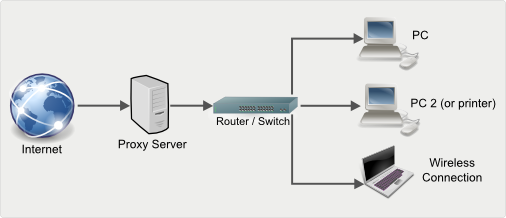
Proxy servers work on the seventh layer (the Application Layer) of the OSI model, thus tending to be application dependent unlike firewalls that work at lower layers. They are also more difficult to install and maintain than firewalls, as proxy functions for each application protocol like HTTP, SMTP, or SOCKS must be configured individually. However, a properly configured proxy server improves network security and performance. Since proxy servers function at the OSI Application layer, their filtering capabilities are relatively intelligent. For example, proxy web servers can check the URL (Uniform Resource Locator) of outgoing requests for Web pages by inspecting HTTP, GET and POST messages. Using this feature, network administrators can bar access to illegal domains but allow access to other sites. Ordinary firewalls, in contrast, cannot see Web domain names inside those messages. Likewise, ordinary routers can filter incoming data traffic by port number or network address, but proxy servers can also filter based on application content inside the messages.
WinProxy
One of the most popular proxy servers available for Windows based systems is WinProxy. One of the reasons for its popularity is that no software has to be installed on the client systems. This is possible since WinProxy is a transparent proxy server, meaning that it also provides NAT (Network Address Translation). Due to this, the client system is virtually unaware of the proxy server’s existence. Apart from the usual caching and security features, it also supports important protocols like HTTP, Real Audio/Video, Mail, FTP, NNTP News, Telnet, Socks, Secure Sockets, DNS, IMAP 4, etc.
The WinProxy Server may be installed and configured as follows:
- Install the TCP/IP protocol on all systems connected to the network.
- Run the Install Wizard. The first screen is the product registration screen, which requires the user to enter the product key.
- The next two screens require information about the Internet connection. Select the connection’s type and name.
- Enter the username and password of the Internet connection to be used.
- WinProxy then configures the internal and external IP addresses. It automatically assigns a unique address to each device on the LAN as internal addresses. The IP address that the ISP assigns to the modem/router is taken as the external address.
- WinProxy then prompts the user to disconnect from the Internet if he/she is already connected.
- In the final step, WinProxy works through all the steps and verifies that all operations have been performed properly.



belay
i have problem with set up proxy for galaxy Samsung mobile model gt-s5282
abedbani
how can i setup a proxy server on a pc in my school lan to allow me to have an acsess to a local website hosted in the school server from outside the school ?? plz help
Ensest Hikayeler
Great post, i need this issue, you explain very clearly
Muhammad Ilyas
I had set up a winproxy server it’s working fine. I want to restrict the one website on a single station (PC) any one guide me?
ali
mmmoa7@hotmail.com
from kuwait go go g o
BON
Iam looking for solution to build a downloadable VPN proxy like that of hotspotshield. any idea as to how to start it all willl be highly appreciated, what I would need to set it up and offer users free US IP and they use similar to hotspotshield?
lamp
I set up a proxy server using python and google app-engine it works fine if you are just browsing, but if you want to log into a website, say twitter or facebook, it does work, it gets stuck after I press log in/sign in.
Any suggestions? Thanks.
bentasinta
I need more friends for funny!
SQL server code!
Gunnar
can Winproxy solve the following problem.
Problem.
We want our members to access resource databases that only allows IP automatic-login. (no username and password)
Issue
My organisation is member based and got user a multiple locations. and we cannot control the users IP addresses.
Environment
Users need to login to our Member site on our web-server
Solution that Im looking for
Once the User have login to our website, can we some how redirect users ip address (x) to our ip address (y)
Thanks you for you help
memenode
You could set up your database server to accept auto-login from an IP address of your proxy server and then provide the proxy server address or link in your members site.
This way when your members in other locations login to your member site they could, regardless of which IP address they currently have, connect to your database server via your proxy IP.
I’m no expert on this so those better knowledgeable correct me if I’m wrong.
Muhammad Nur Husni
Very nice………
murthy
am a network admin recently joined in a company.The problem is how can i restrict or block sites which are connected in lan(there are about 20 systems) with my system only.can this be possible…
Nitin Tomer
i have a CPN connection and a internet broadband connection but CPN connection is diffrent IPs and internet IP is diffrent, and i have a Juniper ssg 20 Router and a switch, so my problem is that the users must have the cpn connection as well as internet connection as our applications runs on cpn connection and for mailing purpose the user need web access also. so please guide me how it is possible?
thanks
nitin
Will.Spencer
Nitin:
I am guessing that you mean “VPN connection”?
What you need to do is to configure your VPN for Split Tunneling.