Home     Blog

MAC Address

A MAC address is an address that exists on Layer 2 of the OSI Model.

Layer 2 of the OSI model is the Data Link Layer. The Data Link Layer consists of two sublayers, the Media Access Control (MAC) layer and the Logical Link Control (LLC) layer. The MAC sublayer controls how a network node gains access to the data and permission to transmit it.

MAC addresses are globally unique and are written into hardware when manufactured. For this reason, MAC addresses are sometimes called Burned In Addresses (BIA).

After manufacture, it is possible in many cases to change the MAC address of a device in software.
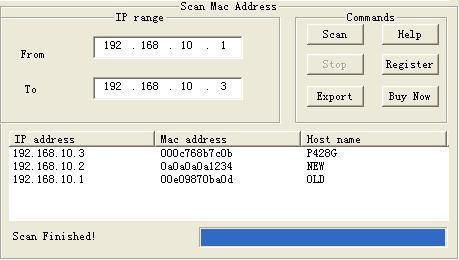
MAC Address MAC Address

Many different Layer 2 technologies, including Ethernet, Token Ring, 802.11, Bluetooth, FDDI, ATM, SCSI, and Fibre Channel use MAC addresses.

Because MAC addresses originated in the Ethernet specification, the MAC address is sometimes referred to as the Ethernet Address.

A MAC address is 48 bits long. This means that there are 281,474,976,710,656 possible MAC addresses.

A sample MAC address looks like this:

00-0C-F1-56-98-AD

The first three bytes of this address (00-0C-F1) identify this network device’s manufacturer, in this case Intel.

The IEEE assigns these first three bytes and the database is available online at IEEE OUI and Company_id Assignments.

Intel assigned this address’s last three bytes when the device was manufactured.
VN:F [1.9.17_1161]
Rating: 5.0/10 (1 vote cast)
MAC Address, 5.0 out of 10 based on 1 rating
Follow Will.Spencer on

Comments (1)


  1. bris says:

    Excellent..clear and sweet

    VA:F [1.9.17_1161]
    Rating: 0.0/5 (0 votes cast)

Leave a Reply

Related Posts

  • ARP Cache

    The ARP cache is a table that stores mappings between Data Link Layer addresses and Network Layer addresses. The Data Link Layer addresses are usually MAC addresses and the Network Layer addresses are most frequently IP addresses. The Operating System stores the ARP cache in RAM. Displaying the ARP Cache Under most Unix and Microsoft [...]...


  • How to Find Your MAC Address

    MAC is an acronym for Media Access Control. A MAC address is an address that is given to a network adapter (NIC) that helps a computer to identify it. Since many functions of a computer can be determined by the MAC address on the network adapter, it is important to be able to find your [...]...


  • How to Change a MAC Address

    Every Ethernet card had a factory assigned MAC address burned into it when it was made. At times, users may want to change this MAC address to one of their choice. One of the main reasons for doing this is to get around access control lists(s) on a specific router or server, either by hiding [...]...


  • Power over Ethernet

    Power over Ethernet (PoE) is a system that provides a constant supply of DC power to a computer network using the same Ethernet cables used for connectivity. Devices such as network cameras and IP telephones can hence be powered without the need for extra wiring. PoE is easy to maintain and requires little or no [...]...


  • Ethernet Switch

    A switch is something that is used to turn various electronic devices on or off. However, in computer networking, a switch is used to connect multiple computers with each other. Since it is an external device it becomes part of the hardware peripherals used in the operation of a computer system. This connection is done [...]...