

A port scanner is a program which attempts to connect to a list or range of TCP (Transmission Control Protocol) or UDP (User Datagram Protocol) ports on a list or range of IP addresses.
Port scanners are used for network mapping and for network security assessments.
The first decision to make when running a port scanner is to determine the network range you want to scan. This could be a single IP address, a list of IP addresses, or a range of IP addresses.
The second decision is to determine how heavily you want to scan. A light port scan might test TCP ports 22 (SSH), 23 (Telnet), 25 (SMTP), and 110 (POP). A heavy port scan might test both TCP and UDP ports 1-1024. A light port scan will return results much more quickly, a heavy port scan will return more detail.
Because UDP is an unreliable protocol, UDP ports require significantly more time to scan than TCP ports.
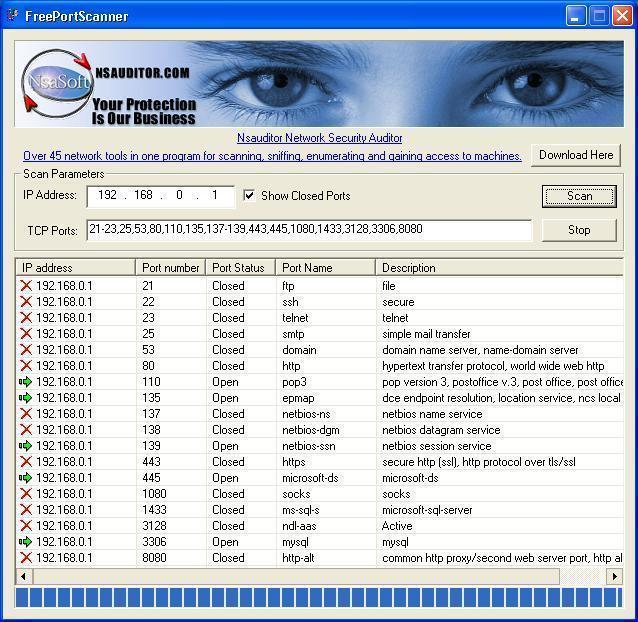
Some port scanners will simply test to see if a port responds, while others will gather information about the services running on a port or even attempt to automatically exploit security vulnerabilities remotely.
Recommended port scanner
NMAP is an excellent open source port scanner. NMAP was designed to rapidly scan large networks, although it works fine against single hosts. Nmap uses raw IP packets in novel ways to determine what hosts are available on the network, what services (application name and version) they are offering, what operating system (and OS version) they are running, what type of packet filters/firewalls are in use, and dozens of other characteristics. Nmap runs on most types of computers and both console and graphical versions are available. Nmap is free software, available with full source code under the terms of the GNU GPL.
Nessus is an excellent open source security scanner which executes an impressive array of security tests, and can utilize NMAP as a port scanner.
Nessus and NMAP together are the best port scanner available today. The Nessus/NMAP combination outperforms all known commercial port scanners and security scanners.
Online web-based port scanners
If you just need a light port scan or you do not have time to setup a real port scanner, an alterntive it to use one of the web based port scanners. These port scanners have limited functionality, but can give you a quick look at what your computer looks like from the Internet.
To find these port scanning services, just Google for "free online port scanner".
NsaSoft Us
You can use Nsauditor Network Security Auditor port scanner. The software includes over 40 network tools and utilities for port scanning, forwarding, sniffing and monitoring http://www.nsauditor.com/network_security/network_security_auditor.html