

The SNMP (Simple Network Management Protocol) allows network management to communicate with different network components. Because of this, it is important for all network hardware to be equipped with an SNMP agent that allows for it to be communicated back to network management. Once the network is connected, the elements are able to send messages back to network management, and at the same time, network management can send messages to the elements for information. It is this constant back and forth between the network and all its elements that necessitates an SNMP.
What is an SNMP Trap?
An SNMP trap allows an element, such as a printer or scanner, to contact network management when there is a significant event. This is done via unsolicited SNMP messages. For example, if the printer is out of paper and an individual is trying to print, an SNMP trap will be sent to the computer with the message, “Out of paper, add more.” Or, if there is a power failure on one of the network elements, the SNMP Trap will let the network manager know so that he can take the necessary steps to correct the problem.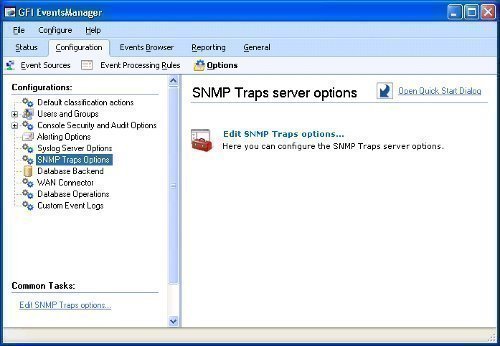
For the most part, an SNMP Trap is unnecessary when dealing with a single personal computer because one person can easily manage this. SNMP becomes important and helpful, though, when a network manager is dealing with numerous network elements that all have numerous elements themselves. This makes it very difficult to manually manage all of them. The SNMP Trap allows the manager to be notified when there is a problem so he can respond to it quickly without having to manually check everything to see what the error is.
For management to determine what is going on with the element that sent the trap, it needs to have a management information base (MIB) installed. What this does is allow the manager to determine which element is having problems. This provides the OID and any information that goes along with it so the manager can make an informed decision on what corrective measures to take.
What are the Definitions of an SNMP Trap?
There are a series of SNMP Trap definitions for RFC 1157. These are:
- Enterprise: Identifies which object sent the trap.
- Agent address: Gives the object’s address.
- Generic Trap Type: Provides generic types of traps.
- Specific Trap Code: Provides specific codes for traps.
- Time stamp: Gives the time between the last reinitialization and the trap generation.



ashamalathi
hi all,
am trying to listen to a trap and the details of it through a mail in the same program using java. would u like to help me out.de plz have a look at my code..
import java.io.IOException;
import org.snmp4j.CommandResponder;
import org.snmp4j.CommandResponderEvent;
import org.snmp4j.CommunityTarget;
import org.snmp4j.MessageDispatcher;
import org.snmp4j.MessageDispatcherImpl;
import org.snmp4j.MessageException;
import org.snmp4j.PDU;
import org.snmp4j.Snmp;
import org.snmp4j.log.LogFactory;
import org.snmp4j.mp.MPv1;
import org.snmp4j.mp.MPv2c;
import org.snmp4j.mp.StateReference;
import org.snmp4j.mp.StatusInformation;
import org.snmp4j.security.Priv3DES;
import org.snmp4j.security.SecurityProtocols;
import org.snmp4j.smi.OctetString;
import org.snmp4j.smi.TcpAddress;
import org.snmp4j.smi.TransportIpAddress;
import org.snmp4j.smi.UdpAddress;
import org.snmp4j.tools.console.SnmpRequest;
import org.snmp4j.transport.AbstractTransportMapping;
import org.snmp4j.transport.DefaultTcpTransportMapping;
import org.snmp4j.transport.DefaultUdpTransportMapping;
import org.snmp4j.util.MultiThreadedMessageDispatcher;
import org.snmp4j.util.ThreadPool;
//import snmp.stuff.TrapReceiver;
import java.util.*;
import javax.mail.*;
import javax.mail.internet.*;
import javax.activation.*;
// Send a simple, single part, text/plain e-mail
public class TrapMail{
//public class TrapReceiver implements CommandResponder
public TrapMail()
{
}
static int pduType;
public static void main(String[“> args)
{
TrapMail snmp4jTrapReceiver = new TrapMail();
try
{
snmp4jTrapReceiver.listen(new UdpAddress(“127.0.0.1/161”));
}
catch (IOException e)
{
System.err.println(“Error in Listening for Trap”);
System.err.println(“Exception Message = ” + e.getMessage());
}
}
/**
* This method will listen for traps and response pdu’s from SNMP agent.
*/
public synchronized void listen(TransportIpAddress address) throws IOException
{
AbstractTransportMapping transport;
if (address instanceof TcpAddress)
{
transport = new DefaultTcpTransportMapping((TcpAddress) address);
}
else
{
transport = new DefaultUdpTransportMapping((UdpAddress) address);
}
ThreadPool threadPool = ThreadPool.create(“DispatcherPool”, 10);
MessageDispatcher mtDispatcher = new MultiThreadedMessageDispatcher(threadPool, new MessageDispatcherImpl());
// add message processing models
mtDispatcher.addMessageProcessingModel(new MPv1());
mtDispatcher.addMessageProcessingModel(new MPv2c());
// add all security protocols
SecurityProtocols.getInstance().addDefaultProtocols();
SecurityProtocols.getInstance().addPrivacyProtocol(new Priv3DES());
//Create Target
CommunityTarget target = new CommunityTarget();
target.setCommunity( new OctetString(“public”));
Snmp snmp = new Snmp(mtDispatcher, transport);
snmp.addCommandResponder((CommandResponder) this);
transport.listen();
System.out.println(“Listening on ” + address);
try
{
this.wait();
}
catch (InterruptedException ex)
{
Thread.currentThread().interrupt();
}
}
/**
* This method will be called whenever a pdu is received on the given port specified in the listen() method
*/
public synchronized void processPdu(CommandResponderEvent cmdRespEvent)
{
System.out.println(“Received PDU…”);
PDU pdu = cmdRespEvent.getPDU();
if (pdu != null)
{
System.out.println(“Trap Type = ” + pdu.getType());
System.out.println(“Variable Bindings = ” + pdu.getVariableBindings());
pduType = pdu.getType();
if ((pduType != PDU.TRAP) && (pduType != PDU.V1TRAP) && (pduType != PDU.REPORT)
&& (pduType != PDU.RESPONSE))
{
pdu.setErrorIndex(0);
pdu.setErrorStatus(0);
pdu.setType(PDU.RESPONSE);
StatusInformation statusInformation = new StatusInformation();
StateReference ref = cmdRespEvent.getStateReference();
try
{
System.out.println(cmdRespEvent.getPDU());
cmdRespEvent.getMessageDispatcher().returnResponsePdu(cmdRespEvent.getMessageProcessingModel(),
cmdRespEvent.getSecurityModel(), cmdRespEvent.getSecurityName(), cmdRespEvent.getSecurityLevel(),
pdu, cmdRespEvent.getMaxSizeResponsePDU(), ref, statusInformation);
}
catch (MessageException ex)
{
System.err.println(“Error while sending response: ” + ex.getMessage());
LogFactory.getLogger(SnmpRequest.class).error(ex);
}
}
}
TestMail();
}
public void TestMail() {
// SUBSTITUTE YOUR EMAIL ADDRESSES HERE!!!
String to = “Asha_Pagadala@mindtree.com”;
String from = “Asha_Pagadala@mindtree.com”;
// SUBSTITUTE YOUR ISP’S MAIL SERVER HERE!!!
String host = “172.22.218.149”;
// Create properties, get Session
Properties props = new Properties();
// If using static Transport.send(),
// need to specify which host to send it to
props.put(“mail.smtp.host”, host);
// To see what is going on behind the scene
props.put(“mail.debug”, “true”);
Session session = Session.getInstance(props);
try {
// Instantiatee a message
Message msg = new MimeMessage(session);
//Set message attributes
msg.setFrom(new InternetAddress(from));
InternetAddress[“> address = {new InternetAddress(to)};
msg.setRecipients(Message.RecipientType.TO, address);
msg.setSubject(“Test E-Mail through Java”);
msg.setSentDate(new Date());
// Set message content
msg.setText(“plain text e-mail through Java.\n” +pduType+
“thank u”);
//Send the message
Transport.send(msg);
}
catch (MessagingException mex) {
// Prints all nested (chained) exceptions as well
mex.printStackTrace();
}
}
}
am not able listen. please reply me if u have a solution for it.