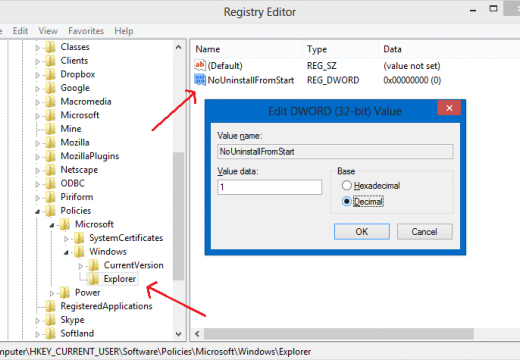
How to Edit the Registry The System Registry is a database used by the Windows operating system. It is used to store hardware, software, and operating system options, settings, and configurations. The registry was originally developed in order to decrease the amount of time that the OS would take to look-up settings while the end-user made selections on the computer. The registry also performs a function as a kernel gateway for the OS. Unfortunately, the longer that you own a computer and add or
[ read more ]
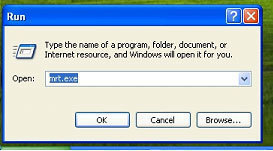
Mrtstub.exe (Mrt.exe) is a process that runs on all Windows Operating System versions. It is a malicious software that downloads and installs other malicious software. Mrtstub.exe can almost always be found directly on the computer's primary hard drive, can hide itself in a randomly named folder, and does not have a visible window. If the user discovers Mrtstub.exe or Mrt.exe on his/her computer, it is highly recommended that the process is stopped and removed immediately.
How Mrtst
[ read more ]
The Windows registry is a database that Microsoft designed to store configuration settings and options for the operating system (OS). It increases OS speed and also contains settings for hardware components, end-users, and system software to help ensure that the highest possible quality of service is delivered to th user. The registry is used as an entrance point or gateway for the Windows OS kernel and has been in use for a number of years. Although significant improvements have been made to th
[ read more ]
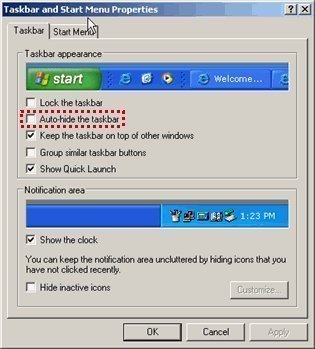
One way to modify a Windows desktop's look is to auto-hide the taskbar. The auto-hide option modifies a desktop by giving the user some extra space. When using the auto-hide taskbar option, the taskbar disappears when it is not being used. However, whenever it is required, simply place the cursor at the bottom of the screen (where the taskbar would normally be) and it will appear. There are two main ways to auto-hide a taskbar, one is by using the registry and the other is to make changes to the
[ read more ]
Windows Registry is a group of data files within the Windows Operating System that contain essential information for running Windows on a computer. Windows Registry runs all programs, user interfaces, and services that the Windows Operating System provides and is critical to a computer's proper performance. Whenever a program is installed on a computer, Windows Installer places data in the Windows Registry to allow the program to run and access other Windows Operating System components. When
[ read more ]
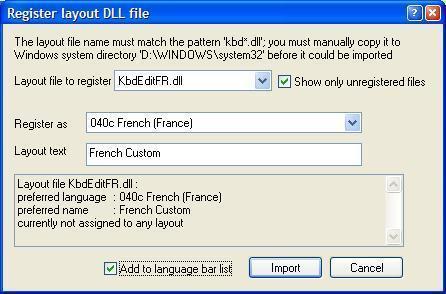
Dynamic Link Library files or DLLs are libraries of computer code and data that are used as shared resources on computers running the Windows Operating System (OS). A common task that arises for home computer users is figuring out how to register a DLL to allow the desired computer software to operate properly. The act of registering a DLL updates the Windows registry with the location and capabilities store in the file to permit proper application execution. The two options available to complet
[ read more ]
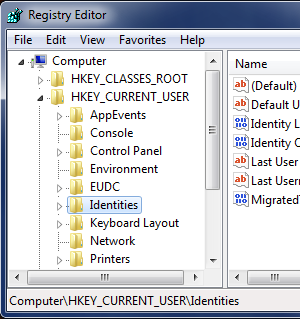
The Windows Registry is a database designed to store options and various hardware and software configuration settings on MS Windows Operating Systems (OS's). Since the registry was first introduced in Windows 3.1, it has grown from storing COM-based component configuration information to management of settings for all of the programs installed on the computer. Today, the registry contains settings for the OS kernel, user interface preferences, device drivers, and other services in order to
[ read more ]
Windows registry
The Windows Registry is a focal database that holds all the settings pertaining to Windows operating systems. It includes data and settings for hardware, software, and user related information. Any change made to the system in terms of system settings, hardware or software is reflected in the Windows registry. The Windows registry can be used to view runtime information about active hardware and software, and it can also be used for troubleshooting and fixing Windows issues. Ho
[ read more ]
The longer a computer is used, the more cluttered the registry can become because most applications these days do not remove all traces of themselves when deleted. This can slow Windows' performance. So it is essential to know how to clean the Windows registry to speed up the PC's performance. Cleaning it up effectively is not easy, though. The steps for doing so are outlined below.
The Windows registry is the Windows component that has all the information about the computer and the software
[ read more ]
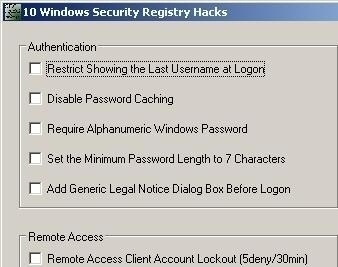
Windows registry 'hacks' are commands incorporated into the Windows Registry with the aim of improving the system's efficiency, security or communications protocols. Knowing how to 'tweak' the registry can help ensure the security and efficiency of a computer system. What follows is a brief explanation of the system registry and some suggested 'hacks' to make a computer system more secure.
What is the Windows Registry?
The system registry is, literally, your
[ read more ]